
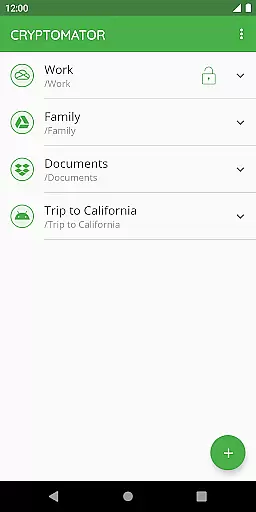
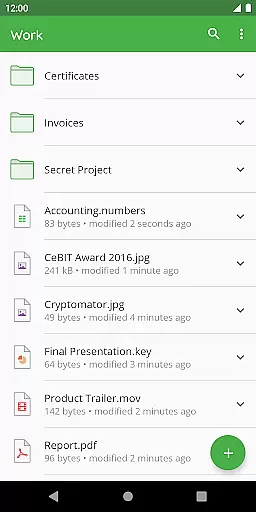
Cryptomator is a user-friendly encryption tool designed to secure your cloud-stored data. With its intuitive interface, users can easily create secure vaults and protect their files with AES encryption using a 256-bit key length. The app ensures that your data remains private by encrypting both file contents and filenames before uploading them to your preferred cloud service.
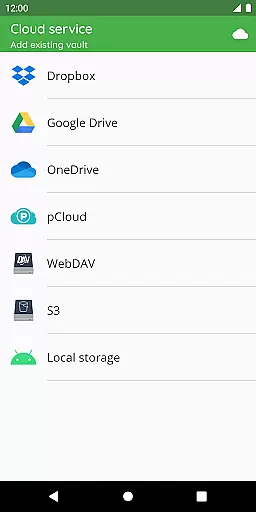
This productivity app stands out for its compatibility with major cloud storage services like Dropbox, Google Drive, and OneDrive. It also supports local storage on Android devices, making it versatile for various use cases. Whether you're working from your mobile device or computer, Cryptomator allows seamless access to your encrypted files, ensuring security without compromising convenience.
For individuals seeking enhanced digital privacy, Cryptomator offers peace of mind through its open-source nature. Users don't need to trust blindly; they can verify the security themselves. Additionally, features like automatic vault locking and fingerprint authentication provide both safety and ease of use, making Cryptomator an essential tool for safeguarding sensitive information in today's digital age.
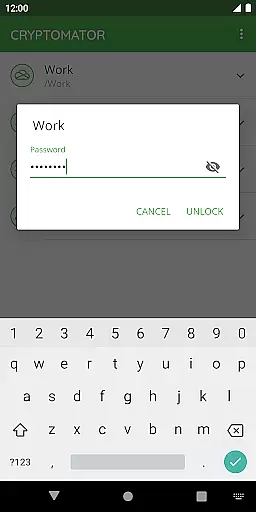
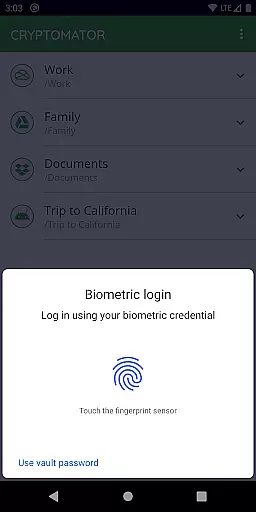
Cryptomator boasts several notable features that enhance its functionality as a secure encryption tool. Firstly, its ease-of-use is unparalleled; users can create vaults and assign passwords without any additional account setup or complex configurations. This simplicity extends to biometric authentication, allowing users to unlock their vaults with a fingerprint scan, streamlining the access process while maintaining high-security standards.
Compatibility is another cornerstone of Cryptomator's design. It works seamlessly with popular cloud storage solutions such as Dropbox, Google Drive, OneDrive, and WebDAV-based services. Furthermore, it supports local storage options on Android devices, enabling integration with third-party sync apps. This flexibility ensures that no matter where your data resides, Cryptomator can protect it effectively.
Security-wise, Cryptomator employs robust encryption methods including AES with a 256-bit key length and uses scrypt to fortify vault passwords against brute-force attacks. Its commitment to transparency is evident as the entire crypto implementation is publicly documented. These features collectively ensure that Cryptomator not only secures your data but does so in a way that's verifiable and trustworthy, setting it apart from other encryption tools in the productivity category.
In the realm of productivity, managing tasks efficiently is paramount. Cryptomator excels by not just offering a tool for securing your data but also streamlining how you handle information across various platforms. Its seamless integration with cloud services like Dropbox and Google Drive means that task management isn't just about keeping things organizedu2014it's about keeping them accessible and secure wherever you are.
The application simplifies task oversight through easy-to-use vaults that serve as encrypted storage spaces. By merely creating a vault and assigning a password, users can compartmentalize different projects or sensitive information sets. This straightforward approach eliminates the need for complex configurations, making it an ideal solution for both personal use and collaborative environments where sharing protected data is crucial.
Moreover, Cryptomator enhances core task management features with robust security measures. It employs AES encryption with a 256-bit key length for file content and filenames, ensuring that your managed tasks and stored information remain confidential. With options to unlock these vaults using fingerprints, convenience doesn't come at the expense of securityu2014making Cryptomator a comprehensive tool in optimizing productivity while safeguarding digital assets.
Cross-device synchronization stands as a critical feature for any productivity tool in todayu2019s fast-paced world, and Cryptomator addresses this need with remarkable reliability. By enabling users to access their encrypted vaults from all mobile devices and computers, it ensures that your important files and managed tasks are available whenever and wherever they're needed. This level of accessibility significantly boosts productivity, allowing for uninterrupted workflow across different devices.
What sets Cryptomator apart is its compatibility with major operating systems and most commonly used cloud storages such as OneDrive and WebDAV-based services. This broad compatibility facilitates smooth synchronization processes without being hindered by platform restrictionsu2014a vital aspect for professionals who operate on multiple devices throughout their day.
Furthermore, Cryptomatoru2019s commitment to open-source software adds another layer of trust to its synchronization capabilities. Users aren't required to blindly trust the system; instead, they can verify the crypto implementation themselves since it's publicly documented. This transparency not only reassures users about the integrity of their synchronized data but also highlights Cryptomator's dedication to providing a reliable, secure cross-device experience that empowers users in managing their digital lives efficiently.
User-friendly interface
Strong AES encryption
Compatible with major cloud services
Automatic vault locking
Open-source software
Limited advanced features
No built-in cloud storage
Fingerprint sensor required
Occasional performance lags
Basic UI design

When you Focus, so will your Bean in this cozy focus timer
 4.30
4.30
Total remote control for your Android device, PC and cloud services (IFTTT)!
4.20
Direct Chat without saving contacts & Dual WA Account on Single Device
4.70
8 custom complications. Custom Time Fonts. Beautiful color schemes. A++ Design.
5.00
Smart PDF reader & editor to view, organize and manage PDF documents easily.
3.70
Device's storage information in a simple and clear graphical form (infographics)
4.10
App Lock with fingerprint, password: Lock apps & hide photos with lock screens
4.60
Fill, sign & send docs, forms, agreements & contracts via electronic signature.
4.50
To do list widget with a notebook organizer, checklist, simple shopping list
4.60
Great calculator for Android named one of USA TODAY's "25 Essential Apps".
4.90
QuickBooks Workforce lets teams view pay info and track time in one place.
4.70
The long-awaited modern gallery app for your Nextcloud server
4.70
A beautiful digital clock with autostart and many other functions
4.70
Tally and goal counter for Wear OS & mobile
4.50
Enjoy classic gameplay with customizable features and retro-style graphics.
4.30
A customizable calendar for your Wear OS watch
4.20
Activate Two Factor Authentication (2FA or Multi OTP), Password manager and more
4.10
Create and edit presentations with Google Slides, part of Google Workspace.
4.00
A Revolutionary All-in-One Artificial Intelligence Tools
3.80


User Reviews