
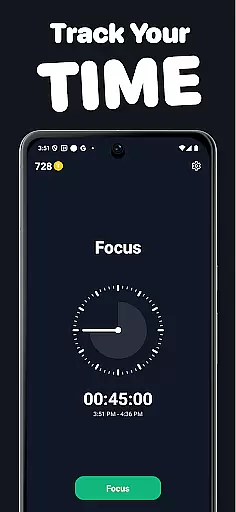
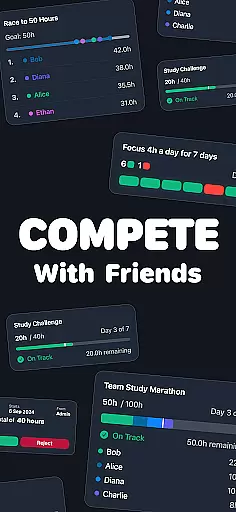
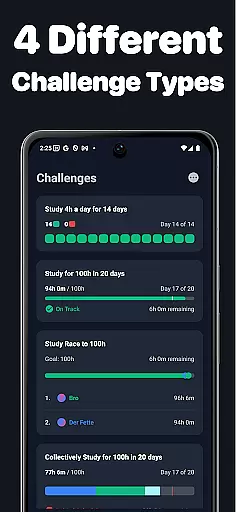
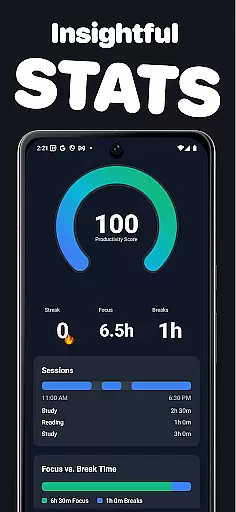
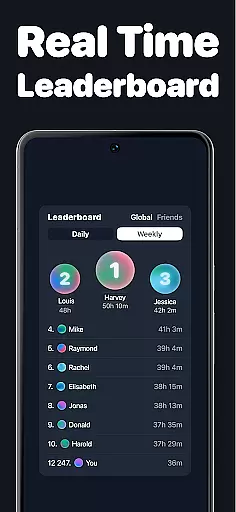
Timero is a productivity app designed to help users build better habits and enhance focus through friendly competition. The core functionality revolves around time tracking, enabling users to log hours in real-time while participating in various challenges. These include solo goals, races, team objectives, and streaks, all aimed at fostering consistency and accountability.
What sets Timero apart is its social integration. Users can create or join challenges with friends, viewing live progress updates that keep everyone motivated. Whether you're studying, working, or training, Timero provides clear visualizations of your weekly stats and streaks, helping you understand how you spend your time. This makes it ideal for those who thrive on social encouragement and need an extra push to stay disciplined.
The app's true value lies in its simplicity and effectiveness. By removing unnecessary distractions and focusing solely on productivity, Timero ensures users remain committed to their goals without any gimmicks. Its clean interface and motivational features make it a powerful tool for anyone looking to boost their productivity while enjoying the process with friends.
Timero offers a robust set of features tailored to maximize productivity through competition and accountability. One of its standout capabilities is the diverse range of challenge types. Users can choose from solo goals for personal targets, races to compete against others, team goals for collaborative efforts, and streaks to maintain daily consistency. Each challenge type is designed to cater to different motivation styles, ensuring there's something for everyone.
The app also excels in progress visualization. Timero allows users to log time in real-time and presents detailed statistics on how time is spent each week. This includes visual representations of streaks and consistency metrics, empowering users to identify patterns and improve their focus. Additionally, the social component is a key feature—users can join or create challenges with friends, view live updates on each other's progress, and stay motivated by seeing others succeed.
Another notable aspect is Timero's commitment to simplicity. Unlike many apps filled with distractions, Timero focuses purely on productivity. Its clean design and straightforward functionality ensure users aren't bogged down by unnecessary features. This minimalist approach, combined with the power of social accountability, makes Timero a unique and effective productivity tool.
Effective task management is essential for maintaining productivity and achieving goals. Timero excels in this area by offering a variety of challenge types tailored to different productivity needs. Whether you're working towards personal targets with solo goals, racing to complete a set number of hours, contributing to team objectives, or maintaining streaks, the app provides structured frameworks to keep you on track.
The app's real-time logging and visualization tools allow users to monitor their progress closely. This immediate feedback loop helps individuals adjust their efforts as needed to meet their productivity targets. By breaking down larger objectives into manageable daily or weekly tasks, Timero ensures that users can maintain consistency without feeling overwhelmed.
Furthermore, Timero's ability to integrate social elements into task management sets it apart. Users can create or join challenges with friends, viewing everyone's progress live. This fosters a sense of community and friendly competition, which can be incredibly motivating. Seeing others committed to their tasks encourages users to stay accountable and push through periods where their motivation might wane.
In today's fast-paced world, having reliable cross-device synchronization is crucial for maintaining workflow continuity. Timero understands this need and offers seamless integration across multiple devices. Whether you're switching from your phone to a tablet or desktop, your data is consistently updated in real-time, ensuring that you never miss a beat.
This synchronization feature extends to all aspects of the app, including time tracking, challenge participation, and progress visualization. Users can start a focus session on one device and continue it on another without any loss of information. This flexibility allows individuals to integrate Timero into their daily routines more naturally, accommodating various work and study environments.
Moreover, Timero's synchronization reliability is bolstered by its clean and straightforward design. The absence of unnecessary distractions or gimmicks means that users can trust the app to function smoothly without interruptions. This reliability not only enhances user experience but also reinforces the app's commitment to providing practical, no-nonsense tools for boosting productivity.
User-friendly interface
Real-time progress tracking
Customizable challenge types
Social accountability features
Clear progress visualization
Limited advanced analytics
No offline functionality
Premium features require subscription
Notifications can be intrusive
Steep learning curve for beginners

⏰ Finally a timer app which can run multiple timers simultaneously on your watch
 3.90
3.90
Pwnagotchi companion app
4.20
Todo reminder
4.10
ID.me Authenticator is a simple and free Two Factor Authentication solution
3.50
Code on-the-go with VScode for Android. Edit,debug and collaborate from mobile!!
3.10
A simple Whisper AI keyboard for reliable speech transcription and rewording
4.60
Secure your apps with lock screens, use custom themes and different features.
4.40
Use powerful, industry-leading AI tools to generate visual charts from any data
4.80
Understand anything with a personalized AI research assistant
4.80
Mind Map and brainstorm, note taking and idea collection
4.80
QuickBooks Workforce lets teams view pay info and track time in one place.
4.70
A beautiful digital clock with autostart and many other functions
4.70
Absolutely the best CNC machinist speed and feed calculator around. fswizard.com
4.60
The AI assistant that thinks with you - write, code, and solve complex tasks
4.60
Automates browsing any website and notifies you of important changes or events
4.30
Access, manage and transfer files on Android, PC, Mac, NAS and cloud storages.
4.30
All in One PDF Reader: Manage, Read and Edit your Documents
4.20
All in one sketching tool. Technical and General drawing. Online Maps support.
3.70
Smart PDF reader & editor to view, organize and manage PDF documents easily.
3.70


User Reviews