
ID.me Authenticator is a productivity-focused app designed to enhance account security through Two Factor Authentication (2FA). It generates 6-digit Time-Based One-Time Passwords (TOTP) and supports PUSH-based one-touch authentication. Users can secure their online accounts on websites that support 2FA without requiring network or cellular connections when used as a TOTP generator.
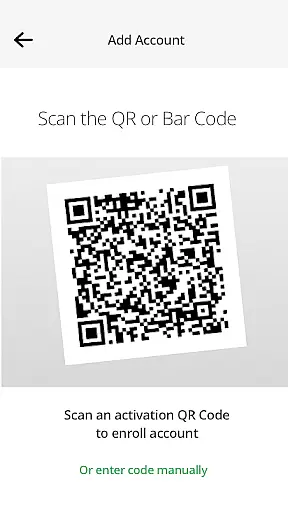
The app allows users to enroll by scanning a QR code during setup, making it easy to integrate with existing ID.me accounts. Its push notification feature adds an extra layer of convenience by allowing users to approve login attempts directly from their mobile devices. This makes ID.me Authenticator a reliable tool for professionals seeking robust yet user-friendly security solutions.
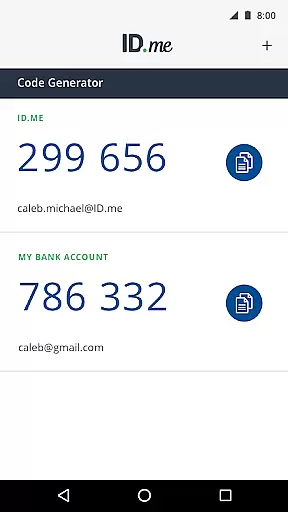
ID.me Authenticator offers several key features that make it stand out in the productivity category. First, its TOTP Code Generator provides 6-digit verification codes that are refreshed every 30 seconds, ensuring strong protection against unauthorized access. Once configured, this feature works offline, making it ideal for users who need consistent security regardless of internet availability.
In addition to TOTP functionality, the app supports PUSH-based authentication. This innovative feature sends real-time notifications to users' devices when they attempt to log in, allowing them to approve or deny access with a single tap. The combination of these two methods ensures both flexibility and enhanced security, catering to diverse professional needs while maintaining ease of use.
ID.me Authenticator excels in core task management by providing a reliable Two Factor Authentication (2FA) solution. This app ensures that users can manage their authentication tasks efficiently through either Time-Based One-Time Passwords (TOTP) or PUSH notifications.
With TOTP, the app generates 6-digit codes that serve as an additional layer of security. These codes are produced locally on the device, eliminating the need for network or cellular connections. This feature allows users to authenticate seamlessly, even in offline scenarios.
The PUSH notification feature simplifies the authentication process further. Users enter their username and password, then approve a push notification sent directly to their phone. This one-touch authentication streamlines the login process while maintaining high-security standards.
By integrating both TOTP and PUSH features, ID.me Authenticator offers a versatile approach to task management in account security. Users can choose the method that best suits their needs, ensuring both convenience and protection.
Cross-device synchronization is a critical aspect of ID.me Authenticator's functionality. The app ensures that users can maintain consistent authentication capabilities across multiple devices. This reliability is crucial for users who switch between devices frequently.
When setting up the app, users can scan a QR code to enroll and connect the authenticator to their account. This initial setup establishes a secure connection that can be synchronized across other devices. As a result, users can access their authentication methods from any enrolled device without compromising security.
The synchronization process is designed to be seamless and user-friendly. Once configured, the app provides verification codes and push notifications reliably, regardless of the device in use. This consistency ensures that users are never locked out of their accounts due to device changes.
Overall, ID.me Authenticator delivers dependable cross-device synchronization. This feature enhances the user experience by providing flexibility and peace of mind, knowing that their authentication methods are always accessible and up-to-date.
Enhanced Security
User-Friendly Interface
Offline Functionality
Real-Time Notifications
Free to Use
Limited Customization
QR Code Required
No Backup Options
Push Notification Dependency
ID.me Specific

Secure, fast, open-source, VNC and SSH Remote Desktop for Windows, Linux and Mac
 4.70
4.70
All in one sketching tool. Technical and General drawing. Online Maps support.
3.70
Android Wallet Password Manager
4.80
Send files, sync SMS, notifications & clipboard across devices via local network
4.40
⏰ Finally a timer app which can run multiple timers simultaneously on your watch
3.90
Enjoy classic gameplay with customizable features and retro-style graphics.
4.30
Access your phone's notifications, calls, apps, photos & texts on your PC
3.90
AT&T Internet customers can use this app to personalize their Wi-Fi network.
4.40
Seamlessly read, manage, and organize all your PDF files solution in one place
4.40
Native client for Forgejo and Gitea
5.00
QuickBooks Workforce lets teams view pay info and track time in one place.
4.70
A beautiful digital clock with autostart and many other functions
4.70
App Lock with fingerprint, password: Lock apps & hide photos with lock screens
4.60
PDF scanner & converter for files, photos, lottery, QR codes. One swipe away!
4.50
When you Focus, so will your Bean in this cozy focus timer
4.30
Intelligent AI Assistant
4.10
The ultimate file manager for rooted devices. The original and still the best.
4.00
Auto-shutoff Alarm with Sunrise, Sunset & Fixed Options.
3.50
Code on-the-go with VScode for Android. Edit,debug and collaborate from mobile!!
3.10


User Reviews