
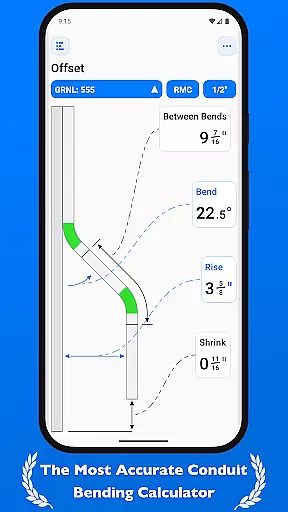
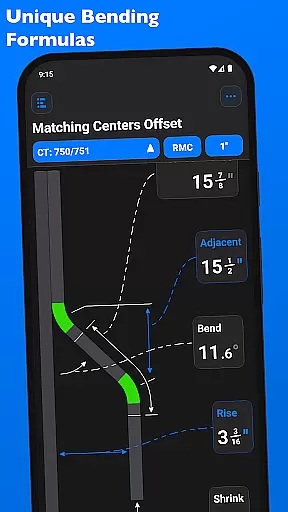
QuickBend is a cutting-edge conduit bending calculator app designed for precision and ease of use. It stands out by offering the most accurate measurements through its centerline radius algorithm, factoring in the shoe and bender radius, conduit type, and size diameter. The app has been rigorously field-tested to ensure reliability.
Built with electricians in mind, QuickBend caters to both seasoned professionals and DIY enthusiasts. Its intuitive interface helps avoid common mistakes, saving users time and money. The app provides detailed documentation for individual bends, enhancing user understanding and efficiency.
QuickBend supports various bend types and allows users to toggle between inches and centimeters. With features like QuickCheck, it offers real-time feedback on bend feasibility, making it an indispensable tool for anyone working with conduits.
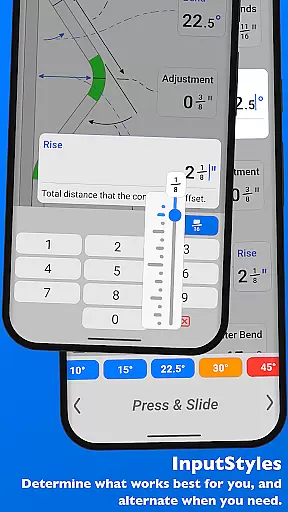
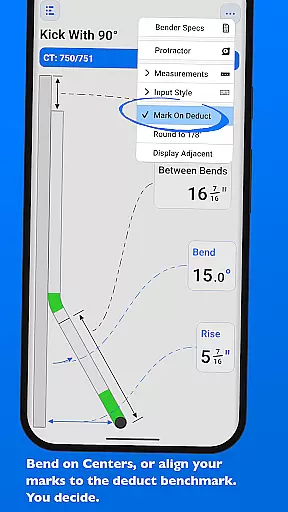
QuickBend boasts an array of advanced features tailored for productivity. One standout feature is its ability to switch between different input styles, such as a number pad or slider bar, catering to user preference and task complexity. This flexibility ensures efficient data entry and precise calculations.
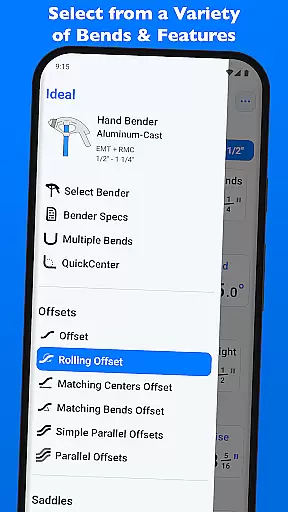
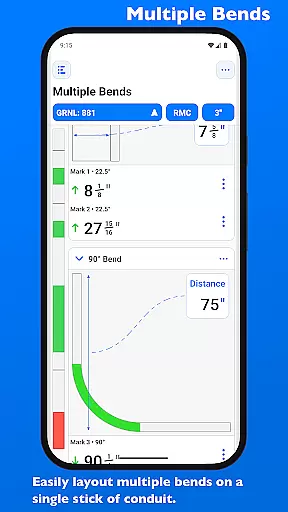
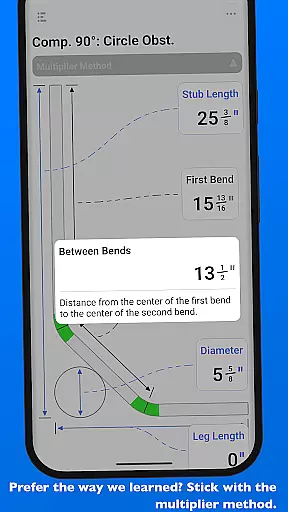
The app supports multiple bend types including Offset, Rolling Offset, and Compound 90° bends, among others. Users can layout multiple bends on a single conduit and easily flip marks per bend. This functionality streamlines complex tasks and enhances accuracy.
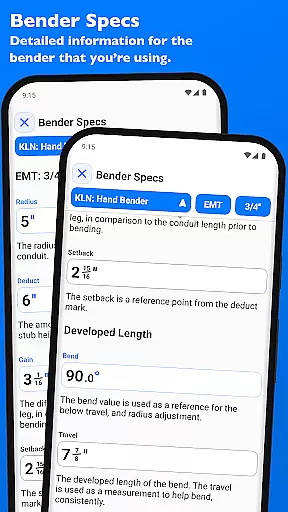
QuickBend also allows users to pin frequently used benders for quick access and provides detailed 'Bender Specs' visualization. These features collectively contribute to a seamless and productive user experience, setting QuickBend apart from other tools in its category.
QuickBend revolutionizes the way electricians and construction professionals manage their bending tasks through its advanced calculation engine. The app's core functionality centers around precise conduit bending measurements, taking into account crucial factors like shoe radius, bender specifications, and conduit dimensions.
The application employs a sophisticated centerline radius algorithm that ensures exceptional accuracy in every calculation. This systematic approach to task management allows users to handle complex bending scenarios with confidence, whether they're working on simple offsets or intricate compound bends.
What sets QuickBend apart is its comprehensive support for various bend types, from basic 90u00b0 bends to complex segmented configurations. The app enables professionals to layout multiple bends on a single conduit while providing exact measurements for each mark, streamlining their workflow and enhancing productivity on the job site.
While primarily functioning as a standalone productivity tool, QuickBend offers remarkable consistency in managing bending data across different work scenarios. The application maintains reliable access to crucial bending specifications and calculations regardless of where or when professionals need them.
The app features a smart pinning system that allows users to save their most frequently used bender configurations. This system works similarly to cross-device synchronization by ensuring that preferred settings are always readily available, eliminating the need for repetitive setup processes and maintaining consistent parameters across various projects.
Furthermore, QuickBend's ability to switch between measurement systems (inches and centimeters) while preserving calculation integrity demonstrates its reliable handling of technical data. The application's robust architecture ensures that all computations remain accurate and accessible, providing professionals with dependable performance whether they're using the app on-site or in the workshop.
User-friendly interface
Accurate measurement algorithms
Comprehensive bend support
Real-time feasibility checks
Customizable input methods
Premium version required
Steep learning curve
Limited free features
Occasional bugs
High system requirements

Absolutely the best CNC machinist speed and feed calculator around. fswizard.com
 4.60
4.60
Pwnagotchi companion app
4.20
CalenGoo is a very flexible and feature-rich calendar app
4.40
Todo reminder
4.10
App Lock with fingerprint, password: Lock apps & hide photos with lock screens
4.60
ID.me Authenticator is a simple and free Two Factor Authentication solution
3.50
Code on-the-go with VScode for Android. Edit,debug and collaborate from mobile!!
3.10
* block pre-roll ads, pop-up and forced redirect ads * Samsung certification app
4.00
Scan paperwork into PDF/JPG, generate your own e-signature and send fax or email
4.70
Multilingual translator for text, voice, and image translation!
4.90
We're working to become the best machining app on the market! www.cncdirt.com
4.80
A simple Whisper AI keyboard for reliable speech transcription and rewording
4.60
Fill, sign & send docs, forms, agreements & contracts via electronic signature.
4.50
This small app MUST BE INSTALLED after purchase, else license won't work
4.40
Total remote control for your Android device, PC and cloud services (IFTTT)!
4.20
Create and edit presentations with Google Slides, part of Google Workspace.
4.00
Mega cloud explorer plugin for Solid Explorer
3.80
Easiest event planning, volunteer signups & parent teacher conference scheduling
2.20
A comprehensive suite of tools designed specifically for Lactation Consultants
4.2


User Reviews