
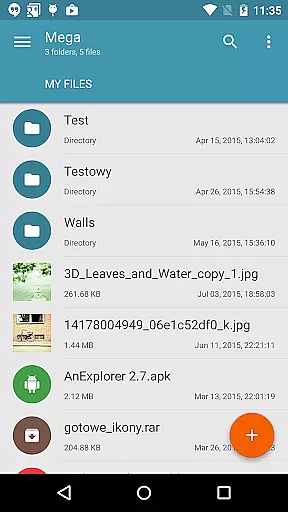
Mega Plugin for Solid Explorer is a productivity-focused extension that seamlessly integrates with your Solid Explorer file manager. This plugin allows you to connect directly to your Mega cloud storage account, enabling comprehensive file management capabilities. With this app, users can copy, move, rename, and view files, as well as download and upload content directly from their Mega storage.
In addition to basic file operations, the plugin supports media streaming, allowing users to stream music and videos without downloading them first. Whether you're managing documents or enjoying multimedia content, this plugin provides a smooth experience across all your connected devices. The ability to handle cloud-based files as if they were local greatly enhances workflow efficiency and convenience.
The Mega Plugin for Solid Explorer stands out with its robust feature set tailored for efficient cloud storage management. One of its key features is the seamless integration with Solid Explorer, which enables users to perform a wide range of file operations including copying, moving, renaming, and viewing files directly within the familiar interface of their file manager.
Beyond basic file handling, the plugin offers advanced functionalities such as downloading and uploading files between local storage and Mega cloud. It also includes media streaming capabilities, letting users play music and videos directly from their cloud storage. These features collectively ensure that users have complete control over their cloud files while maintaining high levels of productivity and accessibility.
Mega Plugin for Solid Explorer offers robust core task management features tailored to enhance productivity. This plugin allows users to perform a wide array of operations on their Mega accounts directly from Solid Explorer.
With functionalities such as copying, moving, renaming, and viewing files, the app ensures that users can efficiently manage their cloud storage. These capabilities are crucial for maintaining an organized digital workspace, enabling seamless navigation and manipulation of files.
In addition to basic file operations, the plugin supports downloading and uploading files. This feature is essential for users who need to access their documents on the go or share them across devices without hassle.
The ability to stream music and videos directly from the cloud further enriches the user experience by providing instant access to multimedia content without the need for local storage.
Cross-device synchronization is a pivotal feature of Mega Plugin for Solid Explorer, ensuring reliable and consistent access to your files across multiple devices. By connecting your Mega account, you can seamlessly sync data between your desktop, tablet, and smartphone.
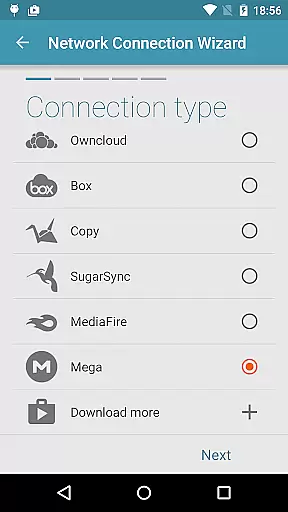
The process of establishing a connection is straightforward. Users simply tap the + button, choose 'Cloud connection,' select the Mega option, and enter their login credentials. Once connected, all devices linked to the same account will have synchronized access to the cloud drive.
This synchronization reliability is vital for professionals and individuals who require constant access to their files regardless of their location. It eliminates the risk of working with outdated versions and ensures that every change is immediately reflected across all platforms.
Moreover, the plugin's secure authentication process guarantees that your data remains protected during transfers, offering peace of mind while managing sensitive information across different environments.
Seamless Integration
Comprehensive File Management
Media Streaming Support
User-Friendly Interface
Efficient Workflow Enhancement
Limited to Mega Users
Requires Solid Explorer
No Standalone Functionality
Potential Sync Delays
Subscription Costs for Mega

 4.20
4.20
Experience Reading - Night Mode for Documents
4.40
Automates browsing any website and notifies you of important changes or events
4.30
A lightweight JSON & XML files creator, editor and viewer (Premium Version)
4.40
We're working to become the best machining app on the market! www.cncdirt.com
4.80
aCalendar+ makes your day, week and month
4.70
Multilingual translator for text, voice, and image translation!
4.90
Translate text/voice/photos in 150+ languages. Offline & fast translator app.
4.50
Seamlessly read, manage, and organize all your PDF files solution in one place
4.40
Scan paperwork into PDF/JPG, generate your own e-signature and send fax or email
4.70
Absolutely the best CNC machinist speed and feed calculator around. fswizard.com
4.60
Planet Free VPN - The best Fast Unlimited and Secure VPN Without Logs
4.50
Share files & memories safely. Keep your photos and videos secure.
4.40
Enjoy classic gameplay with customizable features and retro-style graphics.
4.30
Device's storage information in a simple and clear graphical form (infographics)
4.10
Todo reminder
4.10
* block pre-roll ads, pop-up and forced redirect ads * Samsung certification app
4.00
A simple, portable logger for POTA, SOTA, Field Day, and more
4.4
A comprehensive suite of tools designed specifically for Lactation Consultants
4.4


User Reviews