


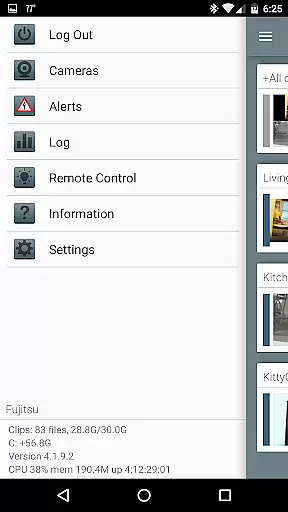
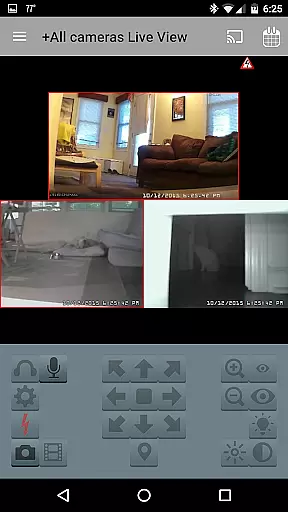

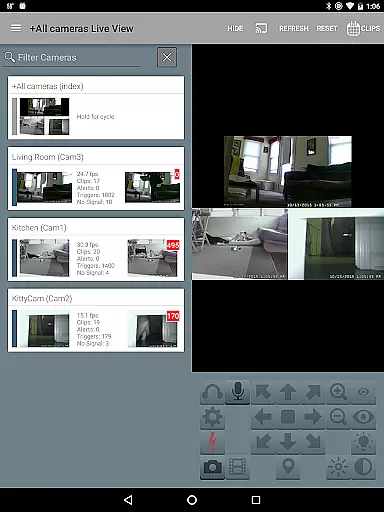
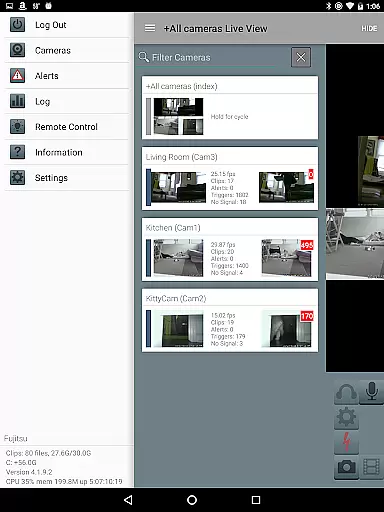
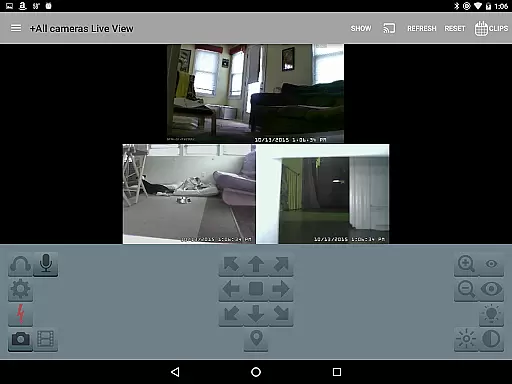
Blue Iris is a specialized client application designed for users who operate the Blue Iris Windows PC software. This app serves as a secure gateway to your home camera network, eliminating the need to expose individual cameras directly to the Internet. By connecting to Blue Iris version 5.x installed on a Windows PC, it provides centralized control over your surveillance system through a session-based protocol that ensures no plain text passwords are transmitted.
With Blue Iris, you can efficiently manage multiple installations of the software while enjoying advanced features such as Android push alerts when a camera is triggered or critical status messages arise. The app supports fast H.264 streaming and allows PTZ (pan-tilt-zoom) control, IR management, audio interaction with supported cameras, and navigation via intuitive tap and swipe gestures. Additionally, users can review recordings stored on their Blue Iris PC at speeds up to 64x and selectively delete footage remotely.
Blue Iris offers an extensive set of features tailored for comprehensive video surveillance management. One key feature is its ability to handle multiple Blue Iris installations from a single interface, allowing users to switch between different setups seamlessly. It also enables remote control over traffic signal icons, scheduling options, and profile selections, providing flexibility in how users configure their systems.
The app excels in delivering real-time alerts through Android push notifications whenever there's motion detection or important system updates. For live monitoring, it supports fast H.264 streaming, ensuring smooth video playback even under limited bandwidth conditions. Users have full PTZ, IR, and audio capabilities for compatible cameras, enhancing interactive experiences during live feeds. Moreover, reviewing past events becomes effortless with playback speeds reaching up to 64x, alongside options to remove unwanted recordings directly from the device.
Blue Iris stands out in video format compatibility, ensuring users can work with a wide range of camera types and models. The app supports H.264 streaming, which is known for its efficiency and widespread adoption in the industry.
This compatibility allows users to connect and manage multiple cameras seamlessly within a single platform. Whether it's PTZ (pan-tilt-zoom) cameras or those supporting IR (infrared), users can control them directly through the app.
The ability to review recordings at up to 64x speed without any loss in quality showcases the app's robust handling of different video formats. This feature is crucial for quickly analyzing events or incidents.
By supporting various formats and providing advanced playback options, Blue Iris ensures that users are not limited by their choice of cameras and can fully leverage their existing equipment.
While primarily a video management tool, Blue Iris incorporates AI-powered features that enhance the user experience significantly. One notable aspect is its Android push alerts system, which uses intelligent algorithms to notify users when a camera is triggered or there's a critical status message.
The app also excels in managing multiple Blue Iris installations efficiently, thanks to smart scheduling and profile selection capabilities. Users can remotely control DIO output signals on compatible devices, adding another layer of automation and intelligence to their setups.
Additionally, Blue Iris offers selective deletion of recordings from the PC, allowing users to manage storage space intelligently based on their needs. This feature is particularly useful for maintaining optimal performance over time.
These AI-driven functionalities ensure that users can maintain a secure and efficient surveillance system without being overwhelmed by manual tasks, making Blue Iris an invaluable tool for both home and business security solutions.
User-friendly interface
Secure connection protocol
Comprehensive camera controls
Fast H.264 streaming support
Remote recording management
Requires Blue Iris PC software
No standalone functionality
Limited to Android devices
Dependent on network stability
Complex setup process

You can play SWF format file!
 2.50
2.50
HD video & music player - All format support with floating & PIP mode!
3.80
Fast video downloader & private browser. Save HD clips to watch offline.
4.40
Powerful HD video player with support for all formats & subtitles.
4.2
Add date and time watermark to photos and videos
4.50
Web Browser for LG TV to stream webvideos, online movies and livestreams in HD
4.20
Cast movies, tv shows and live streams to Chromecast, Roku, DLNA, Fire TV & more
4.60
A Simple app to download Video & Music from the Internet.
4.70
Powerful video player with advanced hardware acceleration and subtitle supports
4.20
Video Trimmer, Video to MP3 Converter. Extract music from video, Easy & Fast.
4.80
GENRAL PRO - General Pro is the best video player that fully supports all formats.
4.70
Find, download, and play torrents with the official BitTorrent® Pro app
4.70
Fast, private downloading, video saving, social media
4.50
Full HD Video mp3 Player, MP4 player play 1080p, File manager, Video Downloader
4.40
Create & edit videos with AI
4.30
Cast to Smart TV, Fire TV. Cast video, photo - Fast & Stable!
3.90
Live TV, anywhere in your home
3.80
Mix with Virtual DJ directly from your phone or tablet !
3.10
The smartest M3U IPTV Player your playlists have ever seen.
4.2


User Reviews