
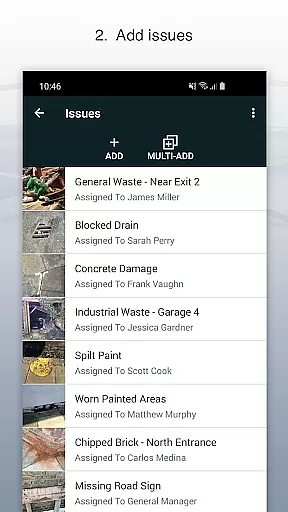
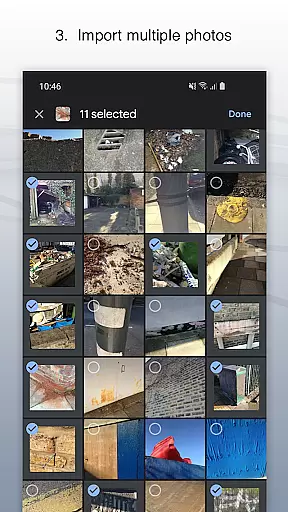
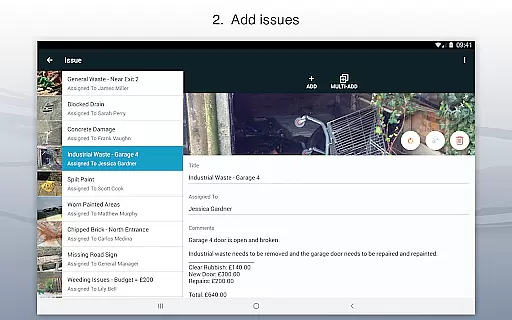
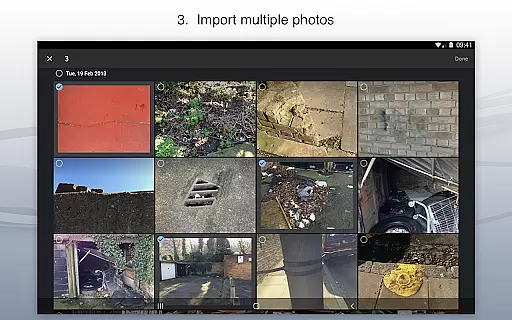
Site Audit Pro is a powerful productivity tool designed to streamline the auditing and inspection process for businesses across various industries. This mobile application allows users to efficiently record issues by capturing photos, adding descriptive titles, assigning tasks to specific individuals, and including relevant comments. The app's intuitive interface makes it easy to annotate images, highlighting critical details that need attention.
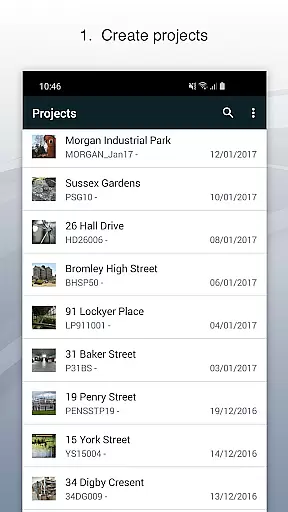
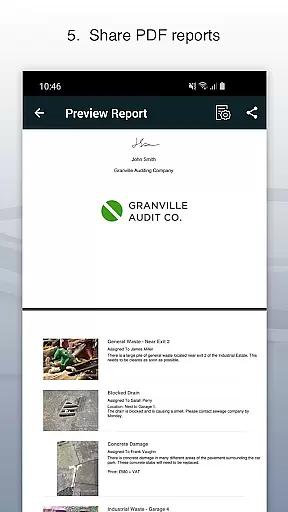
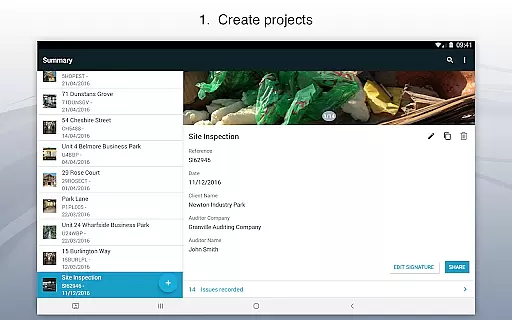
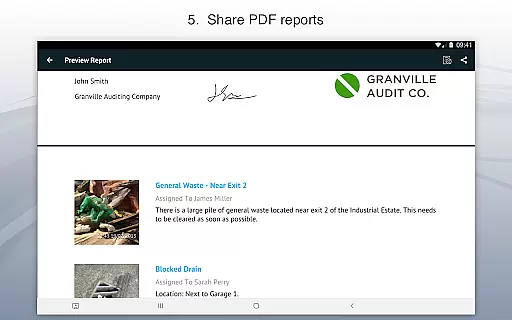
One of the standout features of Site Audit Pro is its ability to organize identified issues into well-structured projects. Users can input specific site and client information for each project, ensuring all data remains contextually relevant and easily accessible. Additionally, the app enables professionals to instantly generate and share customized audit reports in PDF format via email or cloud services like Dropbox. This functionality eliminates the need to return to the office for report generation, significantly enhancing operational efficiency.
Whether you're conducting safety inspections, creating punch lists, or performing site walkthroughs, Site Audit Pro provides a comprehensive solution that saves time and improves overall productivity. Its adaptability to different industries and customizable reporting options make it an invaluable tool for modern businesses looking to optimize their auditing processes.
Site Audit Pro offers a rich set of features that cater to the diverse needs of auditing professionals. The app's core functionality revolves around its ability to capture detailed issue reports through photos, annotations, and comprehensive descriptions. Users can add assignees and comments directly to each identified problem, creating a clear chain of responsibility and communication within their teams.
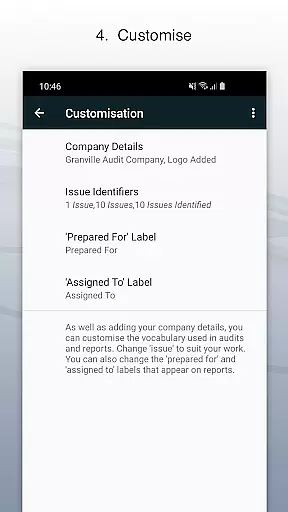
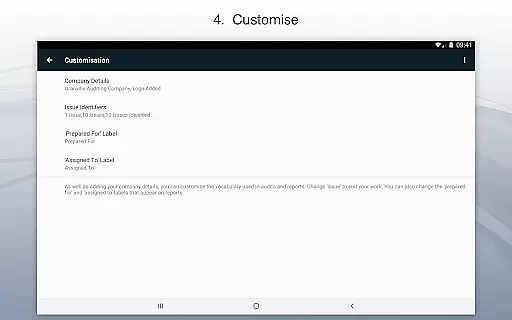
A key advantage of Site Audit Pro is its robust customization capabilities. Businesses can tailor the app to match their specific requirements by incorporating company branding elements such as logos, auditor names, and signatures into reports. The app also supports industry-specific terminology adjustments, allowing users to modify report language to better suit their particular field of work. With eight professional report designs available for customization, organizations can maintain consistent branding while generating professional-looking documentation.
The application's versatility extends to various use cases, including safety audits, snagging lists, site inspections, and checklist management. Its offline functionality ensures that users can continue working even without internet connectivity, while its seamless integration with popular document-sharing platforms guarantees that reports reach their intended recipients quickly and securely. These features combine to create a comprehensive auditing solution that enhances both individual productivity and organizational efficiency.
Effective task management is essential for productivity-focused applications like Site Audit Pro. This app simplifies the process of recording issues, assigning tasks, and managing projects on the go.
Site Audit Pro allows users to capture issues with photos, annotate them to highlight critical details, and assign tasks to specific team members. This ensures that every identified issue is addressed by the right person, streamlining workflow and accountability.
By organizing issues into distinct projects and adding relevant site and client information, users can maintain a clear overview of different tasks and their contexts. This structured approach enhances clarity and helps teams prioritize effectively.
The ability to customize reports with company logos and signatures adds a professional touch to task management. Users can share detailed audit reports instantly via email or cloud services, ensuring timely communication and decision-making.
In today's interconnected world, reliable cross-device synchronization is crucial for maintaining productivity. Site Audit Pro excels in this area by ensuring that all captured data and project details are consistently updated across devices.
With real-time syncing, users can start an audit on one device and seamlessly continue on another without losing any information. This feature is particularly beneficial for teams working in different locations or for individuals who switch between devices frequently.
The app supports instant sharing of audit reports as PDFs through various platforms such as email and Dropbox. This ensures that all stakeholders have access to the latest updates and can collaborate efficiently regardless of their location.
Furthermore, Site Audit Pro's adaptable design allows it to function smoothly across multiple devices and operating systems. Whether using a smartphone or tablet, users can expect consistent performance and reliable data synchronization, enhancing overall productivity.
User-friendly interface
Customizable reporting
Offline functionality
Professional templates
Industry adaptability
Limited free version
Occasional bugs
Learning curve
Premium pricing
Storage limitations

QuickBooks Workforce lets teams view pay info and track time in one place.
 4.70
4.70
Ads Free App! Editor, Hide File, Copy, Move, Delete and Rename.. all facility av
1.70
Smart PDF reader & editor to view, organize and manage PDF documents easily.
3.70
Great calculator for Android named one of USA TODAY's "25 Essential Apps".
4.90
Share files & memories safely. Keep your photos and videos secure.
4.40
Ultimate Virtual AI Character for immersive Roleplay Chat. Perfect Companion
3.90
AT&T Internet customers can use this app to personalize their Wi-Fi network.
4.40
Browse and view your photos and videos from the phone with photo & video hide.
4.10
Put a lock on your cloud: Take the security of your data into your own hands
3.70
Mind Map and brainstorm, note taking and idea collection
4.80
Understand anything with a personalized AI research assistant
4.80
Direct Chat without saving contacts & Dual WA Account on Single Device
4.70
Translate text/voice/photos in 150+ languages. Offline & fast translator app.
4.50
A Pixel Art watchface inspired by other iconic 90s designs for Wear OS devices!
4.40
This small app MUST BE INSTALLED after purchase, else license won't work
4.40
When you Focus, so will your Bean in this cozy focus timer
4.30
Make apps & sites with natural language prompts
4.10
Activate Two Factor Authentication (2FA or Multi OTP), Password manager and more
4.10
Customizable calendar widget for seamless event sync, planning & scheduling.
4.00


User Reviews