


Notes Launcher is a productivity app designed to streamline note-taking and task management. The application allows users to quickly jot down thoughts, ideas, and important information through an intuitive interface accessible with a simple right swipe from the home screen. It offers features such as text formatting tools, color-coding for categorization, locking notes for security, and organizing capabilities like sorting and finding notes easily.
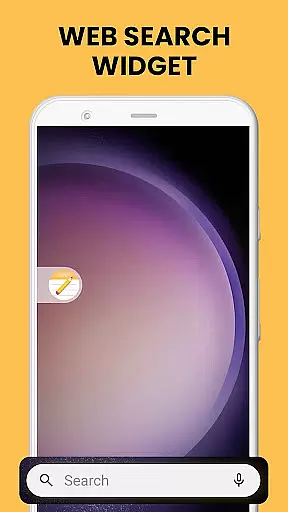
The app also integrates seamlessly into the user's device by providing added functionalities including home screen widgets that display time and weather, personalized wallpapers, and multi-touchpoint search options powered by Yahoo. These features collectively enhance the user experience by offering both aesthetic customization and functional utility. Whether it's for personal or professional use, Notes Launcher helps users stay organized and efficient in their daily tasks.
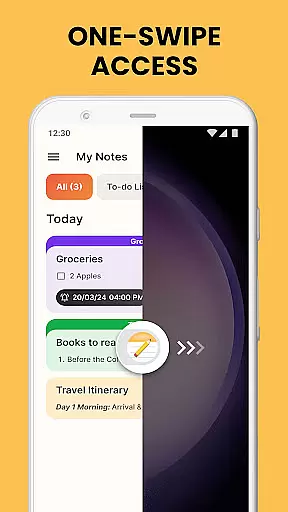
Notes Launcher stands out with its comprehensive set of features tailored to meet diverse note-taking needs. One of the key highlights is the ability to create notes and to-do lists instantly with one-swipe access from the home screen. This ensures that users can capture their thoughts without any delay. Additionally, the app provides rich text formatting tools which allow users to customize fonts, apply styles like italics or underlining, and even create lists.
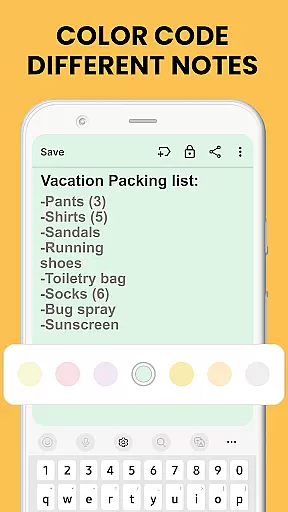
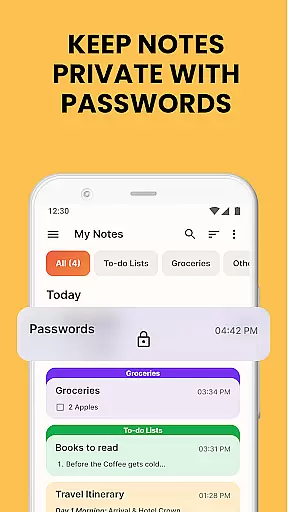
Another significant feature is the option to color-code notes, helping users prioritize and categorize information effectively. For sensitive data, the app offers a lock function to secure notes. Users can also categorize their notes into custom groups, sort them based on modification dates, and utilize the powerful search functionality to find specific notes quickly. Sharing options are plentiful too, enabling collaboration via email, social media, and messaging apps.
Efficient task management is essential for staying organized in today's fast-paced world. Notes Launcher offers a comprehensive suite of tools to help users manage their daily tasks with ease. The app allows you to create quick notes or to-do lists, categorize them, and even sort by modification date or creation order.
One standout feature is the ability to color-code notes, which helps prioritize and organize information visually. Whether it's managing work tasks or planning weekend activities, this functionality ensures that nothing falls through the cracks. Additionally, the intuitive search feature enables users to quickly find specific notes using keywords or phrases.
Notes Launcher also supports collaboration through its sharing capabilities. Users can share their notes via email, social media, or messaging apps, making it ideal for group projects or family planning. This seamless integration enhances productivity by keeping everyone on the same page.
Overall, Notes Launcher transforms how users handle their daily responsibilities by providing an all-in-one platform for note-taking, task management, and collaboration. Its user-friendly interface and robust features make it an indispensable tool for anyone looking to boost their productivity.
In our interconnected world, reliable cross-device synchronization is crucial for maintaining workflow continuity. Notes Launcher excels in this area by ensuring that your notes are consistently updated across all devices. This means you can start a note on your phone and continue editing it on your tablet without missing a beat.
The app employs advanced syncing technology to provide real-time updates. As soon as you make changes to a note, those modifications are instantly reflected on all linked devices. This level of synchronization reliability ensures that you always have access to the most current version of your notes, regardless of where you are.
Security is another critical aspect of Notes Launcher's synchronization process. The app uses robust encryption protocols to protect your data during transfer, safeguarding sensitive information such as passwords and personal details. This commitment to security gives users peace of mind when accessing their notes from multiple devices.
By combining seamless cross-device synchronization with top-notch security measures, Notes Launcher empowers users to stay productive and organized no matter where they go. Its dependable performance makes it an excellent choice for individuals who rely on consistent access to their notes across various platforms.
User-friendly interface
Comprehensive text formatting
Secure note locking
Efficient organization tools
Versatile sharing options
Home screen layout changes
Limited widget customization
No cloud sync feature
Occasional ads in free version
Advanced features need subscription

QuickBooks Workforce lets teams view pay info and track time in one place.
 4.70
4.70
The long-awaited modern gallery app for your Nextcloud server
4.70
Native client for Forgejo and Gitea
5.00
Send files, sync SMS, notifications & clipboard across devices via local network
4.40
A lightweight JSON & XML files creator, editor and viewer (Premium Version)
4.40
CalenGoo is a very flexible and feature-rich calendar app
4.40
Functional QR scanner and barcode reader that requires little storage space.
4.60
Subscribe to Webcal & .ics calendars and keep them up-to-date!
4.50
Ultimate Virtual AI Character for immersive Roleplay Chat. Perfect Companion
3.90
Multilingual translator for text, voice, and image translation!
4.90
Scan paperwork into PDF/JPG, generate your own e-signature and send fax or email
4.70
Absolutely the best CNC machinist speed and feed calculator around. fswizard.com
4.60
Secure, fast, open-source, Remote Desktop Client for Windows and Linux with SSH
4.60
Planet Free VPN - The best Fast Unlimited and Secure VPN Without Logs
4.50
Access, manage and transfer files on Android, PC, Mac, NAS and cloud storages.
4.30
Experience real multitasking on your Android!
4.00
Find and delete junk files & block unwanted notifications & manage files
3.70
ID.me Authenticator is a simple and free Two Factor Authentication solution
3.50
The upgraded version of Name Wheel with AI and the power to add your own wheels.
4.0


User Reviews