


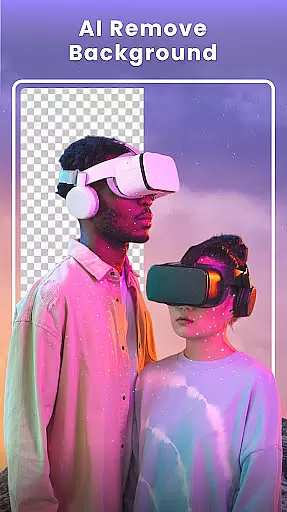



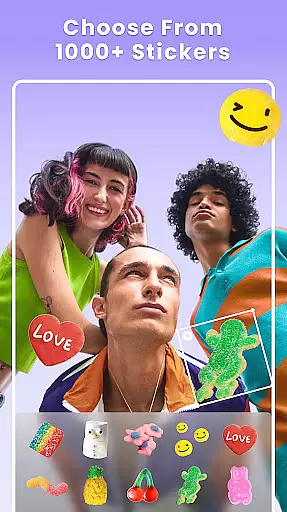

Photo Collage Maker - FunPic is a versatile photography app designed to help users create stunning photo collages and video stories. With over 300 layouts, users can combine photos into eye-catching arrangements while utilizing features like filters, text, stickers, and AI-powered tools for background removal and object erasure.
The app also offers creative templates, doodle options, and music integration, making it ideal for crafting Instagram feeds, photo slideshows, and personalized memories. Whether you're looking to design themed collages or experiment with freestyle layouts, this app provides endless possibilities for expressing creativity.
FunPic stands out with its comprehensive set of photo editing and collage-making features. Users can access more than 300 unique layouts, including standard grids and special shapes, allowing for customized photo arrangements. The app's AI-powered tools enable effortless background removal and object cleanup, ensuring professional-quality edits without hassle.
Additionally, the Video Collage Maker lets users merge videos and photos into dynamic stories enhanced by music, stickers, and decorative elements. With weekly updates to materials like stickers and templates, users have everything they need to produce visually captivating content tailored to platforms like Instagram and WhatsApp.
Real-time capture and preview functionality is essential for ensuring that every photo or video collage created with Photo Collage Maker - FunPic meets the user's expectations immediately upon capture. This feature allows users to see exactly how their final creation will look, making it easier to adjust settings on the fly.
The app leverages advanced processing capabilities to provide a seamless real-time preview experience. Whether combining photos into stunning collages or integrating videos with images, users can witness their vision come to life instantly. This immediate feedback loop enhances creativity and saves time during the editing process.
With real-time previews, users can experiment with different layouts, filters, stickers, and text options without any lag. This ensures that the final output aligns perfectly with their creative intent. The ability to visualize changes instantly not only boosts productivity but also makes the entire photo editing experience more enjoyable and engaging.
AI beauty and enhancement features in Photo Collage Maker - FunPic offer users the tools to refine and perfect their images naturally. These AI-driven enhancements ensure that edits look realistic and preserve the original essence of the photo, avoiding the over-processed appearance common in many photo editing apps.
Utilizing sophisticated algorithms, the app provides functionalities such as automatic background removal, object elimination, and avatar creation. Users can effortlessly apply these enhancements to achieve professional-quality results without needing extensive editing skills. The AI technology intelligently identifies and adjusts specific elements within the photo, maintaining a natural look and feel.
Moreover, weekly updates bring new filters, stickers, and templates, keeping the content fresh and exciting. By prioritizing natural enhancement, Photo Collage Maker - FunPic empowers users to express their unique style while ensuring that every edit enhances the story they wish to tell through their photos. This dedication to authenticity sets the app apart in the realm of photography and photo editing.
User-friendly interface
Extensive layout options
AI-powered editing tools
Versatile customization features
Regular content updates
Premium features require payment
Ads may disrupt workflow
Some tools are complex for beginners
Limited free template selection
Occasional performance lags

Long exposure camera with computational photography
 2.60
2.60
Shooting photos and records video easily and efficient with professional Camera
4.30
HD Photo gallery and photo manager to edit, hide private photos, videos & albums
4.3
Turn your phone into a professional camera - full DSLR manual photography
4.30
Professional quality photo edits with the new Snapseed.
4.00
RAW video capture with advanced controls
4.40
Professional camera app that brings DSLR manual photography controls to Android.
4.20
Effortlessly make high-quality GIFs from images & videos without any watermarks.
4.70
Edit photos with the picture generator: PS2 & AI Clay filters, cartoon effects.
4.50
Enhance, upscale, and transform your images — on your device, without limits
4.70
Easily create custom gifts, cards, photo books & more on the Shutterfly app!
4.60
Unblur, enhance & restore photos with powerful AI photo enhancer tools.
4.60
Safe & smart flight with Go Fly drone controller for 40+ drone camera, zone map
4.50
Create Business Headshots, Polaroid Filter, Retake Photos,Profile Pics,AI Photos
4.50
Transform photos into videos! Create realistic or anime-style images easily!
4.50
Trendy TikTok time warp scan funny filter app brings you unique photos & videos.
4.40
Virtual makeup, hair filters & body tuner—edit from face to full body!
4.20
How would you look like with a differently shaped nose, chin or lips?
3.90
Remote control the phone camera shutter from your smartwatch and take a picture
1.60


User Reviews