


Camera Remote Watch is a smart photography app that allows users to remotely control their phone's camera shutter directly from their smartwatch. This innovative solution eliminates the need to physically touch your phone, making it ideal for capturing steady shots or taking selfies from a distance.
The app works seamlessly with both Android and Wear OS smartwatches, offering flexibility across devices. After setting up the camera view on your phone, you can trigger the camera shutter from your watch. The captured photo is saved in your phone's gallery while also being previewed on your watch, ensuring you can confirm the shot without needing to check your phone.
This app is particularly useful for group photos, long-exposure shots, or any situation where minimizing phone movement is essential. With its simple interface and reliable functionality, Camera Remote Watch enhances the photography experience by adding convenience and precision to every shot.
Camera Remote Watch offers several standout features that make it an excellent tool for photographers who value convenience and control. One of its key capabilities is the ability to trigger the phone's camera shutter directly from a connected smartwatch, which ensures stability during shots and reduces the risk of blurred images.
In addition to remote control functionality, the app provides instant feedback by displaying a copy of the captured photo on the smartwatch screen. This feature allows users to quickly verify if the image meets their expectations without needing to check their phone. Furthermore, the app supports both Android and Wear OS devices, giving users flexibility in choosing compatible hardware.
Another notable feature is its straightforward setup process. Users simply adjust the camera settings on their phone and then use the dedicated watch app to take pictures. While the app requires patience due to potential delays caused by slower watch hardware, its overall performance is reliable when used within supported environments.
Real-time capture and preview functionality is essential for ensuring that every photo taken meets the user's expectations without delay. Camera Remote Watch excels in this area by allowing users to remotely control their phone's camera from a smartwatch, providing instant feedback on the shot taken.
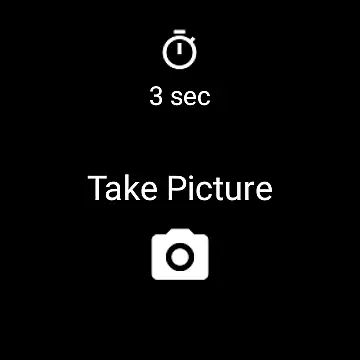
This application facilitates seamless interaction between your watch and phone, enabling you to adjust the camera view directly from your phone before taking a picture. Once ready, simply tap the Camera button on your watch to trigger the phoneu2019s camera shutter, capturing the moment instantly.
The captured image is immediately stored in the phone's photo gallery, accessible via the Android Gallery app. Simultaneously, a copy of the photo appears on your watch, offering a quick review option to determine if another shot is necessary. This immediate preview ensures that users can retake photos if needed, enhancing the overall photography experience.
While Camera Remote Watch does not explicitly market itself as an AI beauty and enhancement tool, its ability to provide natural-looking photos cannot be overlooked. The essence of capturing genuine moments lies in maintaining the authenticity of images while subtly enhancing them.
By using this app, users can ensure that their photos retain a natural appearance without over-processing. The simplicity of the remote capture process reduces the chances of unnatural poses or forced smiles, often resulting from handling the phone directly.
Additionally, the instant preview feature allows users to assess the naturalness of each photo right after capture. If adjustments are needed, users can quickly make another attempt, ensuring that the final image reflects true beauty without artificial enhancements.
Overall, Camera Remote Watch offers a practical solution for those seeking to capture candid moments with minimal interference, preserving the natural essence of every photograph.
User-friendly interface
Instant photo preview
Wide device compatibility
Stable shot capture
Convenient remote access
Slower download speeds
Limited unsupported phones
Requires patience
No advanced editing tools
Dependent on connectivity

Viewfinder, Light meter, Reciprocity failure time, DOF & Bellows Extension
 4.60
4.60
Create Business Headshots, Polaroid Filter, Retake Photos,Profile Pics,AI Photos
4.50
Photo Exif Editor allows to view, add and modify EXIF data of multiple photos
4.50
Create amazing frames with up to five photos. Rounded corners, effects and more!
3.60
USB Storage Access for Photos, Videos, Music and Documents
3.80
Smart, light, and fast photo and video gallery
4.30
Hair color changer, AI haircut app, fun hair editor and buzz cut filter for all!
3.80
RAW video capture with advanced controls
4.40
Your Family Calendar + Photos. Manage your Skylight Calendar and Skylight Frame.
4.40
A collection of tools and reference tables for DPs, ACs, DITs and Operators.
4.70
Amazing Photo Effects - The most fun you can have with your photos!
4.70
AI photo enhancer with Sora 2! Enhance, descratch, and colorize your old photos.
4.50
Virtual makeup, hair filters & body tuner—edit from face to full body!
4.20
The #1 app for B&W film developing featuring an advanced darkroom timer.
4.10
Catch sunlight, sunrise sunset times and sun phases with the AR sun tracker.
4.10
live datamoshing
4.00
Gallery Slideshow is slideshow maker app for slideshow from your gallery photos.
3.90
GCamera allows all GCam features on all phone models! Better photos with GCamera
3.30
Long exposure camera with computational photography
2.60


User Reviews