


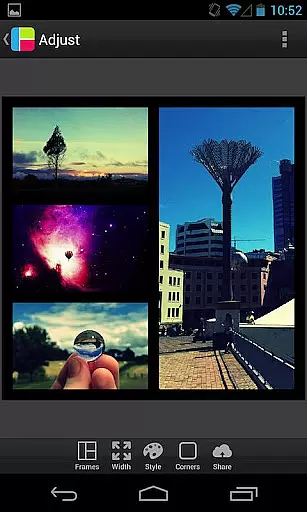
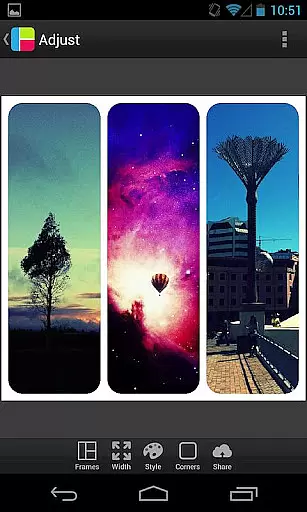

PicFrame is a versatile photography app that allows users to create stunning photo collages by combining multiple images into customizable frames. With 36 adjustable frame layouts, users can include up to five photos in a single frame, offering endless creative possibilities. The app provides advanced editing tools such as rounded corners, shape customization, and precise control over borders, colors, and patterns. Whether you're looking to enhance your social media posts or create personalized gifts, PicFrame delivers professional-quality results with ease.
The app's intuitive interface makes it accessible for both casual users and photography enthusiasts. You can fine-tune photo effects like brightness, contrast, and saturation, and even rotate or zoom individual images for the perfect composition. Once your collage is ready, you can save it to your gallery or instantly share it across platforms like Instagram, Facebook, and Twitter. PicFrame ensures your creations stand out with its unique design options and high-resolution outputs.
PicFrame stands out with its extensive range of features tailored for creative expression. The app offers 36 fully adjustable frames, enabling users to customize layouts by dragging inner borders for endless configurations. Each photo within the frame can be individually edited—adjust brightness, contrast, saturation, and apply rotation for optimal alignment. Unique customization options include changing photo shapes to circles, hearts, or hexagons, and selecting from 52 background patterns to complement your design.
One of the app's key strengths is its attention to detail. Users can adjust border widths, pick colors with an easy-to-use color picker, and round corners for a polished look. PicFrame supports six aspect ratios, including square format, making it ideal for various social media platforms. Its pinch-to-zoom functionality and drag-to-move controls ensure precision placement of photos. By saving creations in multiple output resolutions, PicFrame caters to both digital sharing and print-ready projects, empowering users to achieve their desired aesthetic effortlessly.
PicFrame offers a unique real-time capture and preview experience that allows users to see their creations come to life instantly. This feature is crucial for photography apps as it enables users to adjust their photo frames and effects on the fly.
The app provides 36 fully adjustable frames with endless customization options, letting users drag inner frame borders to create unique compositions. With additional features like rounded corners, adjustable border width, and various shapes, users can personalize their frames to match their creative vision.
Users benefit from the ability to change the color of the borders using an easy-to-use color picker and choose from 52 patterns for the frame's background. These capabilities ensure that every creation has a distinct look, making PicFrame a versatile tool for photographers and hobbyists alike.
This real-time functionality enhances user engagement by providing immediate visual feedback, which is essential for creating perfectly framed photos before saving or sharing them with friends and family.
PicFrame includes AI-powered beauty and enhancement features that bring a natural touch to photo editing. In today's photography landscape, maintaining authenticity while enhancing images is highly valued, making this feature indispensable.
With PicFrame, users can adjust the brightness, contrast, and saturation of each photo within their frame. The app also supports rotating photos and selecting one of six aspect ratios, including square format, ensuring that every composition meets professional standards.
The pinch-to-zoom and drag-to-move functionalities allow precise control over photo placement, giving users the power to fine-tune their creations effortlessly. These intuitive tools help maintain the natural essence of the original photos while still allowing for creative enhancements.
By offering multiple output resolutions and seamless integration with social media platforms like Instagram, Facebook, and Twitter, PicFrame ensures that users can share their naturally enhanced photos with ease, preserving the integrity and beauty of their memories.
User-friendly interface
Extensive customization options
High-resolution outputs
Versatile frame designs
Excellent social media integration
Limited advanced editing tools
No cloud backup feature
Some features may feel overwhelming
Occasional ads in free version
Learning curve for beginners

1M influencer's special filter
 4.60
4.60
Viewfinder, Light meter, Reciprocity failure time, DOF & Bellows Extension
4.60
Create & Edit with AI: AI Remove, Enhance, Retouch, Filter
4.10
Pet Camera
3.70
Photo prints, cards, & gifts at Walgreens. Easy ordering & fast local pickup !
4.80
Photo editor: AI filters, photo enhancer, pic collage maker, AI art generator.
4.80
Gallery Slideshow is slideshow maker app for slideshow from your gallery photos.
3.90
PhotoSync Bundle Add-On License. Enables all features and services in PhotoSync.
4.60
Enhance, upscale, and transform your images — on your device, without limits
4.70
Unblur, enhance & restore photos with powerful AI photo enhancer tools.
4.60
Transform photos into videos! Create realistic or anime-style images easily!
4.50
Photo Exif Editor allows to view, add and modify EXIF data of multiple photos
4.50
HD Camera Pro with HD Video shooting, Panorama, Photo editor , Beauty Camera.
4.50
Natural Beauty, Selfie Retouch
4.30
Create AI Photos, Improve and restore quality of blurry, old or damaged pics.
4.20
Perfect photos with body shaping, BG changer and object remover.
3.70
An interval timer to automate photo taking process for timelapse
2.90
Remote control the phone camera shutter from your smartwatch and take a picture
1.60
Snap photos remotely using your Garmin watch as the camera trigger
4.4


User Reviews