

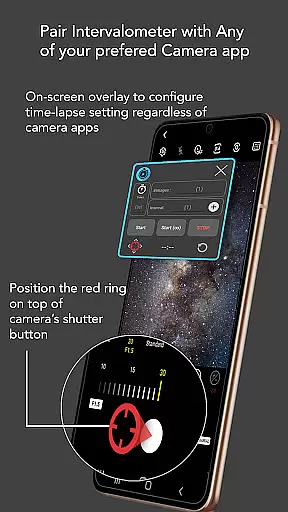
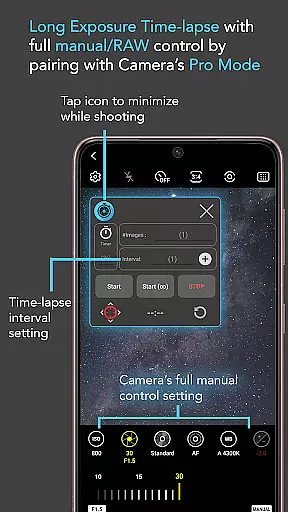
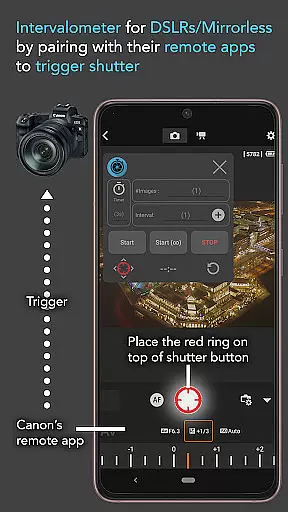
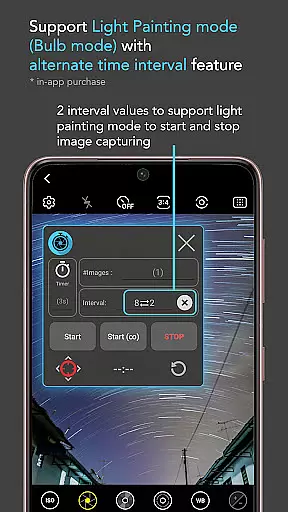
Intervalometer for TimeLapse is a powerful photography tool designed to automate the process of capturing time-lapse sequences. This app allows photographers to configure specific time intervals for triggering the camera shutter, enabling greater creative control over exposure settings and image formats.
The application works seamlessly with any camera app on Android devices (version 7 and above), including advanced modes like HDR, night mode, and ultra-wide angle. It also supports dedicated camera remote apps from brands such as Canon, Sony, and Nikon, functioning as a true intervalometer for both smartphones and professional cameras.
With its precise automation capabilities, Intervalometer makes it possible to capture stunning low-light time-lapses, star trails, and even complex transitions like day-to-night sequences. It's an essential tool for photographers looking to elevate their time-lapse projects.
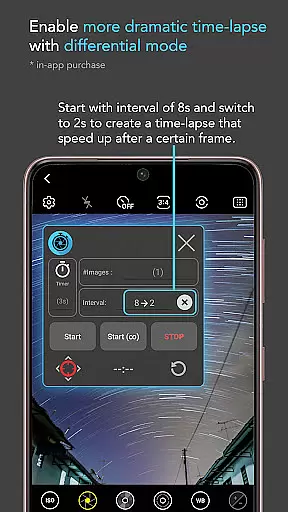
Intervalometer offers a comprehensive set of features tailored for time-lapse photography enthusiasts. The app provides full control over time-lapse configurations, allowing users to customize delay timers, interval durations, and the number of shots. Its infinite mode ensures uninterrupted shooting sessions, while bulb mode caters to long-exposure requirements.
One of the standout features is its compatibility with virtually any camera app. Users can reconfigure the shutter button position to match their preferred camera interface. Whether you're using manual mode, telephoto lenses, or experimenting with light painting, this app adapts to your needs.
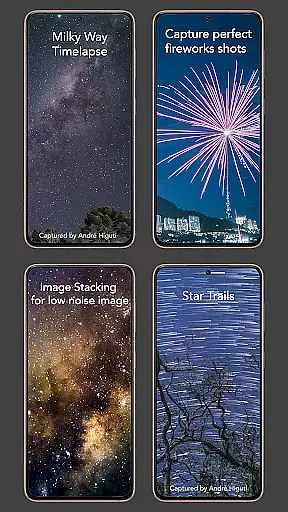
Additionally, Intervalometer supports specialized photography techniques like image stacking, star trail creation, and lightning stacking. These capabilities make it an indispensable tool for achieving high-quality results in post-processing workflows.
Real-time capture and preview functionality is essential for ensuring that every moment of your time-lapse sequence is captured as intended. Intervalometer for TimeLapse offers this by integrating seamlessly with any camera app, allowing users to configure and trigger the camera shutter at specific intervals.
This app leverages the AccessibilityService API to automate the photo-taking process, which means it can work with a wide variety of camera modes including HDR, night mode, and manual settings. This ensures that users have full control over exposure settings and formats, even enabling RAW format captures which are not typically available in standard time-lapse modes on smartphones.
With real-time capture, users can execute complex time-lapse projects such as low light, long exposure, or star trail sequences with precision. The ability to use the app with dedicated camera remote apps from brands like Canon, Sony, and Nikon further extends its utility, making it an indispensable tool for both smartphone and professional camera users alike.
While Intervalometer for TimeLapse does not focus on AI beauty enhancements typical in portrait or selfie applications, it brings a different kind of enhancement to photography - the natural beauty of well-timed and well-executed time-lapse sequences. By providing full control over time-lapse configurations, such as delay timers, interval times, and the number of shots, it allows photographers to capture scenes in their truest form.
The app's flexibility supports various specialized time-lapse types including Milky Way, Holy Grail (day to night), and ultra-wide-angle shots. These capabilities ensure that each frame contributes to a final video that authentically represents the passage of time, without artificial enhancements.
Additionally, Intervalometeru2019s ability to work with any camera app ensures that all native and third-party camera features are accessible. This includes advanced settings that professional photographers rely on to capture high-quality images suitable for post-processing techniques like image stacking or creating star trails, thus preserving the natural aesthetics of the captured scenes.
Full control over settings
Compatible with all camera apps
Supports advanced camera modes
Enables creative time-lapse types
Works with professional cameras
Requires AccessibilityService API
May need device restart on some models
No built-in camera functionality
Limited to Android 7+
Not suitable for beginners

Long exposure camera with computational photography
 2.60
2.60
Create funny photos and videos with the popular Time Warp Scan filter.
4.90
Create AI Photos, Improve and restore quality of blurry, old or damaged pics.
4.20
Movie camera, supports pro recording settings for filming. Try it and be amazed!
4.50
Create AI photos & videos with Enhancer; restore, fix, beautify, enhance photos
4.50
AI Photo Editor with 100+ Filters, Effects! Remove BG, Retouch & Photo Enhancer.
4.80
Easily view, share, delete photos with Gallery.
4.70
Easily create custom gifts, cards, photo books & more on the Shutterfly app!
4.60
Your Family Calendar + Photos. Manage your Skylight Calendar and Skylight Frame.
4.40
Photo Exif Editor allows to view, add and modify EXIF data of multiple photos
4.50
HD Camera Pro with HD Video shooting, Panorama, Photo editor , Beauty Camera.
4.50
Photo editor & gallery. Crop pictures & edit photos offline, no wifi!
4.50
Easily stitch panoramas from multiple photos or video.
4.40
AI portrait generator and polaroid AI selfie, fun AI generated AI photo creator!
4.30
Create & Edit with AI: AI Remove, Enhance, Retouch, Filter
4.10
Catch sunlight, sunrise sunset times and sun phases with the AR sun tracker.
4.10
Astrophotography with your smartphone, photo live stacking and much more!
3.90
Raw Image Viewer. Gallery with support of raw images (.cr3, .cr2, .nef, .raf).
2.00
HD Photo gallery and photo manager to edit, hide private photos, videos & albums
4.2


User Reviews