
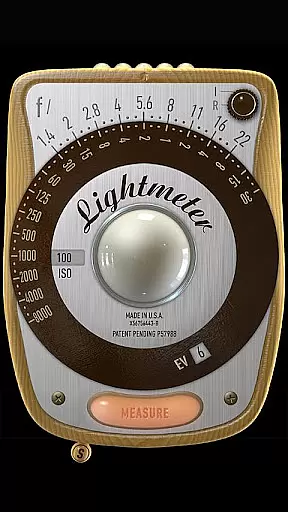
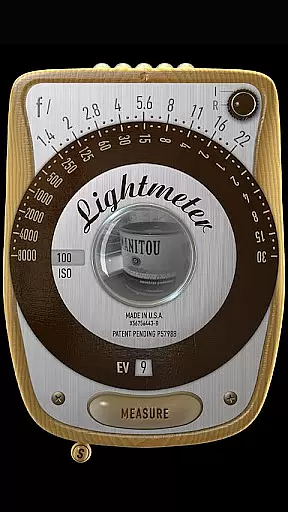
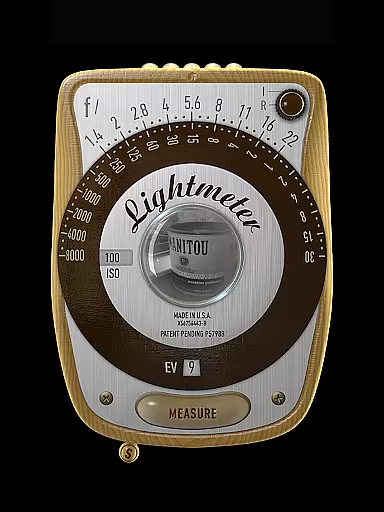
LightMeter is a specialized photography app designed for analog photographers who appreciate the art of old-school photography. This application provides both reflected and incident light metering, catering to users who require precise exposure readings for their analog work. Compatible with devices that can save exposure data to EXIF, it offers an ISO range from 3 to 6400, ensuring flexibility across different lighting conditions.
The app's unique features include low light alerts, camera muting options, and calibration settings, which collectively enhance the user experience. With support for all screen resolutions and compatibility with devices possessing zoom capabilities, LightMeter ensures accurate spot measurements. Whether you're a professional or an advanced amateur, this app supports your creative process by providing essential tools for perfect exposure every time.
LightMeter stands out with its comprehensive set of features tailored for analog photographers. The app includes both incident and reflected light metering options, although the latter requires a compatible camera. Incident light metering utilizes the device's light sensor, offering reliable readings that can be held for convenience.
Additional functionalities such as low light alerts, vibration feedback on measure/hold, and optional display of Exif and sensor information ensure a customizable and user-friendly experience. The app also allows for ISO calibration and state recall upon resuming, maintaining continuity in your workflow. These features collectively provide photographers with the control needed to capture perfectly exposed images under various conditions.
LightMeter offers a unique real-time capture and preview feature that is essential for photographers who rely on accurate exposure readings. This functionality allows users to measure both incident and reflected light, providing crucial information directly through their device's camera and light sensor.
The app supports a wide ISO range from 3 to 6400, catering to various lighting conditions and photographic needs. With options like low light alerts and the ability to mute the camera in select regions, it ensures adaptability to different shooting environments while maintaining the authenticity of the captured moment.
Photographers can benefit significantly from features such as vibration feedback upon measurement, holding incident light readings, and spot measurement for cameras with zoom capabilities. These tools collectively enhance precision and control during photo sessions, making LightMeter an indispensable companion for analog photography enthusiasts.
While primarily designed for serious analog photographers, LightMeter also includes elements of AI beauty and enhancement that preserve the natural qualities of photographs. The calibration feature and alternative ISO selector ensure that images retain their genuine characteristics without artificial alterations.
Users have access to detailed Exif and sensor information displayed on-screen, allowing them to make informed decisions about their settings. This transparency helps maintain the integrity of each shot by providing clear data on how different parameters affect the final image.
By supporting all screen types, including extra-high resolution displays, LightMeter guarantees a seamless experience across devices. This compatibility ensures that enhancements remain subtle and true to life, empowering photographers to produce high-quality work consistently.
User-friendly interface
Wide ISO range
Customizable settings
Supports high resolution screens
Precise light metering
Limited device compatibility
Incident light needs sensor
Reflected light feature limited
Camera muting not global
Requires EXIF capability

Create & Edit with AI: AI Remove, Enhance, Retouch, Filter
 4.10
4.10
Photo Exif Editor allows to view, add and modify EXIF data of multiple photos
4.50
Professional photography on your mobile phone
4.20
Hair color changer, AI haircut app, fun hair editor and buzz cut filter for all!
3.80
Snap photos remotely using your Garmin watch as the camera trigger
4.2
Enhance, upscale, and transform your images — on your device, without limits
4.70
Effortlessly make high-quality GIFs from images & videos without any watermarks.
4.70
Solocator stamps photos you take with GPS location, Compass Direction, Date/Time
3.80
Edit photos with the picture generator: PS2 & AI Clay filters, cartoon effects.
4.50
Gallery show photo, video, slideshow, is perfect 3D effect private photo albums.
4.80
Unblur, enhance & restore photos with powerful AI photo enhancer tools.
4.60
Safe & smart flight with Go Fly drone controller for 40+ drone camera, zone map
4.50
Create collages easily! Nice pic collage maker & background eraser for Instagram
4.50
Create AI photos & videos with Enhancer; restore, fix, beautify, enhance photos
4.50
Effortlessly organize, view and share your photos & videos with Gallery app!
4.40
What celebrity do you look like? Celebs will find your celebrity match!
4.10
Transform Photos: Edit, Beautify and Craft Memories & Make Collages!
4.10
Photobooth mini FULL app will allow you to add more fun to your parties
4.00
Superimpose one photo on top of another using the original Superimpose app!
3.20


User Reviews