
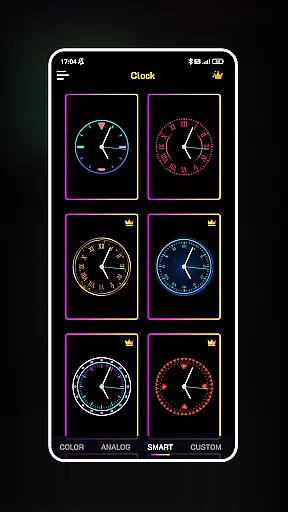
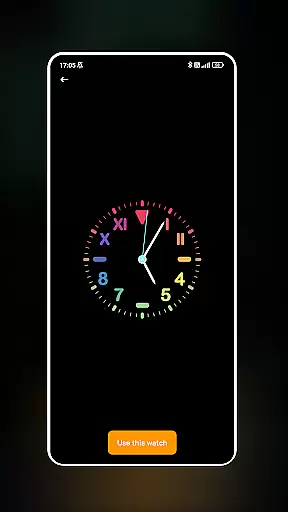
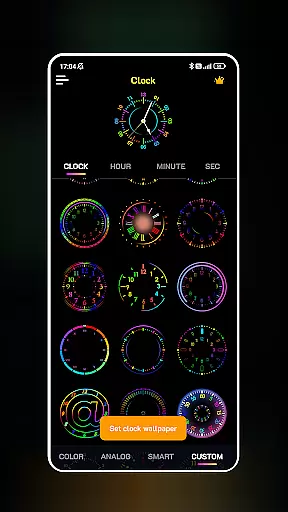
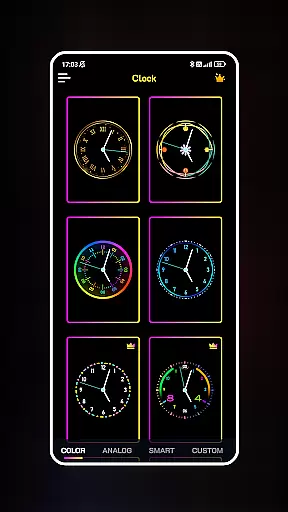
Neon Clock Wallpaper is a dynamic personalization app that allows users to design and customize unique clock wallpapers for both home screens and lock screens. The app provides diverse pre-made templates with various styles, colors, and neon effects, enabling users to express their individuality through creative clock designs.
With its intuitive interface, users can easily personalize every aspect of the clock's appearance, including size, color, and style. Whether you're looking to enhance your device's aesthetics or create a functional yet artistic timepiece, Neon Clock Wallpaper offers endless possibilities to craft visually stunning backgrounds that reflect personal taste.
This app is perfect for those who want to stand out by transforming their smartphones into personalized works of art. By combining practicality with creativity, it ensures your device remains both beautiful and functional.
Neon Clock Wallpaper stands out with its robust customization capabilities. Users can choose from a wide array of pre-designed clock templates, each offering unique designs and vibrant neon effects. These templates serve as a starting point for creating personalized clocks that match individual preferences.
The app also supports advanced customization features, allowing users to modify clock components such as hands, numbers, and backgrounds. With adjustable colors, sizes, and styles, users have full control over the design process. Additionally, the app's neon effects add an eye-catching touch, making each clock truly distinctive.
Another notable feature is the ability to set these custom clocks as both wallpaper and lock screen displays. This dual functionality ensures that users can enjoy their creations across all aspects of their device’s interface, enhancing both usability and visual appeal.
Customization is at the heart of Neon Clock Wallpaper, offering users a rich palette of options to express their unique style. The app provides a wide array of clock templates that cater to different tastes and preferences, ensuring that every user can find something that resonates with their personal aesthetic.
With the ability to create custom clocks, users are not just limited to pre-made designs. They have the freedom to mix and match components, adjust colors, resize elements, and choose from various styles to design a clock that is truly their own. This level of customization empowers users to craft a timepiece that is not only functional but also an extension of their personality.
The inclusion of stunning neon effects adds another layer of individuality, allowing users to make their clock pop with vibrant colors and eye-catching designs. Whether it's for a subtle background or a bold statement piece, the Neon Clock Wallpaper app ensures that personal expression is limitless.
Neon Clock Wallpaper excels in theme compatibility, ensuring that the clocks you create will look great on any device and screen. The app is designed to seamlessly integrate with your smartphoneu2019s existing themes, providing a cohesive look that enhances your overall device aesthetics.
Users can set their uniquely designed clocks as both wallpaper for the home screen and the lock screen, maintaining consistency across all views of their device. This dual functionality allows for a personalized experience whether the phone is in use or locked, keeping your custom design front and center.
Furthermore, the app's compatibility extends to various devices and operating systems, making sure that no matter what type of device you own, your personalized clock will appear as intended. With Neon Clock Wallpaper, you're guaranteed a harmonious blend of custom clocks with your device's native theme, elevating your screen's visual appeal.
Highly customizable
Vibrant neon effects
User-friendly interface
Wide template selection
Dual screen support
May drain battery
Limited free options
Occasional glitches
Ads in free version
Steep learning curve

Winter's Journey: digital watch face for Galaxy Watch & Wear OS
 4.80
4.80
3D, live, and moving wallpapers & themes in 4K and HD for your device.
4.50
Wallpaper HD 4K Live - Thousands of high-quality Anime backgrounds for you.
4.80 4.50
4.50
Custom edge gestures for volume control, brightness, apps, and shortcuts.
4.0
300+ Stunning and well-designed widgets inspired by NOTHING.
4.70
Handcrafted pixel art icons, widgets & wallpapers
4.60
350+ widgets with a premium glass-style finish, perfect for home & lock screens.
4.70
Enjoy a variety of amazing live wallpapers and colorful EDGE lighting borders!
4.80
Dark icon pack based on One 8
4.80
Vertically oriented rectangular icons
4.70
A launcher for Samsung Good Lock and Good Guardians modules without ads
4.70
Make your phone look simple & luxury, like iDevice
4.60
Transform your phone with Launcher iOS 26 - Smooth & elegant iOS experience
4.50 4.50
4.50
Run multiple accounts of the same app on a single device
4.10
Create unique, fun emojis with Funny Emoji Maker! Unlimited creativity!
4.00
Transform your phone with stunning video wallpapers and a unique, personal touch
3.80
Interactive Miniature Painting Catalogue
3.30


User Reviews