
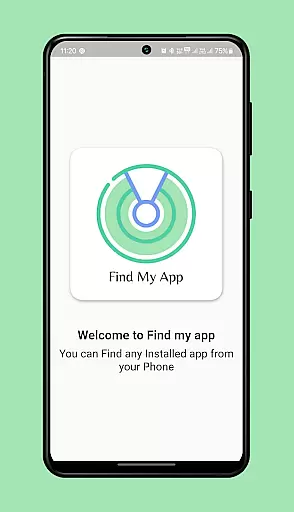
Find my app is a powerful personalization tool designed to help users efficiently manage and locate their installed applications. The program uses advanced technology to instantly identify every app on your phone, both existing and newly installed ones.
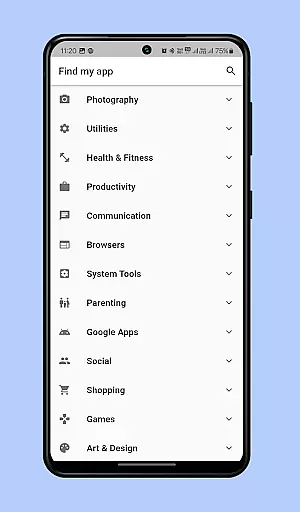
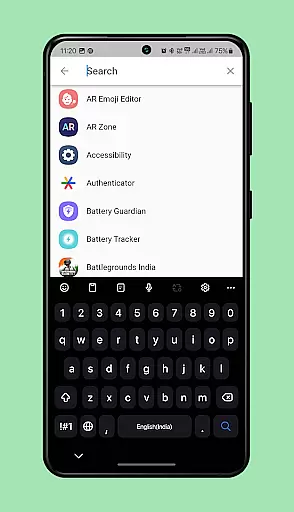
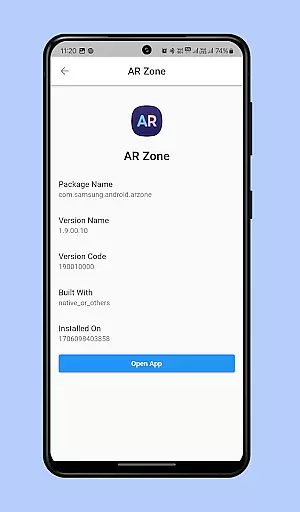
The app organizes these apps into an efficient menu grouped by categories, allowing you to quickly find the app you're looking for. Additionally, it features a smart search function where you can type the name or part of the name of the desired app, and Find my app will instantly locate and open it for you.
This functionality eliminates the need to scroll through numerous pages of app icons, saving you time and effort. Whether you struggle with finding apps due to a cluttered home screen or simply want faster access to your frequently used apps, Find my app provides an instant solution tailored to enhance your smartphone experience.
One of the standout features of Find my app is its ability to categorize all installed apps into an intuitive menu system. This allows users to browse through their apps by category rather than sifting through endless screens of icons.
In addition to the categorized menu, the app includes a powerful search function. By typing just a part of an app's name, users can instantly find and launch the desired application. This feature is particularly useful when dealing with large numbers of installed apps.
Another notable aspect is its lightweight design and ease of use. The interface is straightforward, ensuring that even those who aren't tech-savvy can benefit from its capabilities. Overall, Find my app offers a streamlined way to manage your apps, making daily smartphone tasks quicker and more efficient.
Customization options variety refers to the range of features that allow users to tailor their app experience according to their preferences. In the case of Find my app, this involves organizing and categorizing installed apps into an efficient menu system.
The application intelligently identifies both existing and newly installed apps on your phone, arranging them into categorized groups. This organization allows for quick access and eliminates the need to scroll through numerous pages of app icons.
Users benefit from a highly personalized interface where they can easily locate any app by its category or name. The ability to customize how apps are displayed enhances user convenience and saves time when navigating a crowded home screen.
This level of customization ensures that every user's most-used apps are just a tap away, streamlining daily tasks and improving overall productivity.
Theme compatibility is crucial for applications aiming to provide a seamless visual experience across different devices and operating systems. For Find my app, theme compatibility means ensuring that the app not only functions well but also looks good on various Android devices.
The app supports multiple themes, adapting its appearance based on the deviceu2019s current settings. Whether using light mode during the day or switching to dark mode at night, Find my app maintains a consistent look and feel with other apps on your phone.
By offering theme compatibility, Find my app enhances user satisfaction as it integrates smoothly with the deviceu2019s aesthetics. Users enjoy a cohesive visual experience without abrupt changes in design language between different sections of their device.
Ultimately, theme compatibility contributes significantly to user retention and engagement, making sure that the app remains visually appealing under all conditions.
Instant app identification
Efficient category grouping
Smart search functionality
User-friendly interface
Time-saving navigation
Limited customization options
No widget support
Basic visual design
Occasional indexing delays
Ads in free version

Ultra realistic high quality analog watch face for Wear OS.
 4.60
4.60
Unique Android Launcher
4.60
Run multiple accounts of the same app on a single device
4.10 4.50
4.50
Embrace the Night. Unleash the power of darkness with Raven Dark Icon Pack
4.60
One 8 icons glass color version
4.80
Create unique, fun emojis with Funny Emoji Maker! Unlimited creativity!
4.00
Customize phone with anime themes, 3D icons, aesthetic widgets & wallpapers
4.80
Transform your phone with stylish zipper lock themes and 4D live wallpaper
4.10
Nothing Icon pack with more than 3750+ highly crafted icons.
4.70
A minimalist productivity launcher. One-hand-friendly. Zero ads.
4.70
A retro cartoon style watch face and a punch right in the face of the copyright
4.60
Transform your phone with Launcher iOS 26 - Smooth & elegant iOS experience
4.50
Vibrant Adaptive Icons with Material You and Enhanced Monet Colors.
4.50
Romantic Kiss Stickers App. Start romantic messaging now!
4.30
Unique Fonts, typefaces and stylish text. Fonts for Instagram, Whatsapp & others
4.20
Customizable flower power digital watch face for Wear OS watches.
4.00
Design your screen with unique, vibrant clocks
3.80
Custom edge gestures for volume control, brightness, apps, and shortcuts.
4.5


User Reviews