
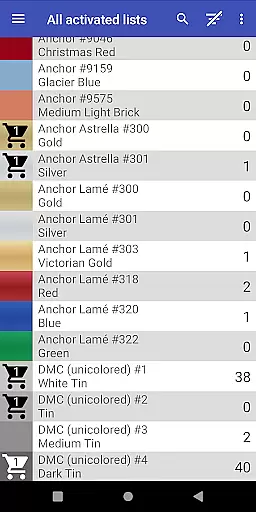
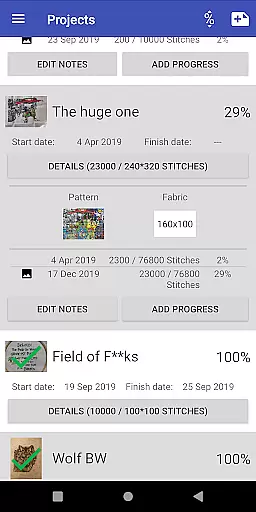
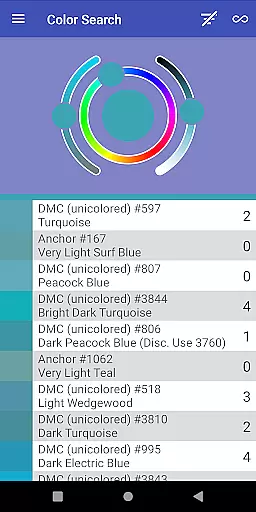
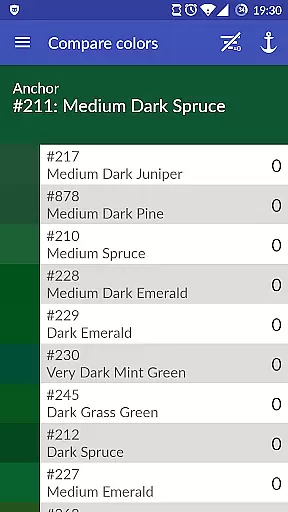
Cross Stitch Thread Organizer is a comprehensive tool designed for cross-stitch enthusiasts, providing an efficient way to manage thread collections on the go. With its user-friendly interface and robust features, this app ensures that users can easily navigate through their entire thread inventory without any distractions from ads or unnecessary elements.
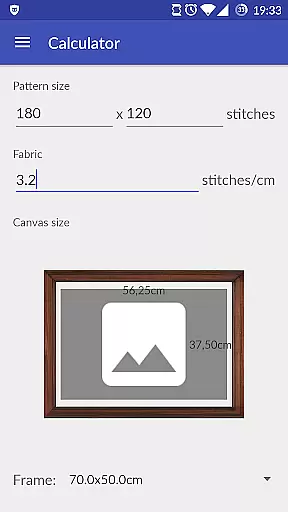
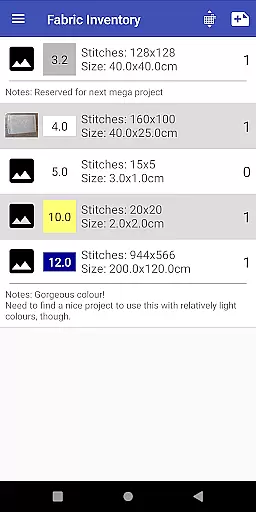
The application supports a wide array of functionalities including inventory management, color matching, and project tracking. Users can keep track of their threads, fabrics, and patterns while also monitoring the progress of their projects. Additionally, it offers tools for calculating final piece sizes and selecting appropriate frames, making it an indispensable companion for both amateur and professional stitchers.
One of the standout features of Cross Stitch Thread Organizer is its extensive vendor support, covering approximately 160 individual lists such as DMC, Anchor, and many others. This ensures that users have access to a vast database of threads with full-color displays and various types like cotton, silk, and metallic.
Beyond just cataloging threads, the app allows users to search for specific colors, find substitutions, and even add custom lists for vendors not already included. The ability to manage shopping carts, track daily project progress, and calculate final piece dimensions further enhances the user experience. These features collectively provide a seamless and enriched cross-stitching journey.
Cross Stitch Thread Organizer offers a comprehensive suite of creative tools tailored for embroidery enthusiasts. The app supports an extensive list of thread vendors, including popular names like DMC, Anchor, and Kreinik, along with unique offerings such as Swarovski Beads and custom lists for those hard-to-find threads.
With features that allow users to manage their entire thread collection, the app ensures that all necessary materials for a project are easily accessible. Users can search for threads by specific colors, track inventory, and even calculate the final size of their cross-stitch pieces.
The inclusion of functionalities for managing fabrics, patterns, and daily project progress makes this app a one-stop solution for all embroidery needs. Whether you're calculating frame sizes or tracking thread requirements, Cross Stitch Thread Organizer provides the tools necessary for both amateur and professional stitchers.
Flexibility in canvas and format options is where Cross Stitch Thread Organizer truly shines. Users can work with over 160 individual thread lists, featuring full-color displays and various thread types such as cotton, silk, and metallics. This vast selection ensures that users can find exactly what they need for their projects.
In addition to supporting numerous vendors, the app allows users to create custom lists, ensuring that even if a favorite vendor is missing, users can still have a personalized experience. This feature adds a layer of customization that enhances the overall user experience.
Moreover, the app's ability to handle different project elementsu2014like assigning required threads and managing shopping cartsu2014provides a seamless workflow. By offering these flexible and customizable options, Cross Stitch Thread Organizer empowers users to bring their creative visions to life without limitations.
User-friendly interface
Extensive vendor support
Custom list addition
Project tracking tools
No ads or bloatware
Limited to cross-stitch
Occasional bugs
Missing some vendors
No iOS version
Complex for beginners

Customizable Outlined Fonts. Watch Face Format. Battery friendly Digital Clock.
 4.20
4.20
Create stylish invitation cards using templates for weddings, birthdays & RSVP.
4.20
AI Face Swap, Video Effects Editor, Realtime Morph, Funny Video FX,AI Filters
3.70
Digital, Abstract, Classic - all types of color wheels in one app!
4.60
Your AI soulmate — meaningful chats, and unique emotional moments
4.70
Inky runs Inkscape on Android devices and Chromebooks
2.90
Video AI: Revolutionize Your Content Creation with Advanced Video Generation
4.50
Draw, fidget, and spin glow art! Relax and express your creativity with a finger
4.60
Create amazing pictures and unleash your creative genius with AR Drawing Sketch
4.40
Photo editor for art, avatars, filters & fun transformations.
4.60
Draw anime & manga drawing, art with templates to create stunning picture!
4.50
Digital illustration drawing & painting pad app to paint Anime and Manga art
4.50
Create neon drawing with magic doodle and fun doodle art effects!
4.50
Draw Trace image sketch by, AR art projector app, Easy to trace any image.
4.50
AI generated images & photos, turn your words into drawing, painting & pictures.
4.30
Remove Background, Magic Eraser, Photo Enhancer, Story Templates, Collage Maker
4.30
Turning simple sketches into captivating tales filled with life and motion
3.90
Vidu is an AI video generator made for creators and aspiring makers.
3.30
Art of Combination Wear OS Watch faces
4.0


User Reviews