
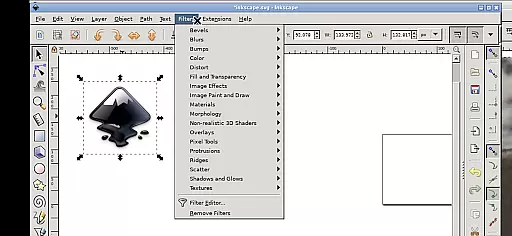
Inky is a feature-rich vector graphics editor that brings the full functionality of Inkscape to Android devices. This app allows users to create and edit vector images in Scalable Vector Graphics (SVG) format, with support for importing and exporting other file types. It offers professional-grade tools for rendering primitive shapes, text manipulation, and advanced color gradients.
The application supports raster graphics embedding and tracing, enabling designers to convert photos into vector graphics. With intuitive touch-based controls optimized for mobile devices, Inky makes it easy to zoom, pan, and manipulate objects using simple gestures. The app's seamless integration with Android's file system allows direct access to documents and media files without cumbersome import/export processes.
Inky stands out with its comprehensive set of vector editing tools adapted for mobile use. The app implements one-finger tapping for left clicks, pinch-to-zoom functionality, and two-finger scrolling, making desktop-grade design work possible on smartphones and tablets. Its unique gesture-based interface includes press-and-hold panning and two-finger right-click emulation.
Advanced features include support for various shape primitives, gradient fills, transparency adjustments, and transformation tools like rotation and skewing. The app maintains compatibility with the Linux version of Inkscape while running natively on Android through UserLAnd technology. Professional designers can work with confidence knowing they have access to the same powerful tools across different platforms.
Inky offers a comprehensive suite of creative tools that cater to both professional designers and hobbyists. The app provides full-featured vector graphics editing capabilities, allowing users to create intricate designs with shapes such as rectangles, ellipses, polygons, arcs, spirals, stars, and even 3D boxes.
Users can fill these shapes with solid colors, patterns, or gradients and adjust the transparency for unique effects. The ability to embed and trace raster graphics means that Inky is not just limited to vector art; it can also transform photos and other raster images into scalable vector formats.
The manipulation options are vast, including moving, rotating, scaling, and skewing created shapes. This flexibility ensures that artists have all the necessary tools at their disposal to bring their visions to life without any compromise on quality or functionality.
One of Inky's standout features is its canvas and format flexibility, which allows creators to work seamlessly across different mediums and file types. Users can import various graphic formats and export their finished projects in multiple formats, primarily focusing on Scalable Vector Graphics (SVG).
The app supports linking to external directories like Documents and Pictures directly from the home directory, eliminating the need for cumbersome file imports and exports. This makes it incredibly convenient for users who want to access and edit files stored anywhere on their Android device.
Additionally, Inkyu2019s interface adapts well to different screen sizes, whether you're using a phone or a tablet. While it shines best on larger displays with a stylus, it remains fully functional even when used on smaller screens or with touch controls alone.
User-friendly touch interface
Full-featured vector editing
Seamless file integration
Professional-grade tools
Open-source flexibility
Steep learning curve
Small screen limitations
Performance intensive
Complex gestures required
Limited mobile optimizations

Create trending AI photos & videos with powerful effects and 3D styles.
 3.20
3.20
Meet the magic aı 3d photo generator and smart AI video generator app.
3.20
Paint with oils and sketch with natural tools on a realistic virtual canvas.
3.80
Your Essential Color Theory Guide: Red, Yellow, Blue (RYB)
4.0
Create stunning art with AI.
4.80
Resize photos and print photos in exact size with our powerful photo printer!
3.80
Video AI: Revolutionize Your Content Creation with Advanced Video Generation
4.50
Draw, fidget, and spin glow art! Relax and express your creativity with a finger
4.60
Sketch and paint on your device with the feel and freedom of drawing on paper
4.00
Photo stitcher for automatically screenshot stitching into a long screenshot
4.70
The ultimate tool for creating animations
4.60
Unleash your drawing and painting potential
4.50
Custom Character Creator & PFP Maker!
4.20
Text to Image, Image to Video & AI Chat
4.20
AI Face Swap, Video Effects Editor, Realtime Morph, Funny Video FX,AI Filters
3.70
AI Art Generator transforms your words into AI generated art & paintings.
3.70
Your homescreen as an elegant glass with customized blur, lighting, and visuals.
3.70
Create cute cat emojis & PFPs! Fun, custom avatars for cat lovers.
3.70
Art of Combination Wear OS Watch faces
4.4


User Reviews