
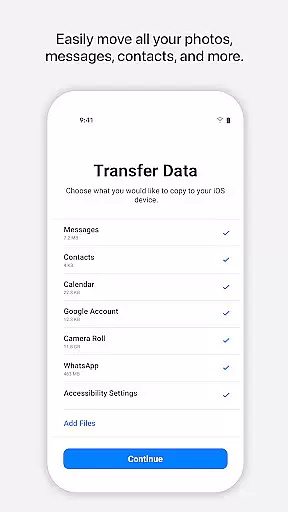
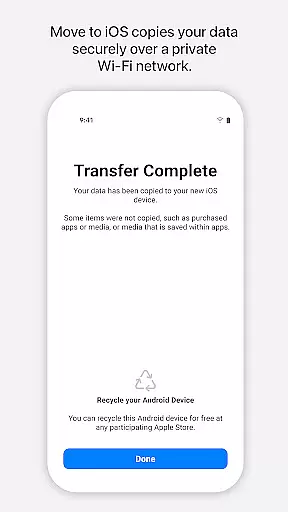
Move to iOS is a powerful migration tool designed to simplify the transition from Android to iPhone or iPad. This application enables users to transfer various types of content seamlessly and securely, including contacts, message history, photos, videos, mail accounts, calendars, and even WhatsApp data. By creating a private Wi-Fi network between devices, Move to iOS ensures that all data migration occurs without the need for third-party storage solutions.
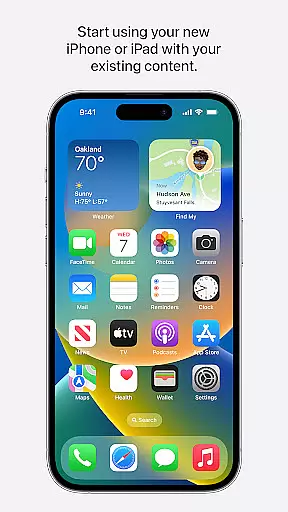
The app's standout feature is its ability to migrate content automatically within just a few steps, making switching to iOS an easy process. Users can start enjoying their new Apple device immediately after the transfer is complete, with all their essential data already in place. The application also provides clear guidance throughout the migration process, ensuring a smooth user experience.
This tool is particularly valuable for individuals upgrading to iOS who want to retain their digital life without manual backups or complex transfer procedures. With support for multiple content categories and optional permissions for more granular control, Move to iOS offers a comprehensive solution for Android users transitioning to Apple's ecosystem.
Move to iOS distinguishes itself through several key features that enhance the migration experience. First, the app creates a dedicated private Wi-Fi network between the Android device and the new iPhone or iPad, enabling direct and secure data transfer without requiring internet connectivity. This ensures that personal information remains protected during the migration process.
The application supports a wide range of content types, including contacts, message history, photos, videos, mail accounts, calendars, call logs, and WhatsApp data. Each category is transferred directly to the corresponding location on the iOS device, maintaining proper organization. Additionally, users can choose which specific data to migrate by granting optional permissions for SMS, photos, contacts, and other content categories.
Another notable feature is the security code verification system, which adds an extra layer of protection during the transfer process. Once initiated, the migration runs automatically, allowing users to focus on setting up their new device while the app handles the data transfer in the background. This combination of security, automation, and comprehensive content support makes Move to iOS an indispensable tool for Android-to-iOS transitions.
Move to iOS offers a seamless transition experience for users switching from Android to Apple devices. The app's core functionality lies in its ability to transfer a wide array of data types, including contacts, message history, photos, and even WhatsApp content, with precision.
The effectiveness of Move to iOS is evident in its secure and automatic migration process. By creating a private Wi-Fi network between devices, it ensures that all personal information is transferred safely without the need for third-party services or manual backups.
Users benefit from the app's comprehensive approach to data migration. With support for various content categories like calendars, call logs, and voice memos, Move to iOS simplifies the switch by placing each data type into its appropriate location on the new device.
This attention to detail and commitment to user-friendly design demonstrates how Move to iOS effectively removes barriers when transitioning operating systems, allowing users to focus on exploring their new device's capabilities.
The interface of Move to iOS reflects Appleu2019s dedication to simplicity and ease of use. Upon launching the app, users are greeted with clear instructions that guide them through each step of the migration process, ensuring an intuitive experience.
With minimalistic design elements and straightforward navigation paths, Move to iOS eliminates confusion during what could be a complex task. Users can easily understand how to establish a connection between their old Android device and new iPhone or iPad without technical expertise.
Optional permissions further exemplify this simplicity; while they enhance functionality by enabling additional data transfers such as SMS messages or music libraries, these features do not complicate the primary workflow but rather offer flexible choices tailored to individual needs.
By focusing on essential tasks within a clean layout, Move to iOS provides an accessible tool that empowers anyoneu2014from tech-savvy individuals to those less familiar with digital transitionsu2014to successfully complete their move with confidence.
User-friendly interface
Secure data transfer
Comprehensive content support
Private Wi-Fi connection
Automatic migration process
Limited to Android-to-iOS
Requires stable connection
Optional permissions needed
No reverse migration option
Dependent on device compatibility

Change your GPS location instantly. Simulate routes anywhere in the world.
 4.90
4.90
Transfer Files, APK from Phone to Watch & Install.
4.5
Enjoy smooth gameplay with Game Booster
4.90
An open-source APK explorer for Android!
4.10
Excellent scientific calculator with symbolic algebra, integrals, derivatives
4.80
Making emulation easy for everyone!
4.30
The Ultimate Flex Drivers Utility App - Convenient Tapping & Block Filters
4.70
Clean up large files and similar photos, fast and easy to use
4.40
Screen recorder with audio to record high-quality videos and take screenshots.
4.40
Powerful collection of electronics tools and reference.A must for any enthusiast
4.90
Unit and currency converter with easy and simple UI.
4.80
Monitor car performance in real time and troubleshoot malfunctions.
4.80 4.50
4.50
Carry a FTP server in your pocket and avoid USB cables for file transfer
4.20
VESC Tool can monitor and configure VESC-compatible devices over BLE and Wifi
4.20
Unleash gamepad precision for ultimate mobile gaming dominance.
3.90
Create your own custom widget with endless possibilities
3.90
A powerful, easy-to-use flight computer on your phone or tablet!
3.80
This app unlocks the Pro features of the Central for DayZ app
3.60


User Reviews