


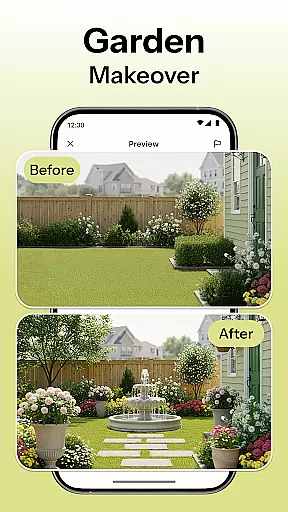
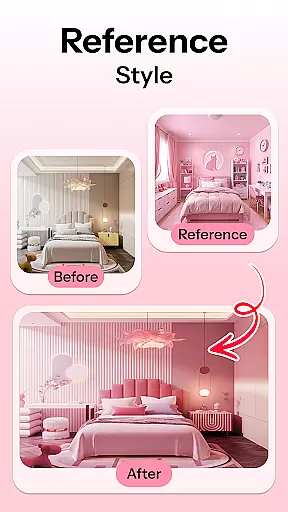
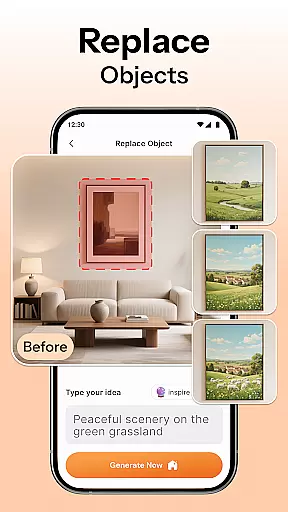
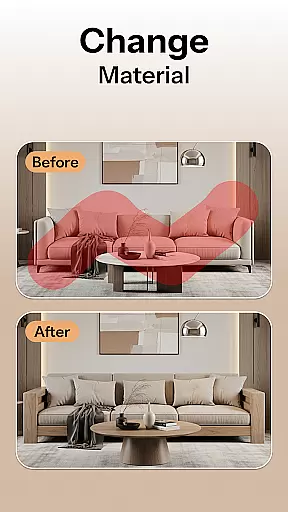
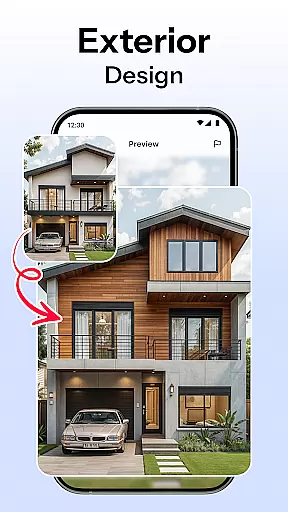

HomeMagic is an innovative AI-powered interior design application that serves as your personal design assistant. The app's core functionality lies in its ability to transform any room instantly through advanced AI algorithms. Users can simply take a photo of their space and select from various design styles such as Modern, Retro, Tropical, Bohemian, Vintage, and Cyberpunk. Within seconds, HomeMagic generates beautifully rendered room designs tailored to individual preferences.
Beyond basic transformations, the app offers smart furniture layout planning, decor ideas with style filters, and realistic previews of complete room makeovers. These features allow users to visualize new layouts, experiment with wall colors and flooring textures, and optimize space usage before making any physical changes. Whether you're a homeowner planning renovations, a renter refreshing your space, or a professional interior designer, HomeMagic provides valuable design insights and inspiration.
The app's before-and-after comparison feature lets users evaluate current spaces against AI-designed versions side by side. This functionality is particularly useful for those preparing for home renovations or exploring makeover ideas. By saving and organizing designs in high-quality galleries, users can easily share their favorite concepts with friends, family, or professional designers, making HomeMagic an essential tool for anyone interested in interior design.
HomeMagic distinguishes itself through its comprehensive suite of AI-driven design features. The app's most notable capability is its AI Interior Design Generator, which processes uploaded photos and applies various design styles within seconds. This feature supports multiple aesthetics, including Modern, Retro, Tropical, Bohemian, Vintage, and Cyberpunk, catering to diverse user preferences.
The Room Makeover Preview function enables users to redesign different living spaces using realistic design samples. From bedrooms to kitchens and offices, this feature helps visualize complete transformations before committing to physical changes. Additionally, the Smart Furniture Layout Planner utilizes AI algorithms to suggest optimal arrangements for furniture, lighting, and wall art, helping users maximize their space efficiency while maintaining aesthetic appeal.
Other notable features include Home Decor Ideas & Style Filters, which allow experimentation with wall colors, flooring textures, and trendy furniture sets. The Before & After Comparison tool provides side-by-side views of original and redesigned spaces, while the Save & Organize functionality creates personalized galleries of styled rooms. These features collectively offer users unprecedented control over their design process, making HomeMagic an invaluable resource for both amateur decorators and professional designers.
HomeMagic offers a comprehensive suite of creative tools that cater to all your interior design needs. With features like AI Interior Design Generator, Smart Furniture Layout Planner, and Home Decor Ideas & Style Filters, users can experiment with various design styles and room layouts effortlessly.
The app allows you to upload a photo of your space and transform it using different design themes such as Modern, Retro, Tropical, Bohemian, Vintage, and Cyberpunk. This versatility ensures that whether you're revamping your bedroom, living room, kitchen, or office, HomeMagic has the right tools to bring your vision to life.
Additionally, the Smart Furniture Layout Planner optimizes your space by suggesting ideal placements for furniture, lighting, and wall art. This feature is particularly beneficial for those looking to maximize their room's potential while maintaining aesthetic appeal.
Flexibility in design and format is a standout feature of HomeMagic. The app provides users with the ability to experiment with wall colors, flooring textures, and trendy furniture sets, ensuring that every detail of your dream space can be customized to your preference.
One of the key aspects of HomeMagic is its Before & After Comparison tool. This feature lets you view the current state of your room alongside the AI-designed version, making it easier to make informed decisions about your interior design choices.
Moreover, HomeMagic allows you to save and organize your designs, creating a personalized gallery of styled rooms. You can export these designs in high quality, making it convenient to share your ideas with friends, family, or professional interior designers. This level of flexibility ensures that your creative process is both seamless and efficient.
User-friendly interface
Wide range of design styles
Realistic rendering quality
Comprehensive feature set
High-quality export options
Limited free features
Subscription costs
Occasional rendering delays
Device compatibility issues
Learning curve for beginners

Discover Cartoon Dream : Unleash Your Creativity with CuttingEdge AI
 4.50
4.50
Art of Combination Wear OS Watch faces
4.0
Draw glowing spinners, relax, and spin your creative art
4.60
Powerful home decoration & house design that allows you to design dream home.
3.80
Resize photos and print photos in exact size with our powerful photo printer!
3.80
Retouch photos. Create or edit images. Endless capabilities.
2.70
Video AI: Revolutionize Your Content Creation with Advanced Video Generation
4.50
Kling AI is an image and video generation and editing studio powered by AI.
4.50
Create amazing pictures and unleash your creative genius with AR Drawing Sketch
4.40
2D animation studio for Android tablets - unlimited layers, infinite timeline
4.70
Learn how to draw with step-by-step tutorials, fun lessons & multiplayer drawing
4.70
Photo editor for art, avatars, filters & fun transformations.
4.60
Digital illustration drawing & painting pad app to paint Anime and Manga art
4.50
The perfect place to start sketching! Use Sketchbook to draw and paint sketches.
4.50
Share the joy of painting with ibis Paint! Drawing anime and manga art.
4.50
Sketch, plan, take notes and illustrate on an infinite canvas.
4.20
Custom Character Creator & PFP Maker!
4.20
Create Logos, Tattoos, AI Art & more with our AI Photo Generator & Design Editor
4.20
Turning simple sketches into captivating tales filled with life and motion
3.90


User Reviews