
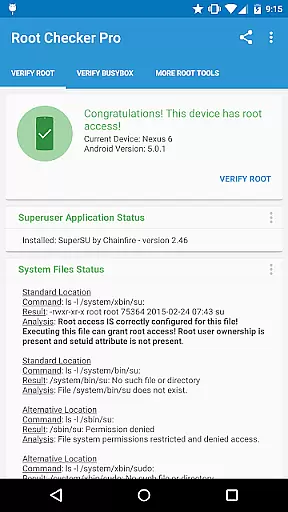
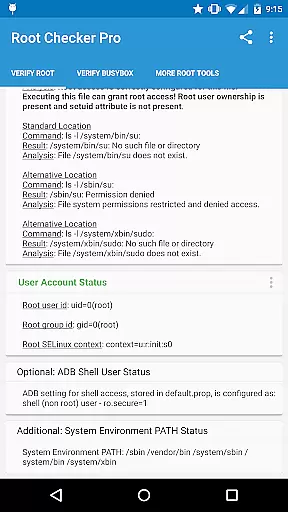
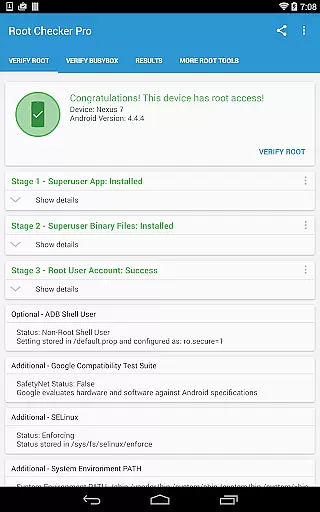
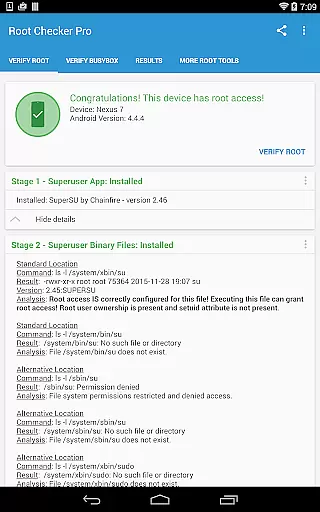
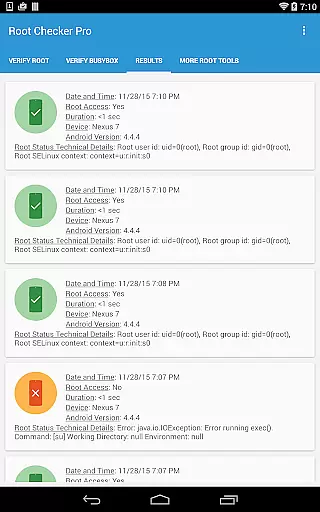
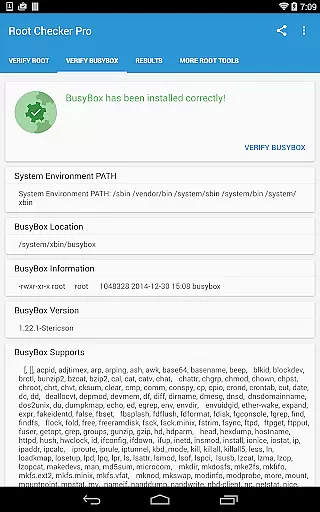
Root Checker Pro is a powerful diagnostic tool designed to verify root access and BusyBox installation on Android devices. The app provides both basic and advanced users with critical information about their device's root status, including su binary locations, file permissions, SELinux context results, and Superuser application details. With its intuitive interface, the app ensures even novice Android users can easily confirm whether their device has proper root access.
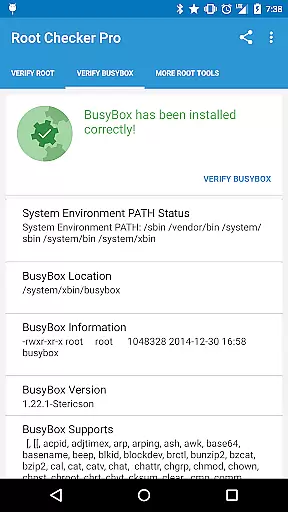
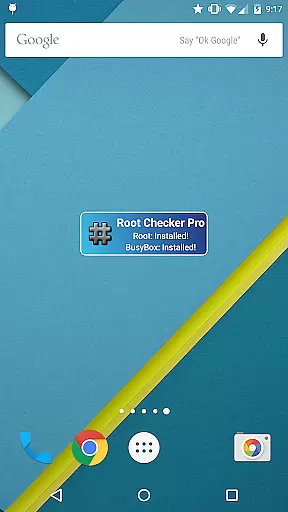
In addition to root verification, the app offers detailed insights into BusyBox installations, making it an essential utility for troubleshooting root-related issues. Users can export diagnostic reports via email or social media with a single tap, enabling efficient collaboration with technical support teams. The included widget allows real-time monitoring of root and BusyBox status, providing continuous updates and notifications directly on the home screen.
Root Checker Pro stands out with its comprehensive diagnostic capabilities that cater to both casual and advanced Android users. The app checks all standard su binary locations and verifies file permissions while also examining root uid/gid and SELinux contexts. It detects installed Superuser applications and their versions, ensuring complete visibility into the device's root configuration.
For power users, the app provides in-depth technical details about the root environment and BusyBox installation. The unique export feature allows users to share detailed root and BusyBox information through various communication channels. The integrated widget delivers persistent monitoring functionality, checking root and BusyBox status at customizable intervals while displaying real-time notifications on the device's home screen.
The app's ability to quickly diagnose and report root access issues makes it invaluable for troubleshooting. By presenting all necessary technical details in an organized manner, it enables efficient resolution of root-related problems while maintaining user-friendly operation through its simple interface design.
Root Checker Pro delivers exceptional accuracy in verifying root access on Android devices. The application meticulously checks the presence and status of the su binary, which is critical for granting root permissions.
The app's effectiveness lies in its comprehensive diagnostic capabilities. It examines standard su binary locations, file permissions, and system-defined paths, providing users with detailed insights into their device's root status.
For technically inclined users, the app offers advanced details about SELinux contexts, Superuser application versions, and adb shell user modes. This level of detail enables precise troubleshooting of root-related issues.
What sets this tool apart is its ability to quickly export diagnostic information through email or other installed applications. This feature facilitates collaboration and technical support, making it an invaluable resource for both novice and experienced Android users.
The interface of Root Checker Pro has been carefully designed to provide a straightforward user experience. Despite dealing with complex technical information, the app presents its findings in a clear and organized manner.
Key information about root access and BusyBox installation is displayed in a logical sequence, making it easy for users to follow. The main testing function is accessible through a single button press, streamlining the verification process.
A dedicated widget enhances the user experience by providing continuous monitoring of root and BusyBox status. Users can configure notification intervals, ensuring they stay informed about any changes in their device's root status.
The developer has successfully balanced technical depth with user-friendliness. Even users new to Android development can navigate the application easily while advanced users appreciate the depth of information available at their fingertips.
Comprehensive root detection
User-friendly interface
Detailed BusyBox analysis
Quick export functionality
Real-time monitoring widget
No automatic issue resolution
Requires manual checks
Limited visual customization
Paid version only
No root installation capability

A convenient photo, video, and file recovery tool.
 4.00
4.00
Just swipe the edge to do something!
4.40
PDF Reader - Document Viewer: Read, Manage & Organize Your Documents
3.10
Safely recover deleted photos, videos, and files with a single easy tap.
3.70
eXtended Permission Manager - a small app to manage permissions and AppOps
4.50
Keep track of your Palia friendships, tasks, and inventory with Palia Notebook
4.60
Unleash gamepad precision for ultimate mobile gaming dominance.
3.90
Excellent scientific calculator with symbolic algebra, integrals, derivatives
4.80
Screen Mirroring for Roku Sticks, Roku TCL TV and Roku Hisense TV
4.50
Change your GPS location instantly. Simulate routes anywhere in the world.
4.90
Fast Video Downloader, Movie Downloader, Torrent Downloader & Adblock Browser
4.70
FV File Manager Pro, Fast and powerful file manager for Android
4.60 4.50
4.50
Family Locator, Share location, StayConnect with your family in real time
3.90
Create your own live wallpaper or check out thousands already made presets
3.90
A powerful, easy-to-use flight computer on your phone or tablet!
3.80
Clean the junk files on your device
3.40
A non-root local ADB shell client. READ BELOW!
3.40
Unlock your Essential Key. Create custom shortcuts to your favorite apps!
4.2


User Reviews