
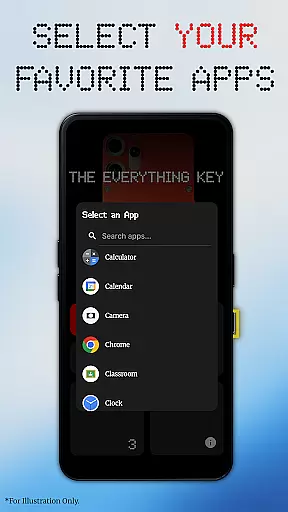
The Everything Key is a powerful utility app designed to unlock the hidden potential of your device's hardware button. With its intuitive remapping capabilities, you can transform that underutilized button into a productivity powerhouse. The app allows users to assign custom actions to both double and triple presses, giving you instant access to your most-used apps and functions.
What sets The Everything Key apart is its commitment to simplicity and privacy. The clean, minimalist interface makes it easy to manage your key mappings, while the app's use of Android's Accessibility Service ensures your data remains protected. Whether you want to launch your camera, favorite messaging app, or essential utilities with a simple press combination, this tool puts control back in your hands without compromising your personal information.
The Everything Key offers an impressive array of features that enhance your device's functionality. Its powerful remapping capability lets you assign different apps to both double-press and triple-press actions, effectively doubling the utility of your hardware button. The app's advanced control system provides quick access to enable, disable, or remove mappings through an intuitive card-based interface.
One of the standout features is the "Toggle All" functionality, which allows users to activate or deactivate all mappings with a single command. The app also includes a personalized setup process that detects your specific device model and color, displaying a matching background for a seamless visual experience. Unlike other similar tools, The Everything Key operates without requiring root access or complex ADB commands, making it accessible to all users regardless of technical expertise.
The Everything Key excels in providing accurate and effective core functionality by enabling users to remap their device's hardware button. This app leverages Android's Accessibility Service to detect specific hardware key presses, ensuring that each double or triple press triggers the intended action reliably. The app strictly limits its function to detecting these key presses without accessing any on-screen content, passwords, or personal information, thus maintaining a high level of operational precision.
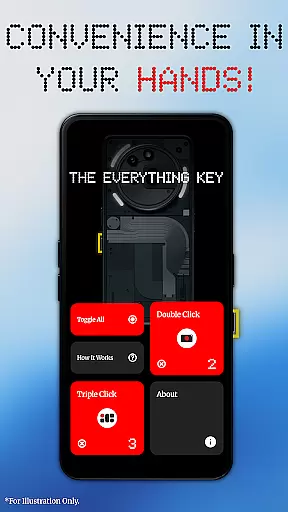
With this tool, you can assign various apps to both double-press and triple-press actions, making it an instant productivity booster. Whether launching your camera, favorite messaging app, or most-used utility, the response is immediate and dependable. The minimalist interface allows users to easily see which apps are mapped and whether they are active, enhancing the overall user experience through clear visual cues and straightforward controls.
The Everything Key offers advanced control features such as the ability to quickly enable or disable actions by tapping a mapped card. Additionally, the 'Toggle All' feature lets users activate or deactivate all mappings at once, providing unparalleled flexibility and convenience. These capabilities ensure that the app not only meets but exceeds user expectations for functional accuracy and effectiveness, delivering a seamless and personalized experience.
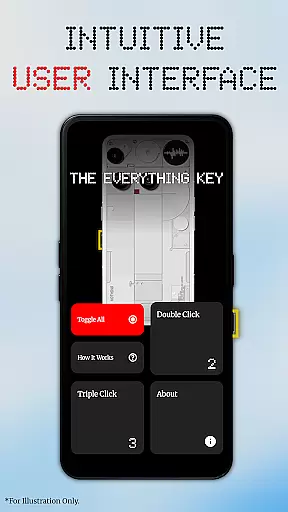
The Everything Key boasts a clean, intuitive user interface inspired by the Nothing aesthetic, making it exceptionally easy to use. Upon first launch, the app assists users in selecting their specific device model and color, displaying a stunning, integrated background that enhances the visual appeal. This attention to detail ensures that the interface feels right at home on your device, offering a personalized and aesthetically pleasing experience from the start.
Navigation within the app is straightforward, with clearly labeled sections and easily identifiable icons. Users can effortlessly see which apps are mapped to specific key presses and whether these mappings are active, thanks to the minimalist design that prioritizes clarity and usability. The app's layout is uncluttered, allowing users to focus on their primary goalu2014enhancing device functionalityu2014without being overwhelmed by unnecessary complexity.
Advanced features like the ability to tap a mapped card to enable or disable its action, or to use the 'Toggle All' feature for managing multiple mappings simultaneously, are implemented with simplicity in mind. These functionalities are accessible through intuitive controls that require minimal learning curve, ensuring that even novice users can take full advantage of what The Everything Key has to offer. Overall, the app delivers an interface that is both simple and powerful, enhancing user satisfaction and productivity.
Intuitive user interface
No root access required
Advanced mapping controls
Privacy-focused design
Device-specific customization
Limited device compatibility
Requires accessibility permission
No automatic updates
Basic UI elements only
Independent developer support

 4.50
4.50
Create your own live wallpaper or check out thousands already made presets
3.90
Effortlessly run ADB commands directly on your device without a PC.
4.20
MS-DOS in your pocket. Play old DOS games anywhere you are ;)
4.10
PC precision for mobile gaming: dominate with keyboard and mouse!
4.30
The Ultimate Bluetooth Keyboard & Mouse. Securely control your PC, Mac, and more
4.50
The ultimate tool for network analysis, wifi scanning and problem detection.
4.90
Creation, Learning, Entertainment & More — The All-in-One AI Search Engine
4.70
fast and easy mp3 music downloader
4.80
Excellent scientific calculator with symbolic algebra, integrals, derivatives
4.80
HD Video player and downloader for all formats, fast & smooth 4K video playback.
4.60
Just swipe the edge to do something!
4.40
Making emulation easy for everyone!
4.30
Just one-tap to easy translate in any language after calls within seconds.
4.20
Remote for Roku, Fire TV, Samsung TV, LG TV, Android TV, Chromecast and VIZIO TV
4.20
Quickly & easily calculate the spacing of handrail balusters
4.20 4.10
4.10
Clean the junk files on your device
3.40
Save any video in HD - paste the link, download fast and watch offline.
4.5


User Reviews