
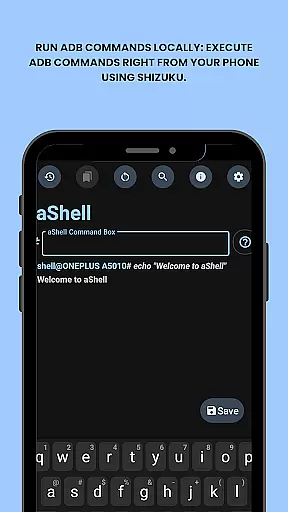
aShell is a specialized Android tool that allows users to execute ADB commands directly from their mobile device without requiring a PC. Designed for developers, power users, and tech enthusiasts, it provides full control over the device's internals through an intuitive interface.
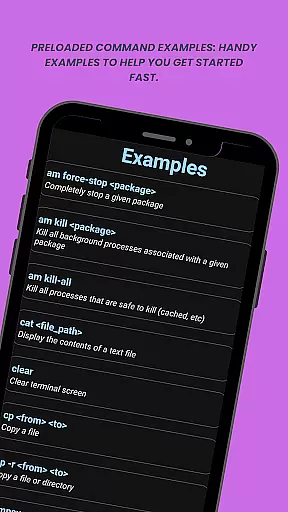
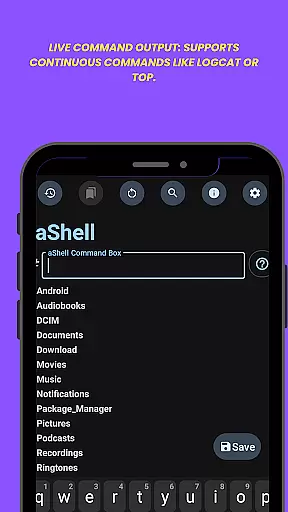
Key features include live command output, preloaded examples for quick execution, and support for saving outputs to files. The app also supports dark/light mode and integrates seamlessly with Shizuku, making it ideal for advanced system operations.
This app is particularly useful in scenarios where direct debugging or system-level access is needed on the go. Its ability to bookmark frequently used commands enhances productivity, while its open-source nature ensures transparency and community-driven improvements.
aShell stands out with its unique combination of functionality and accessibility. It leverages Shizuku to enable local execution of ADB commands, eliminating the need for external hardware like PCs. This makes it highly versatile for both casual experimentation and professional development workflows.
The app includes practical tools such as continuous command support (e.g., logcat), search functionality within outputs, and export options for saving results to text files. These features ensure that users can efficiently manage complex tasks without hassle.
Additionally, aShell offers customization options like theme adaptation and bookmarking capabilities. By providing resources such as source code availability and translation contributions, it fosters a collaborative environment for users who wish to extend or modify its functionality.
aShell is designed to provide an accurate and effective way for users to execute ADB commands directly on their Android devices. This eliminates the need for a PC, making it highly convenient for developers and power users.
The app leverages the Shizuku environment to ensure that all ADB commands are executed with precision. It supports continuous commands like logcat or top, providing live output that allows users to monitor processes in real time.
With features such as search within output and saving output to a file, aShell enhances usability by allowing users to manage and review command results efficiently. These capabilities ensure that users can handle complex tasks without hassle.
Overall, aShell's core functionality empowers users with extensive control over their deviceu2019s internals, offering a seamless experience for executing a wide range of ADB operations effectively.
The interface of aShell is crafted to be simple and intuitive, ensuring that even those with basic ADB knowledge can navigate and utilize its features with ease. The design focuses on user accessibility and efficient interaction.
Upon launching the app, users are greeted with preloaded command examples which serve as handy references. This feature significantly reduces the learning curve for beginners who might be unfamiliar with various ADB commands.
In addition, aShell supports dark/light mode, automatically adapting to the system theme. This not only enhances visual comfort but also integrates smoothly with users' preferences and environments.
By combining straightforward controls with functional design elements like bookmarks for frequently used commands, aShell delivers an intuitive user experience that simplifies complex operations into manageable tasks.
Lightweight design
Open-source platform
Live command output
Dark/Light mode
Bookmark commands
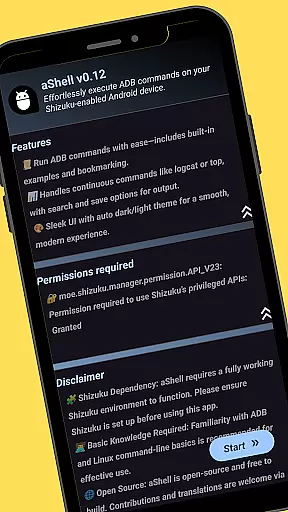
Requires Shizuku
ADB knowledge needed
Limited user base
No offline builds
Complex setup

pdf merge, word to pdf, jpg to pdf, edit pdf, convert to pdf and much more!
 4.20
4.20
Safely recover deleted photos, videos, and files with a single easy tap.
3.70
Carry a FTP server in your pocket and avoid USB cables for file transfer
4.20
ADB support Android 4.X-Android 13(Support wireless pair mode).No root required!
4.70
Monitor car performance in real time and troubleshoot malfunctions.
4.80
Automate everything from settings to photos, SMS to speech. ADC2 prize winner.
4.10
A clean app.
4.50
Fast VPN USA for any country. Super secure VPN for calls, streaming, games, TV.
4.40
Your personal health butler
3.60
Best leveling tool for your Android device. Hang paintings like a pro.
4.90
Enjoy smooth gameplay with Game Booster
4.90
Easily install aab(Android App Bundle) files on your Android device with our app
4.80
Small and simple app to Verify Root Access and BusyBox Install!
4.70
Connect instantly to a fast, encrypted VPN with one tap
4.60 4.50
4.50
Quickly & easily calculate the spacing of handrail balusters
4.20
VESC Tool can monitor and configure VESC-compatible devices over BLE and Wifi
4.20
An open-source APK explorer for Android!
4.10
Introducing Smart Printer, your ultimate destination for printing solutions!
4.00


User Reviews