
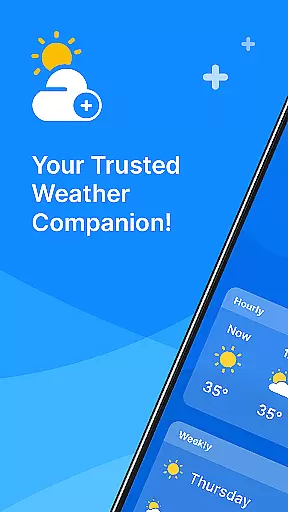
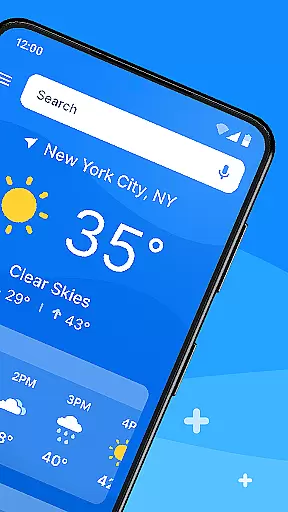
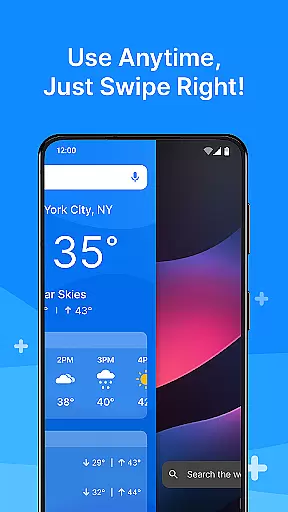
All Weather Mode is a comprehensive weather application designed to keep users informed about current and forecasted weather conditions. The app provides real-time updates, detailed forecasts, and location-based reporting, ensuring you're always prepared for the day ahead. With an intuitive home screen layout, it offers quick access to essential weather information through swipe shortcuts.
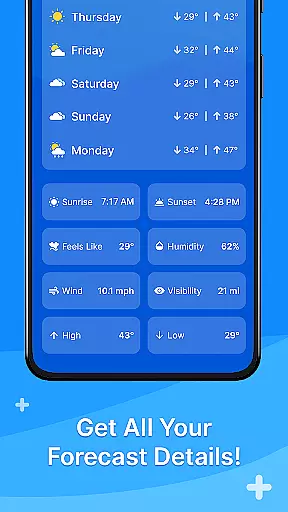
One of the standout features is its robust reporting system that includes temperature, sunrise, sunset, feels-like temperatures, humidity levels, wind speed, visibility, and more. Whether planning daily activities or outdoor excursions, All Weather Mode equips users with accurate data to make informed decisions. Its 7-day forecast with hourly updates ensures timely preparation for any weather eventuality.
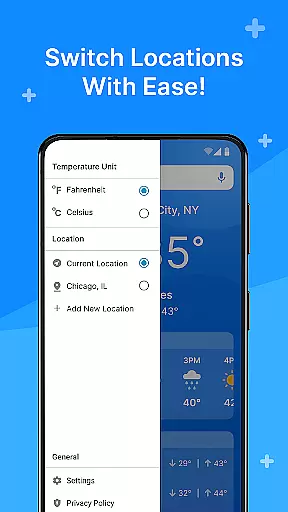
The app's ability to add multiple locations makes it ideal for travelers or those concerned about loved ones in different areas. Sunrise and sunset times further enhance planning capabilities for outdoor activities. By delivering precise and actionable weather insights, All Weather Mode stands out as a reliable companion for navigating the ever-changing skies.
All Weather Mode boasts several key features that set it apart from other weather applications. First is its Intuitive Home Screen Layout, which provides a clean and user-friendly interface. This design allows users to effortlessly access weather forecasts through quick-swipe shortcuts, eliminating the need to search extensively within the app.
Real-Time Weather Reporting is another critical feature, offering up-to-the-minute information on current and added locations. Users can view accurate details such as temperature, sunrise and sunset times, feels-like temperatures, humidity levels, wind speed, visibility, and more at their fingertips. This ensures they have all necessary data readily available.
Detailed Forecasts provide a 7-day outlook with daily temperature highs and lows, enabling confident weekly planning. Additionally, robust hourly forecasts assist in making timely decisions throughout the day by providing precipitation percentages and hour-by-hour updates. Location-Based Weather functionality allows users to monitor various areas, whether for travel destinations or checking on loved ones. These features collectively ensure that All Weather Mode remains a versatile tool for staying informed about weather conditions.
Weather Mode: Weather Launcher stands out with its diverse customization options that cater to various user preferences. The app provides an intuitive home screen layout, allowing users to personalize their experience by arranging quick-swipe shortcuts for easy access to forecasts.
Beyond the home screen, users can tailor their weather information display. Whether it's choosing which details to show on the current weather screen or setting up alerts for specific conditions, the app ensures that each user's interface is suited to their needs.
The personalization extends to location settings as well, where users can add multiple locations and receive localized weather reports. This feature is particularly useful for those who travel frequently or wish to stay informed about the weather in different areas.
With robust search capabilities powered by Yahoo, users have the freedom to discover and customize their weather data sources. This level of customization empowers users to create a personalized weather station that aligns perfectly with their lifestyle and informational requirements.
Theme compatibility is a crucial aspect of Weather Mode: Weather Launcher, ensuring that the app not only functions seamlessly but also integrates visually with users' devices. The app boasts a clean and modern design that adapts to various themes, providing a cohesive look across different Android versions and device models.
Users can enjoy a consistent visual experience whether they prefer the classic light theme or opt for the more contemporary dark mode. This flexibility in theme options allows for comfortable viewing at any time of day and reduces eye strain during night-time use.
In addition to aesthetic benefits, the app maintains optimal usability regardless of the chosen theme. All features, from real-time weather reporting to detailed forecasts, are easily accessible and clearly presented, preserving functionality while enhancing the overall user interface.
By prioritizing theme compatibility, Weather Mode: Weather Launcher demonstrates its commitment to delivering a personalized and visually pleasing experience without compromising on the quality or accuracy of its weather data.
User-friendly interface
Accurate real-time data
Comprehensive forecasts
Multiple location tracking
Quick access shortcuts
Limited customization options
Occasional update delays
Ads in free version
Requires internet connection
No advanced analytics

Stunningly Different look with Line Icons and Neon Colors
 4.60
4.60
Transform your phone with Launcher iOS 26 - Smooth & elegant iOS experience
4.50
100+ Stylish Fonts, Emojis, Symbols keyboard for Instagram & TikTok!
4.80
Embrace the Night. Unleash the power of darkness with Raven Dark Icon Pack
4.60
One 8 icons glass color version
4.80
200+ Material Inspired Widgets
4.50
Struggling to find apps? Use this app to locate and open any app on your phone!
2.20
Amazing letter fonts in your messages and social statuses
4.70
Your home screen, just the way you like it.
3.80
300+ Stunning and well-designed widgets inspired by NOTHING.
4.70
350+ widgets with a premium glass-style finish, perfect for home & lock screens.
4.70
Choose your keyboard with RGB colors effect, themes, fonts, emojis.
4.60
Icons made of colorful linear lines
4.60 4.50
4.50 4.50
4.50 4.10
4.10
Crystal-clear, square icon provides a sleek and sophisticated visual upgrade
4.00
Ultimate widget creator. Design custom widgets for a truly unique home screen!
3.90
Interactive Miniature Painting Catalogue
3.30


User Reviews