
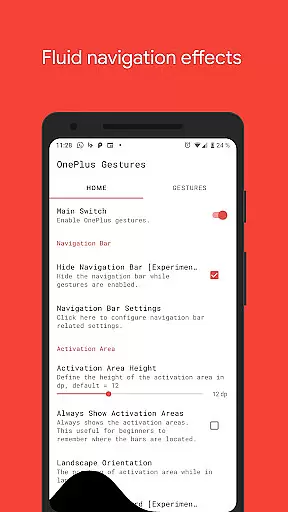
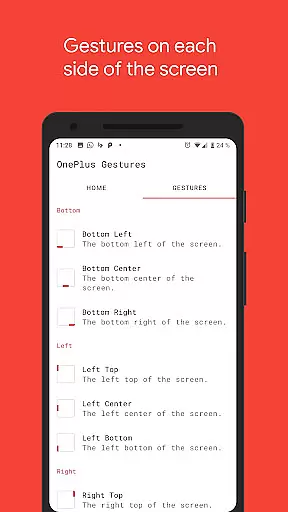
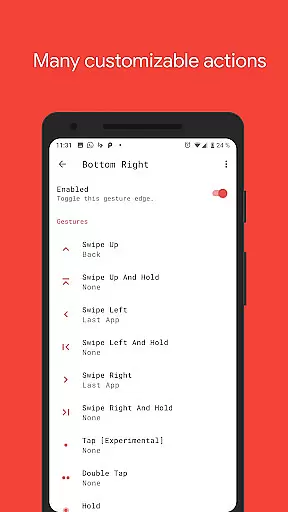
Vivid Navigation Gestures is a powerful tool that revolutionizes the way you interact with your Android device. This app allows users to control their devices through intuitive gestures instead of traditional button presses, offering a more modern and fluid user experience.
Key features include beautiful visual effects during gesture execution, multiple gesture triggers across different screen areas, and a wide range of customizable actions. Whether launching Google Assistant, managing apps, or controlling media playback, this app provides extensive functionality that enhances device navigation.
Ideal for power users seeking advanced control options, Vivid Navigation Gestures works on various Android versions without requiring new hardware. The app's ability to hide the stock navigation bar (with ADB or Root) creates a cleaner, more immersive interface.
Vivid Navigation Gestures stands out with its comprehensive set of features designed to maximize device control. The app supports multiple gesture triggers from nine different screen positions, including bottom left, center, right, and various side locations.
Users can execute various gestures such as swipe up, swipe left, double tap, and hold actions. Each gesture can be mapped to specific functions like launching apps, managing system settings, controlling media playback, or accessing quick settings. The inclusion of accessibility services enables programmatic execution of essential navigation functions.
Advanced users will appreciate the option to hide the stock navigation bar using ADB commands or root access. The app also provides detailed instructions for setting up ADB on PCs and includes safety measures for restoring default navigation keys when needed.
Gestures are revolutionizing the way users interact with their devices, and 'Vivid Navigation Gestures' is at the forefront of this change. The app's core functionality lies in its ability to replace traditional button presses with intuitive gestures, offering a seamless navigation experience on Android devices.
The app supports an extensive range of gesture triggers from different screen areas, such as Bottom Left, Bottom Center, and more, allowing users to execute various actions like launching Google Assistant, going Back, returning to Home, and even taking screenshots. This versatility ensures that users can control their devices in a way that feels both natural and efficient.
By utilizing accessibility services, 'Vivid Navigation Gestures' programmatically performs essential device functions without collecting any personal data. This approach not only enhances user privacy but also provides peace of mind while enjoying the benefits of gesture-based controls.
For those seeking additional customization, the app allows hiding the stock navigation bar when gestures are enabled, although this feature requires ADB or Root access. Overall, the precision and effectiveness of 'Vivid Navigation Gestures' make it an indispensable tool for modern Android users.
A truly effective tool should not only be powerful but also easy to use, and 'Vivid Navigation Gestures' excels in providing an intuitive interface. Despite the complexity of its features, the app maintains a straightforward setup process that allows users to quickly adapt to gesture-based navigation.
With clear options for Available Gestures such as Swipe up, Swipe left, and Double Tap, users can easily assign specific actions to each gesture. This simplicity extends to the visual feedback provided during gesture execution, ensuring users understand their interactions without confusion.
The app's design emphasizes fluidity and responsiveness, making every swipe or tap feel natural. Whether users want to toggle split-screen mode or open quick settings, they can do so effortlessly thanks to the app's logical layout and immediate feedback system.
Furthermore, helpful resources like installation guides for ADB ensure that even less experienced users can take full advantage of advanced features. By combining powerful functionality with an accessible interface, 'Vivid Navigation Gestures' sets a new standard for user-friendly tools on Android devices.
Intuitive gesture controls
Wide range of actions
Beautiful visual effects
Customizable triggers
Comprehensive documentation
Requires technical knowledge
ADB setup needed
Root access preferred
Complex for beginners
System permission required

 4.10
4.10
A convenient photo, video, and file recovery tool.
4.00
Connect instantly to a fast, encrypted VPN with one tap
4.60
ADB support Android 4.X-Android 13(Support wireless pair mode).No root required!
4.70
Signal Strength, Mobile, Wifi, Speed Test, Bad Signals, Cellular, 5G, LTE, 4G
4.20
Support Fossify apps with a warm thank you!
5.00
Create your own custom widget with endless possibilities
3.90
Fun lie-detection pranks for friends and parties.
3.80
Mobile Security with Scam Protection | Malware & Virus Cleaner | Safe Browser
4.70
Small and simple app to Verify Root Access and BusyBox Install!
4.70 4.50
4.50
Quickly switch to an encrypted DNS server on Android TV
4.50
With videos, electrical calculators, and built-in ebook, Ugly’s has your answer.
4.50
An open-source APK explorer for Android!
4.10
1-Click close all background apps on Android TV
3.90
Amateur Radio app for APRS: Track friends, exchange messages, get tactical info.
3.90
Unleash gamepad precision for ultimate mobile gaming dominance.
3.90
Safely recover deleted photos, videos, and files with a single easy tap.
3.70
A non-root local ADB shell client. READ BELOW!
3.40


User Reviews