
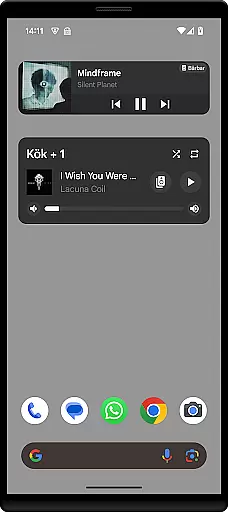
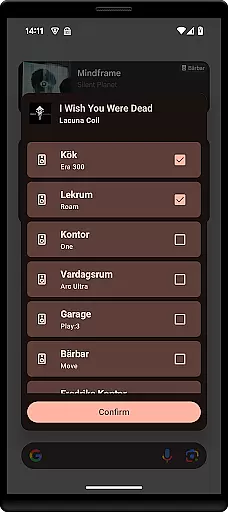
Sonos Widget is a powerful tool designed for music enthusiasts who want seamless control over their Sonos system directly from their home screen. This app offers two distinct widget options - Compact and Enhanced, allowing users to choose the layout that best suits their needs.
With features like volume control, grouping, playback controls (Play, Pause, Next, Previous), and support for modes such as Shuffle and Repeat, Sonos Widget provides comprehensive management of your audio experience. The app displays relevant metadata, ensuring you have all the information about your current track at your fingertips.
Whether you're hosting a party or simply enjoying music at home, Sonos Widget enhances convenience by providing quick access to essential controls without needing to open the full Sonos app.
The standout feature of Sonos Widget is its dual-widget offering. The Compact widget provides a streamlined interface with basic controls, while the Enhanced widget gives more detailed information and additional functionalities. Both widgets display relevant metadata, keeping you informed about the currently playing track.
Users can adjust volume levels, group speakers for synchronized playback across rooms, and manage playback actions such as Play, Pause, Next, and Previous. Additionally, the app supports playback modes like Shuffle and Repeat, giving users more flexibility in how they listen to their music.
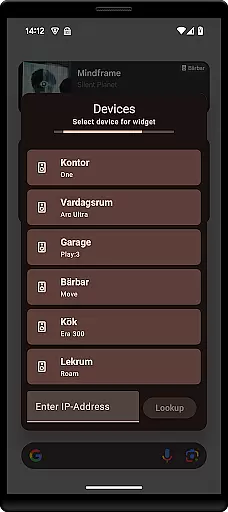
To set up Sonos Widget, simply select it from your 'Widget'-drawer and add it to your home screen. Follow the on-screen instructions to connect to your Sonos system. For any questions or issues, users can reach out via email at contact@freddroid.com.
When it comes to managing your music experience, the Sonos Widget app offers a unique approach by allowing users to control their Sonos system directly from their home screen. While the app itself does not host a music library, its seamless integration with your existing Sonos setup ensures that all your music content is easily accessible. This includes popular streaming services and personal audio files, which are managed through the official Sonos app.
The Sonos Widget provides essential playback controls such as play, pause, next, and previous track options. These features ensure that users can enjoy their entire music collection without any limitations. The app supports various modes like shuffle and repeat, enhancing the listening experience while maintaining the integrity of the original music content.
One of the key benefits of using the Sonos Widget is its ability to display relevant metadata for the currently playing track. This includes artist information, album art, and song titles, which enriches the user's interaction with their music library. By providing accurate and detailed metadata, the app ensures that users have a comprehensive view of their audio content at all times.
Moreover, the app's volume control and grouping features allow users to customize their listening environment according to their preferences. Whether adjusting the sound level or synchronizing multiple speakers, these functionalities contribute to an optimized music experience. Overall, the Sonos Widget enhances accessibility and control over your extensive music library while ensuring copyright authenticity through its integration with legitimate music sources.
The Sonos Widget app excels in delivering high-quality audio experiences by offering various options to manage and enhance sound output. As an extension of the renowned Sonos system, this app ensures that users can maintain optimal audio settings directly from their home screen. With features like volume control and grouping, users have the flexibility to adjust audio levels across different rooms or zones within their home.
One of the standout aspects of the Sonos Widget is its support for different playback modes, including shuffle and repeat. These options not only diversify the listening experience but also ensure consistent audio quality regardless of the playback mode selected. Users can seamlessly switch between tracks without experiencing any degradation in sound performance, thanks to the robust architecture of the Sonos ecosystem.
In addition to basic playback controls, the app displays relevant metadata for each track, such as artist details and album artwork. This feature enhances the overall audio experience by providing context and visual appeal alongside superior sound quality. The metadata presentation is designed to complement the auditory experience, making it more engaging and informative.
Furthermore, the Sonos Widget facilitates easy setup and management of your Sonos devices, ensuring that all components work harmoniously to deliver exceptional audio performance. By following simple on-screen instructions, users can connect their widgets to the Sonos system and start enjoying premium sound quality immediately. Overall, the Sonos Widget app stands out as a powerful tool for audiophiles seeking convenience and excellence in their daily music routines.
User-friendly interface
Comprehensive audio control
Quick access to key features
Flexible widget options
Enhanced convenience
Limited official support
No direct affiliation with Sonos
Potential compatibility issues
Basic visual design
Dependent on main Sonos app

Performance-Synthesizer & Multi-Track-Sequencer, polyphonic + multi timbral!
 4.70
4.70
Enhance the sound quality of your devices, listen to what you want
4.50
The ultimate media player for Android devices
3.90
Next generation modular control surface
4.10
Learn to play the piano using falling notes!
3.80
Play your hearts out on TouchTunes jukeboxes & connect with fellow music lovers.
4.80
The official Sonos app
4.10
Turn your Android phone into a professional audio analyser with up to 120 bands.
4.00
Learn the notes on the guitar fretboard fast with this easy and fun app
4.60
Offline Music Player & MP3 Player.Powerful equalizer, Lyrics, Themes, Tag Editor
4.80
Formerly known as Spotistats! View your top tracks, artists, albums and more!
4.40
Play KORG’s revolutionary touch-based instrument on a variety of devices.
4.40
Ringtone Maker is free app create ringtone from music files or your recording.
4.40
Learn and play 2M+ music tabs & chords on guitar, ukulele, bass, and more
4.30
Powerful 10-Band equalizer pro with sound booster improves Android audio quality
4.30
No wifi music app. Mp3 offline. Tuner radio, young radio music. Music downloader
4.20
The original SP-1200 experience on your iPad
4.20
Versatile MP3 recorder with auto-backup to Dropbox and Google Drive
4.10
Background pads for your band
3.80


User Reviews