
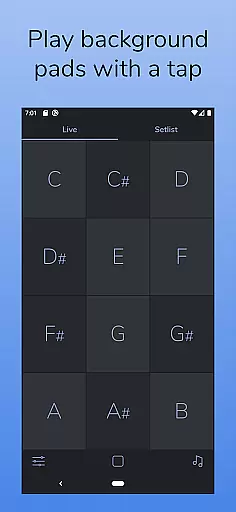
AutoPad is a versatile ambient pad loop application designed to enhance live performances and recordings with seamlessly looped drones. The app provides users with 10 carefully crafted pad sounds, each offering a unique atmosphere across all 12 musical keys. Its intuitive interface allows musicians to easily incorporate tasteful soundscapes into their mixes by simply tapping a key. AutoPad supports extended playback and handles natural crossfades between keys automatically, ensuring smooth transitions.
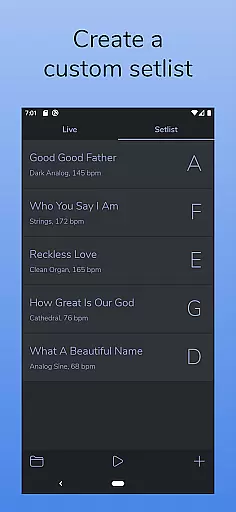
The app features two distinct modes: LIVE mode for instant access to all keys, and SETLIST mode for creating customized song lists. Additionally, AutoPad includes a built-in metronome, MIDI compatibility (with physical controllers), and adjustable parameters like crossfade time, filters, reverb, pan, and volume. With its dark color scheme optimized for stage use, AutoPad is an ideal tool for musicians seeking to add professional-quality ambient layers to their performances.
AutoPad stands out with its dual-mode functionality, offering both LIVE mode for quick key access and SETLIST mode for pre-planned performances. The app includes 10 expertly designed pad sounds that provide unique atmospheres in all 12 keys, making it suitable for various musical contexts. Users can expand their sound library through in-app purchases or by importing custom WAV files, allowing for personalized soundscapes.
Advanced features include a built-in metronome for band synchronization, automatic crossfading between keys, and comprehensive sound control through adjustable parameters such as filters, reverb, pan, and volume. The app's MIDI compatibility enables integration with external controllers, while its dark theme ensures optimal visibility during performances. These features collectively make AutoPad a powerful tool for musicians looking to enhance their live shows and recordings with professional-grade ambient pads.
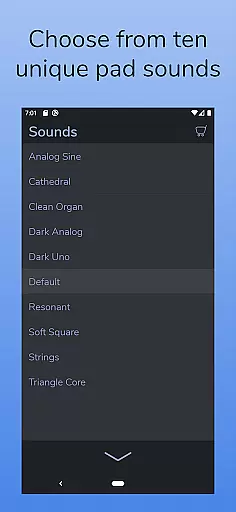
AutoPad offers a robust music library that includes 10 carefully designed pad sounds, each providing a unique atmosphere in all 12 keys.
In addition to the built-in sounds, users can expand their sound library by purchasing in-app sound packs or importing their own pad files, although currently only wav files are supported on the Android version.
All sounds are crafted with copyright authenticity in mind, ensuring users can legally and confidently incorporate them into their mixes.
This extensive and authentic sound library empowers musicians to create rich, immersive ambient soundscapes for both live performances and recordings.
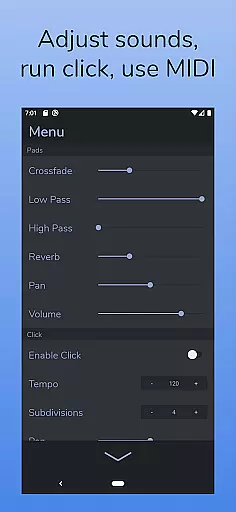
AutoPad ensures high audio quality through its meticulously crafted pad sounds, which include natural crossfades between keys and offer control over two filters, reverb amount, pan, and volume via the app menu.
The inclusion of a built-in metronome helps keep bands locked in, enhancing overall audio precision without the need for additional equipment.
Moreover, AutoPad's responsive design to MIDI allows for triggering pads with a keyboard, adding another layer of audio manipulation possibilities, though virtual MIDI or Bluetooth MIDI is not yet supported on the Android version.
These features collectively contribute to an exceptional audio experience, making AutoPad a versatile tool for musicians seeking both quality and flexibility in their sound production.
User-friendly interface
Seamless key transitions
Customizable sound options
Built-in metronome feature
MIDI controller support
Limited file format support
No virtual MIDI on Android
In-app purchases required
Complex for beginners
Resource-intensive operation

Your HD audio recorder on the go for music, meetings, ambience, animal sounds…
 4.30
4.30
The Cubase remote control app
3.60
Advanced 10-Band Audio Graphic Equalizer Sound Booster Pro
4.30
The ultimate media player for Android devices
3.90
AI Music Maker: Generate And Compose AI Tunes & AI Songs & AI Music & AI Melody!
4.60
Enjoy singing any song, no matter how high or low it is
4.30
Music, News & Sports Radio Tuner App. Tune in Live FM & AM Radio Stations.
4.80
The official Sonos app
4.10
Reverse your voice & songs instantly! Fun singing challenge with cool effects.
4.60
Make songs with AI! Any genre, custom lyric, song generator for music creation!
4.80
Pay Once, no monthly payment
4.60
A complete sound package for the sound engineer or enthusiast
4.60
10-Band Audio Equalizer, Sound / Bass Booster for Spotify Users & Music Players
4.40
DJ Music Mixer - DJ Remix: remix songs, make beat music & record mix of DJ.
4.40
Turn your phone into a musical instrument from the future!
3.90
Sheet music reader, piano & music note player. Play music score & learn to read.
3.90
Powerful beat maker & DJ mixer to remix tracks, make music, & perform DJ mix
3.70
Slow music down without changing pitch.
3.70
Remove ads permanently from Music Visualizer
4.3


User Reviews