
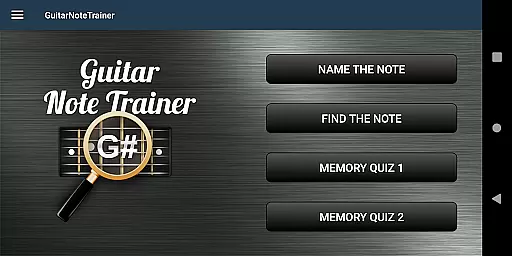
Guitar Fretboard Note Trainer is a specialized app designed to help guitarists master the notes on their instrument's fretboard. This essential skill is crucial for progressing musicians, and the app makes learning both fun and effective through engaging games.
The app features four distinct training modes that cater to different learning styles and levels of proficiency. Users can practice naming notes, finding specific notes across all six strings, and testing their memory with challenging quizzes. With adjustable difficulty settings and an audio option to hear each note, this app provides a comprehensive learning experience suitable for beginners and advanced players alike.
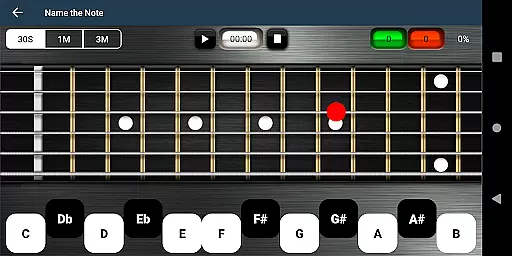
The app offers four unique training modes to develop fretboard knowledge. The 'Name The Note' mode tests users' ability to identify displayed notes, while 'Find A Note' challenges them to locate specific notes across all positions.
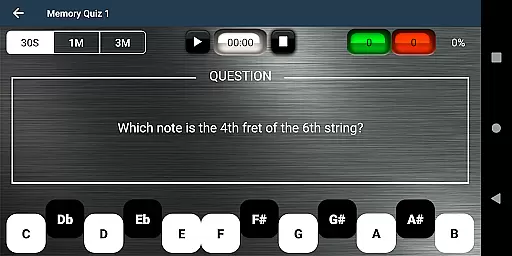
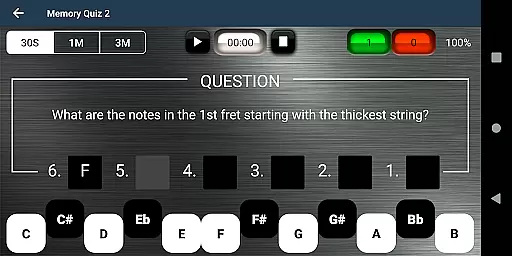
For memory training, the app includes two quiz modes. Memory Quiz 1 requires naming a note based on its position, and the more advanced Memory Quiz 2 tasks users with naming all notes across an entire fret. The app's progressive difficulty system allows beginners to start with simplified answer options.
Additional features include an audio playback option for auditory learners and a helpful 'cheat' function that temporarily reveals all notes. These comprehensive tools create an adaptive learning environment suitable for various skill levels.
When it comes to music learning applications, the size and authenticity of the music library are crucial. The Justin Guitar Fretboard Note Trainer offers a comprehensive selection of notes and training modes that cater to guitarists at different skill levels. With four distinct training modes, users can progressively enhance their knowledge of the guitar neck.
The app provides various interactive games such as 'Name The Note', 'Find A Note', and two types of 'Memory Quiz', ensuring an engaging learning experience. These features not only expand the breadth of its music library but also reinforce the accuracy and educational value of its content. This approach helps users to learn and retain the information more effectively.
Furthermore, the inclusion of audio options for hearing notes as they are selected adds another layer of authenticity to the learning process. Users can be confident that the sounds they are learning to identify are accurate and true to life, which is essential for developing a good ear in music.
Audio quality is paramount when training to recognize and play musical notes. The Justin Guitar Fretboard Note Trainer ensures high-quality audio output so that learners can accurately discern the nuances of each note. This attention to audio detail supports the development of a refined musical ear.
In addition to superior sound quality, the app includes features like the 'Easy' options for beginners, which limit the range of answers and simplify the learning curve. This makes it accessible for users who are just starting out and need a more focused set of notes to practice with.
For those moments when extra help is needed, the app even allows users to swipe across the fretboard to reveal all notes temporarily. While this feature is intended for occasional use, it underscores the app's commitment to providing tools that assist users in verifying their understanding and improving their skills.
Engaging game-based learning
Progressive difficulty levels
Comprehensive fretboard coverage
Audio feedback for notes
Beginner-friendly options
Limited advanced techniques
No tablature support
Basic interface design
Few customization options
Occasional performance issues

Over 100 million tracks available for high quality streaming and download
 4.60
4.60
Gorgeous UI, Powerful music Search and Equalizer, the great choice for you!
4.70
The only true audiophile music player with Hi-Fi audio rendering and DSP engine
3.90
The best music and audio player, with beautiful UI, music search and equalizer.
4.60
Smart piano keyboard, Classical to Pop, Real-time multiplayer connection!
4.20
The original SP-1200 experience on your iPad
4.20
Play KORG’s revolutionary touch-based instrument on a variety of devices.
4.40
Turn Every Moment into Music
3.60
Get alarms that fit your lifestyle and wake up to the sounds you love.
4.80
Voice recorder - Audio recorder. Best recorder for recording
4.90
Tune in to the greatest hits on UK Radio | The home of Capital, Smooth & Heart.
4.90
Music, News & Sports Radio Tuner App. Tune in Live FM & AM Radio Stations.
4.80
Make songs with AI! Any genre, custom lyric, song generator for music creation!
4.80
Recording studio w/ 10k beats, pro vocal FX and a network of 20M rappers & fans!
4.60
Powerful 10-Band equalizer pro with sound booster improves Android audio quality
4.30
The alternative folder based music player.
4.20
Offline and always ad-free - stream in the highest quality available.
4.10
The ultimate media player for Android devices
3.90
Simply convert wav to mp3. Clear. Reliable. Safe.
4.2


User Reviews