
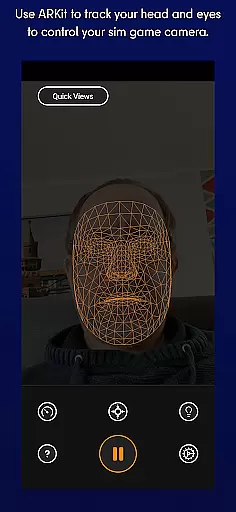
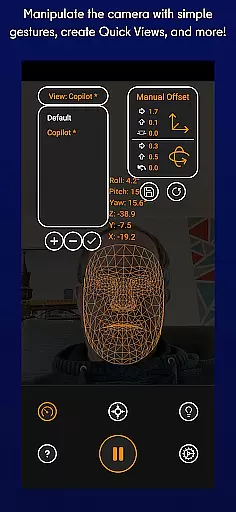
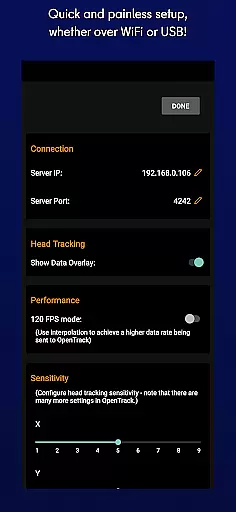
SmoothTrack is an innovative tool that transforms your mobile device into a 3D head tracking controller for sim games. By leveraging the AR capabilities of your device, it allows you to intuitively control your game's camera with natural head movements. Whether you're flying a plane in Microsoft Flight Simulator or navigating through Elite: Dangerous, SmoothTrack provides an immersive experience without the need for additional equipment.
The app supports any game compatible with TrackIR, FreeTrack, or similar protocols. It uses advanced motion detection to translate slight head movements into precise in-game camera controls. With features like dark mode for battery savings and bright mode for low-light environments, SmoothTrack ensures optimal performance across different gaming setups. This makes it an essential tool for simulation enthusiasts seeking enhanced realism and control.
SmoothTrack stands out with its unique use of AR technology for 3D head tracking. The app employs sophisticated algorithms to detect facial features and translate them into precise camera movements within supported games. This creates a near-magical experience where slight head motions result in immediate in-game perspective changes.
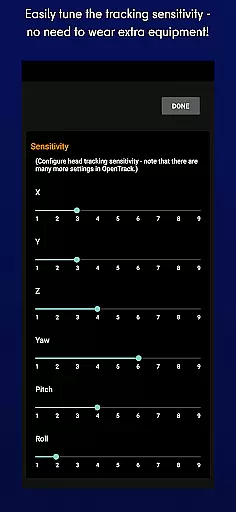
One of the key innovations is the motion magnification feature, which allows users to achieve extreme viewing angles with minimal physical movement. The app also includes customizable sensitivity settings, multiple operation modes including dark and bright modes, and comprehensive compatibility with various simulation titles. These features combine to create an unparalleled level of immersion while maintaining user comfort during extended gaming sessions.
SmoothTrack's core functionality lies in its ability to provide precise 3D head tracking for controlling simulation game cameras. This is achieved through the device's AR capabilities, ensuring accurate detection of even the slightest head movements.
The app employs advanced algorithms that translate these subtle motions into responsive in-game camera perspectives. Whether you're leaning forward to inspect your Flight Simulator cockpit or shifting your gaze slightly left to view a space station in Elite: Dangerous, the response is immediate and natural.
This level of precision creates an immersive experience that traditional controllers can't match. The exaggerated movement translation allows users to achieve extreme viewing angles with minimal physical movement, enhancing both comfort and gameplay.
By supporting industry-standard protocols like FreeTrack and TrackIR, SmoothTrack ensures compatibility with major simulation titles while maintaining exceptional tracking accuracy across different gaming scenarios.
SmoothTrack demonstrates exceptional interface design by eliminating the need for complex equipment or multiple control schemes. Users can simply position their device to capture their face, allowing for intuitive control without additional hardware.
The application features straightforward gesture controls that require no special training to master. Simple head movements are enough to manipulate in-game perspectives, making it accessible even for newcomers to head-tracking technology.
Two distinct display modes - dark and bright - cater to different environmental conditions while conserving battery life. This thoughtful design approach enhances usability without compromising performance or visual clarity.
With dedicated support channels available through Discord and email, SmoothTrack ensures that any interface-related queries or feature requests receive prompt attention, contributing to an overall user-friendly experience.
Intuitive head tracking
No extra equipment needed
Wide game compatibility
Customizable sensitivity
Battery-saving modes
Requires AR support
Limited to compatible games
Device positioning crucial
May cause motion sickness
Internet connection needed

HD Camera captures every special moment.
 4.60
4.60
PDF Reader - Document Viewer: Read, Manage & Organize Your Documents
3.10
Learn the vast amount of system information about device and monitor it's state
4.70
Canon PRINT is a companion app for your Canon printer.
4.60
App that Recover your pictures, videos or files after you delete them.
4.20
Support Fossify apps with a warm thank you!
5.00
Play your X-Box games remotely in 1080p with any controller and zero latency
4.60
Button mapper, mouse toggle, sleep timer and a lot of another features
4.50
Fast VPN USA for any country. Super secure VPN for calls, streaming, games, TV.
4.40
Navigate with Ease and Style
4.90
The ultimate tool for network analysis, wifi scanning and problem detection.
4.90
Keep track of your Palia friendships, tasks, and inventory with Palia Notebook
4.60
App to pay for FUTO Keyboard
4.60
Quickly switch to an encrypted DNS server on Android TV
4.50
eXtended Permission Manager - a small app to manage permissions and AppOps
4.50
Making emulation easy for everyone!
4.30
Effortlessly run ADB commands directly on your device without a PC.
4.20
A simple app to back up and restore SMS & MMS messages and call logs.
4.10
Fun lie-detection pranks for friends and parties.
3.80


User Reviews