
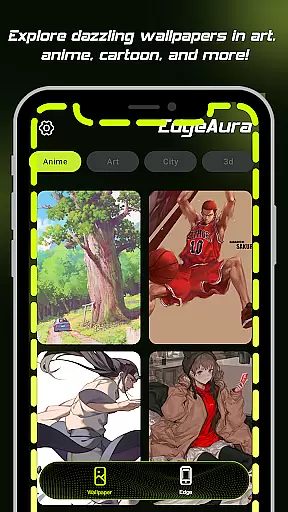
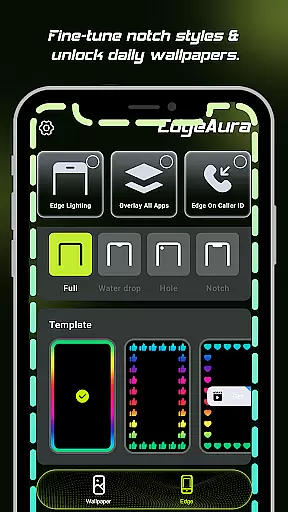
EdgeAura is a personalization app that enhances your device's visual experience with stunning edge glow effects and dynamic live wallpapers. This app allows you to customize the color, width, and intensity of the light to create a unique aura around your screen's edges. The floating overlay effect works seamlessly over other applications, ensuring an immersive experience without disrupting normal phone use.
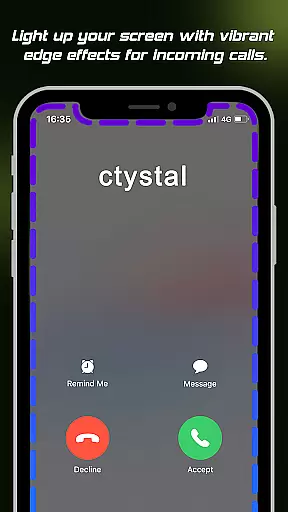
One standout feature is the incoming call alert, where the screen edges light up with your chosen color, offering a modern notification style. Additionally, EdgeAura provides an extensive collection of high-quality, animated live wallpapers, regularly updated to keep your home and lock screens fresh and vibrant. With these features, EdgeAura transforms your device into a personalized, visually striking tool that stands out from the crowd.
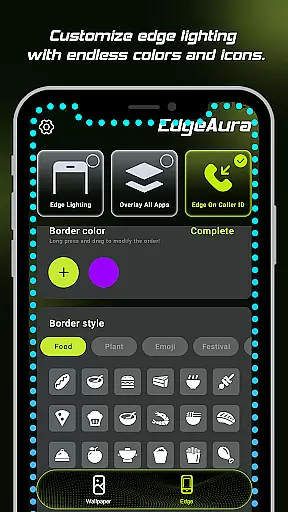
EdgeAura offers several key features that set it apart in the personalization category. The Dynamic Edge Glow allows users to enjoy a smooth, colorful glow framing their screen. You can customize the color, width, and intensity of the light, aligning it perfectly with your style and wallpaper. This customization ensures that your device remains uniquely yours.
The Floating Overlay Effect is another significant feature, providing a continuous visual experience by working on top of other applications. This ensures that the elegant glow does not interfere with your regular phone activities. Furthermore, the Incoming Call Alert function lights up the screen edges when you receive a call, adding a modern and visually appealing notification method. Coupled with an extensive live wallpaper collection, EdgeAura delivers a comprehensive package for users seeking a vibrant and personalized device appearance.
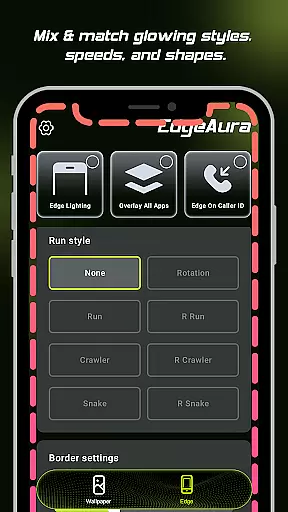
EdgeAura offers an extensive range of customization options that allow users to personalize their device's visual experience. The app provides dynamic edge glow effects which can be tailored in terms of color, width, and intensity, ensuring the visual enhancements align with individual preferences and styles.
Beyond the basic adjustments, EdgeAura supports a floating overlay effect that works seamlessly over other applications. This feature ensures that the aesthetic modifications are not only visually appealing but also unobtrusive to the user's regular interaction with their device.
The app further enriches personalization by offering an extensive live wallpaper collection. Users can choose from a wide variety of high-quality, animated live wallpapers, which are regularly updated, allowing for frequent refreshment of both home and lock screens.
With these comprehensive customization features, EdgeAura empowers users to make their devices truly unique, reflecting their personal style through sophisticated light effects and vibrant wallpapers that transform an ordinary screen into a standout piece of digital art.
Theme compatibility is at the heart of EdgeAura's design philosophy, ensuring that its stunning visual effects harmonize with the user's chosen device themes. The app's dynamic edge glow and live wallpapers are crafted to maintain visual consistency across different themes, preserving the intended look and feel.
By integrating with the Android Accessibility Service, EdgeAura smartly detects the screen content and application windows to draw the glow effect around the edges without clashing with the active theme. This technical synergy allows for an immersive experience that respects the thematic elements already in place on the user's device.
Moreover, EdgeAura's incoming call alert feature is engineered to react to user activities within the parameters of the current theme. When receiving a call, the screen edges light up in a manner that complements rather than disrupts the existing visual setup.
This commitment to theme compatibility means that users can enjoy EdgeAura's innovative features without compromising the cohesive aesthetic they desire, resulting in a personalized yet seamless digital environment.
Stunning visual effects
Highly customizable options
Unique incoming call alerts
Extensive live wallpaper library
Immersive user experience
Requires accessibility permission
May drain battery faster
Limited to Android devices
Potential performance issues
Some features may not work on all devices

Stunningly Different look with Line Icons and Neon Colors
 4.60
4.60
Capture moments that pass like a storm, second by second.
4.3
Ultra realistic high quality analog watch face for Wear OS.
4.60
A launcher for Samsung Good Lock and Good Guardians modules without ads
4.70
Over 28,000 high quality icons to bring color & homogeneity to your phone.
4.60
Interactive Miniature Painting Catalogue
3.30
Aesthetic Widgets, HD Wallpapers, Themes in Mico Widget for Home and Lock Screen
4.50
Struggling to find apps? Use this app to locate and open any app on your phone!
2.20
Your home screen, just the way you like it.
3.80
Dark icon pack based on One 8
4.80
Gun Chase - Let the chase begin.
4.80
Bring adorable pets to life on your screen. Playful, interactive and full of fun
4.60
3D, live, and moving wallpapers & themes in 4K and HD for your device.
4.50
Themes - Widget & Wallpaper: Customize home screen, icon changer w unique themes
4.30
Customizable flower power digital watch face for Wear OS watches.
4.00
Emoji Maker app - Design custom emojis and effortlessly blend them with Mixer
3.80 3.50
3.50
Prank your friends with realistic broken screen and cracked HD effects!
4.2
⭐ OneUI inspired Fluffy Icon Pack – Soft. Stylish. Standout. ⭐
4.5


User Reviews