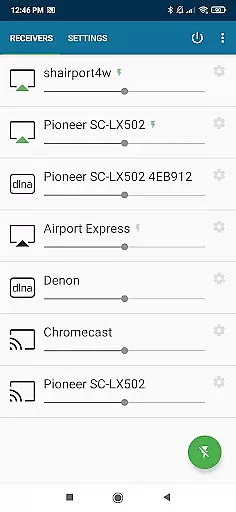
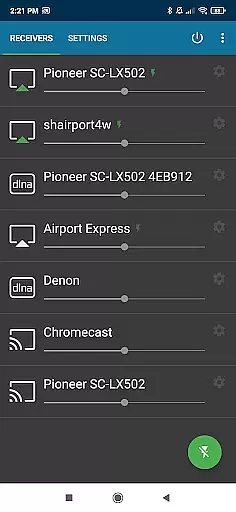
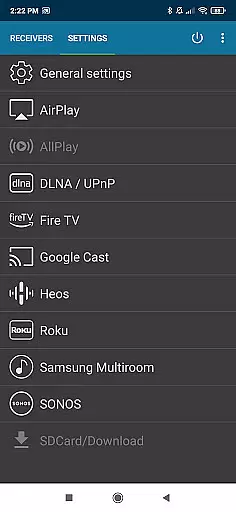
AirMusic is a versatile audio streaming application that allows users to stream audio from virtually any app to a wide range of receivers with just one click. Compatible with popular streaming services like YouTube Music, Deezer, Amazon Music, Apple Music, and Spotify, it supports devices including SONOS, Apple TV, Chromecast, Fire TV, Smart TVs, AV-receivers, HomePod, Samsung Multiroom, Denon HEOS, Roku, Raspberry Pi, and Airport Express.
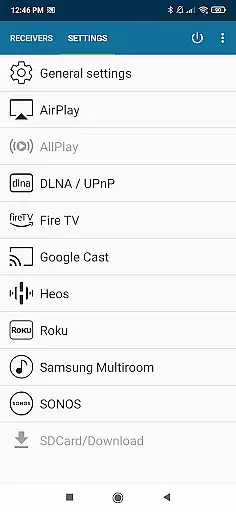
The app integrates seamlessly with the latest streaming technologies such as Apple AirPlay, SONOS, Google Cast, DLNA, Amazon Fire TV, Samsung Multiroom, Denon HEOS, and Roku. Whether you're using an Apple TV, HomePod, or even Bang & Olufsen, AirMusic ensures your music reaches every corner of your home effortlessly.
With its powerful features and broad compatibility, AirMusic enhances your entertainment experience by providing easy and seamless streaming options for all your audio needs.
AirMusic stands out with its robust feature set tailored for audiophiles and casual listeners alike. One of its key strengths is the ability to run in the background, enabling users to stream audio with just one click. This ease of use extends to its support for sending metadata and artwork to compatible AirPlay or Google Cast receivers, enhancing the listening experience.
Additionally, AirMusic offers advanced integration capabilities with automation apps like Tasker and MacroDroid. Users can create custom widgets or automate their music streaming based on specific triggers or routines. This flexibility makes AirMusic not only a powerful tool for streaming but also a customizable solution for personalized audio experiences.
Despite some limitations with certain apps and Android versions, AirMusic continues to provide reliable performance across a multitude of devices and platforms, ensuring that users can enjoy their favorite music without hassle.
AirMusic offers an extensive streaming solution that supports a wide range of music services including YouTube Music, Deezer, Amazon Music, Apple Music, and Spotify. This compatibility ensures users have access to a vast music library across multiple platforms.
The app guarantees the authenticity of its content by directly streaming from verified sources, ensuring users enjoy legitimate and high-quality audio without any copyright infringement concerns.
By supporting all major streaming technologies like Apple AirPlay, SONOS, Google Cast, DLNA, and more, AirMusic provides seamless integration with numerous devices, enhancing the overall user experience through its broad connectivity options.
One of AirMusic's standout features is its ability to maintain superior audio quality during streaming. The application supports various high-fidelity formats, ensuring that users can enjoy their favorite tracks in the best possible sound quality available on their chosen service.
In addition to supporting standard audio formats, AirMusic also allows advanced settings for audiophiles who demand the highest standards in audio reproduction. Users can customize their listening experience according to their preferences and equipment capabilities.
Furthermore, AirMusic enhances the auditory experience by sending metadata and artwork to compatible receivers, providing not only excellent sound but also enriching the visual aspect of music playback. This feature adds another layer of immersion and engagement for the listener.
User-friendly interface
Wide device compatibility
Advanced automation support
Seamless background operation
Metadata and artwork support
Limited app compatibility
Android version restrictions
Occasional connectivity issues
Premium subscription required
No offline mode

The Cubase remote control app
 3.60
3.60
Time Trainer: accurate metronome w tools to help you develop your internal time!
4.20
A High-Precision Audio Spectrum Analysis App
4.20
Visualize the guitar fretboard, master scales & play through changes like a pro!
4.50
AI Music Maker: Generate And Compose AI Tunes & AI Songs & AI Music & AI Melody!
4.60
Play your hearts out on TouchTunes jukeboxes & connect with fellow music lovers.
4.80
Responsive piano with great sounds, graphics, and songs
4.80
Full featured mp3 and audio player with Chromecast and Android Auto support.
4.40
Offline Tunes, Unlimited Vibes
3.90
Offline Music Player & MP3 Player.Powerful equalizer, Lyrics, Themes, Tag Editor
4.80
JBL PartyBox APP works with 110/310/710/120/320/520/Encore/Encore 2/Encore Ess 2
4.80
Gorgeous UI, Powerful music Search and Equalizer, the great choice for you!
4.70
SqueezePlayer turns your Android phone or tablet into a SqueezeBox on its own!
4.60
Play KORG’s revolutionary touch-based instrument on a variety of devices.
4.40
Ringtone Maker is free app create ringtone from music files or your recording.
4.40
A sleek, no-frills player designed for true music lovers.
4.20
Next generation modular control surface
4.10
USB audio recording and playback finally possible on Android 3.1 or higher!
3.90
The Minimalistic Premium Music Player. Handmade with passion for music
2.20


User Reviews