
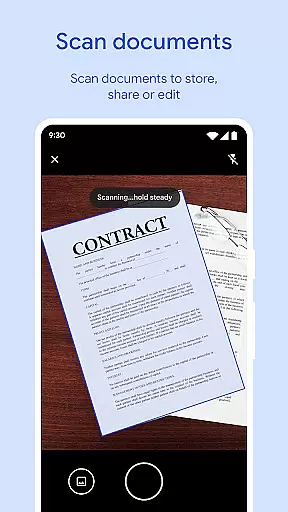
Files by Google is a powerful file management tool designed to help users efficiently organize, secure, and optimize their mobile device storage. The app provides comprehensive features such as cleaning recommendations, quick offline file sharing, cloud backup, and advanced media controls.
One of the standout capabilities is its intelligent space-saving recommendation system, which identifies duplicate files, old photos, and cached data that can be removed. Additionally, Files by Google ensures security with customizable lock settings and enables fast file transfers through Quick Share, even without an internet connection.
This app is particularly useful for users who need to manage large media libraries or frequently share files with others. Its intuitive interface and smart features make it an essential tool for maintaining an organized and efficient device.
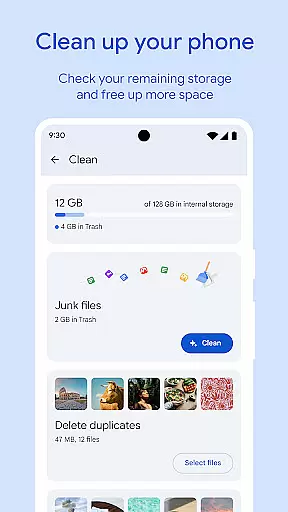
Files by Google offers a rich set of features tailored to streamline file management on Android devices. The app's cleaning recommendations provide detailed insights into storage usage, helping users identify unnecessary files such as duplicates, cached data, and large media files that consume valuable space.
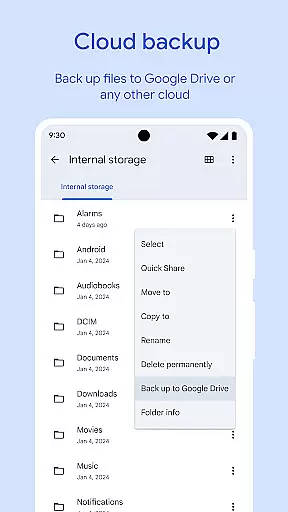
Another notable feature is Quick Share, which allows users to transfer files at speeds up to 480 Mbps without requiring an internet connection. This functionality is secured with end-to-end encryption, ensuring privacy during file exchanges. Additionally, the app supports cloud backups to Google Drive or other cloud services, enabling users to free up device storage while keeping important files accessible.
For media enthusiasts, Files by Google includes advanced playback controls for offline media, such as adjustable playback speed and shuffle options. These features enhance the user experience by providing greater flexibility and control over how content is consumed.
Files by Google excels in providing accurate and effective core functions that cater to users' file management needs. The app offers precise recommendations for freeing up space by identifying old photos, duplicate files, and cache data. This targeted approach ensures users can efficiently manage their device storage without wasting time on irrelevant suggestions.
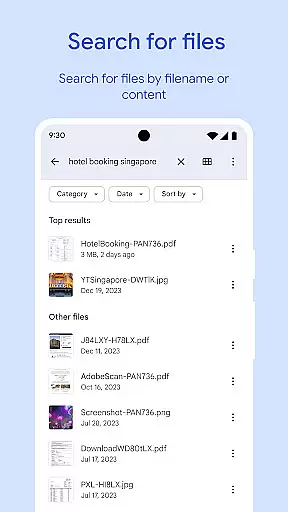
The search and browsing functionality is designed for speed and accuracy. Users can quickly locate specific files through an intelligent search feature that understands the context of their queries. Whether it's finding recent downloads or specific document types, the app delivers results with impressive precision, saving valuable time.
When it comes to file sharing, the app maintains exceptional transfer accuracy even when operating offline. The Quick Share feature employs advanced protocols to ensure files reach their destination intact and without corruption. This reliability extends to media playback, where videos and music maintain their original quality during playback.
All these features work together seamlessly, creating a comprehensive tool that handles various file management tasks with consistent accuracy. From space management to secure file transfers, Files by Google demonstrates how a well-designed application can significantly improve user productivity through precise and reliable functionality.
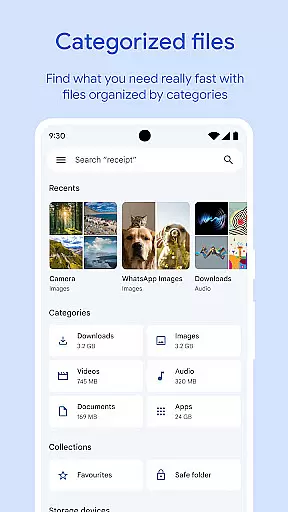
The interface design of Files by Google showcases an optimal balance between simplicity and powerful functionality. The main dashboard presents essential information in a clear, uncluttered layout that allows users to understand their storage situation at a glance. Important features like space management and file categories are readily accessible through intuitive navigation paths.
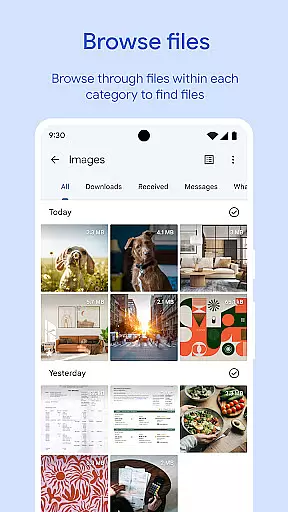
File browsing and search operations follow familiar patterns that require minimal learning curve. The app employs recognizable icons and logical grouping of file types, making it easy for users to locate their documents, images, and videos. This thoughtful organization extends to advanced features like playback controls, which are presented in a straightforward manner that doesn't overwhelm users.
Even sophisticated functions such as end-to-end encrypted file sharing and custom backup options are implemented with clarity in mind. The app guides users through these complex processes with simple, step-by-step instructions that appear contextually when needed. This approach maintains a clean interface while still offering powerful capabilities.
The consistency in design language across different features contributes to an overall intuitive experience. Whether users are managing storage, sharing files, or securing their documents, they can expect the same level of straightforward interaction throughout the application.
User-friendly interface
Efficient storage management
Fast offline sharing
Secure file encryption
Smart cleaning suggestions
Limited to Android
No advanced editing tools
Dependent on Google services
Occasional bugs reported
Basic media player

Remote for Roku, Fire TV, Samsung TV, LG TV, Android TV, Chromecast and VIZIO TV
 4.20
4.20
Quickly & easily calculate the spacing of handrail balusters
4.20
eXtended Permission Manager - a small app to manage permissions and AppOps
4.50
Effortlessly run ADB commands directly on your device without a PC.
4.20
Powerful collection of electronics tools and reference.A must for any enthusiast
4.90
Fast Video Downloader, Movie Downloader, Torrent Downloader & Adblock Browser
4.70
A simple app to back up and restore SMS & MMS messages and call logs.
4.10
Game Booster, GFX Tool is now compatible with newer game update
4.50
Protect your device with antivirus, storage cleanup, and system monitoring
4.70
Best leveling tool for your Android device. Hang paintings like a pro.
4.90
Enjoy smooth gameplay with Game Booster
4.90
Monitor car performance in real time and troubleshoot malfunctions.
4.80 4.50
4.50
Mirror your screen to Fire TV - Super fast and simple
4.40
An easy-to-use calculator designed to save time calculating and bending conduit
4.30
Just one-tap to easy translate in any language after calls within seconds.
4.20
Carry a FTP server in your pocket and avoid USB cables for file transfer
4.20
Automate everything from settings to photos, SMS to speech. ADC2 prize winner.
4.10
Amateur Radio app for APRS: Track friends, exchange messages, get tactical info.
3.90


User Reviews