
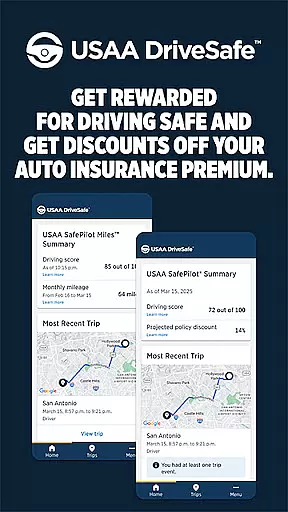

USAA DriveSafe is a cutting-edge mobile application designed to promote safe driving habits while offering potential savings on auto insurance premiums. The app leverages advanced GPS and sensor technologies to automatically track and analyze driving behaviors, providing users with detailed insights into their driving patterns. Key features include monitoring of driving frequency, phone usage while driving, and detection of abrupt braking incidents.
This innovative app is exclusively available to USAA members with active auto insurance policies in select states who are enrolled in either the USAA SafePilot® or USAA SafePilot Miles™ programs. By using USAA DriveSafe, drivers can benefit from a quicker claims process after accidents and receive timely assistance when crashes are detected. This makes it an essential tool for responsible drivers looking to improve their driving habits while enjoying financial benefits.
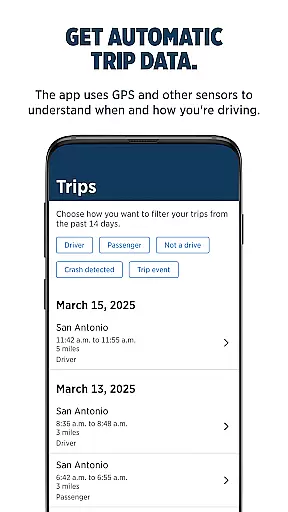
USAA DriveSafe offers an impressive array of features that set it apart in the Auto & Vehicles category. One of its standout capabilities is automatic trip data collection, which uses sophisticated GPS and sensor technologies to map out driving routes and gather crucial driving statistics. This feature allows users to understand their driving behaviors in detail, including metrics like distance driven, speed patterns, and even phone usage while driving.
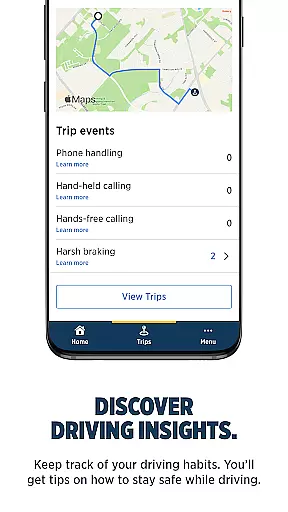
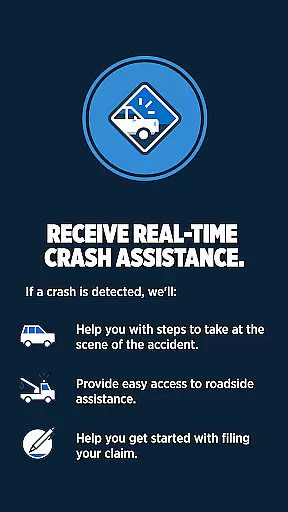
Beyond basic tracking, the app provides valuable driving insights that help users build safer driving habits over time. It also includes a crash assistance feature that automatically checks on the driver's well-being after detecting an accident and offers guidance on next steps. Additionally, the app streamlines the claims process by providing verified driving data to insurance adjusters, potentially speeding up claim resolutions. These comprehensive features make USAA DriveSafe an invaluable tool for both new and experienced drivers.
Understanding your vehicle's performance and safety metrics is crucial for any driver. The USAA DriveSafe App provides detailed insights into driving habits by leveraging GPS and sensor data to track trips, speed, and braking patterns.
This app goes beyond basic tracking by offering comprehensive analytics on driving behavior. Users can access information about their driving style, including instances of harsh braking and phone usage while driving, which are critical factors in maintaining vehicle health and ensuring safety.
By monitoring these parameters, drivers gain a clearer picture of their driving patterns. This helps in making informed decisions regarding vehicle maintenance and adopting safer driving practices, ultimately leading to enhanced vehicle longevity and reduced insurance costs.
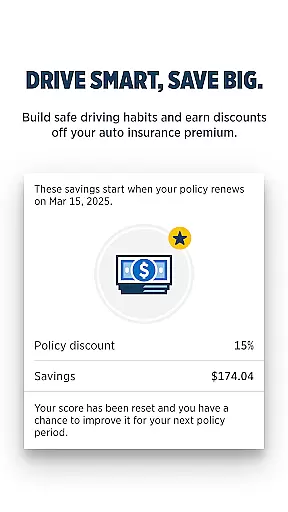
Price transparency in auto insurance means understanding how driving behaviors influence insurance premiums. The USAA DriveSafe App excels in this area by providing users with clear data on their driving habits, which directly impacts their eligibility for discounts.
The app's detailed tracking system ensures that users have access to transparent information about their driving performance. By analyzing trip data and driving behaviors such as speeding or distracted driving, the app calculates potential savings on insurance premiums.
With this level of transparency, users can actively work towards improving their driving habits to achieve better rates. This approach not only benefits drivers financially but also promotes safer roads by encouraging responsible driving practices.
Automatic trip tracking
Detailed driving insights
Crash detection system
Quicker claims processing
Exclusive member benefits
Limited state availability
Requires program enrollment
Constant GPS usage
Potential privacy concerns
Membership restrictions

Taximeter; the professional's choice
 4.30
4.30
Monitor specific TOYOTA parameters by adding this plugin to Torque Pro.
2.00
OBDII - ELM327 Terminal tool for 96-00 Volvos
4.50
* This app needs an adapter cable and a certain OBD2 adapter to work *
4.20
Launcher for use in the car
4.40
Read and delete OBD codes with any ELM327 OBD scanner. Coding functions included
3.40
Club Car Wash Mobile App—the fast lane to managing your wash membership.
3.30
Quick and easy car diagnostics to get you the right fix.
4.70
PayByPhone: A quick and easy way to pay for parking.
3.80
The Texaco App allows you to pay for fuel from the comfort of your car!
4.80
The ExtraMile App allows you to pay for fuel from the comfort of your car!
4.70
1M+ high-quality auto parts at your fingertips. Fitment guaranteed.
4.70
Browse millions of cars, track vehicle listings or sell your car today
4.70
Instantly redesign your car with AI. From sporty to futuristic, try it all.
4.50
Secure mobile payments & fuel savings at Phillips 66®, Conoco® and 76® stations
4.40
A full featured, real-time transit locator system
4.30
By enthusiasts, for enthusiasts
4.00
Better fuel to help keep you on the road
3.20
Theme for Car Launcher
4.5


User Reviews