
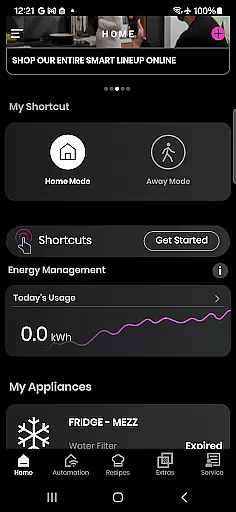
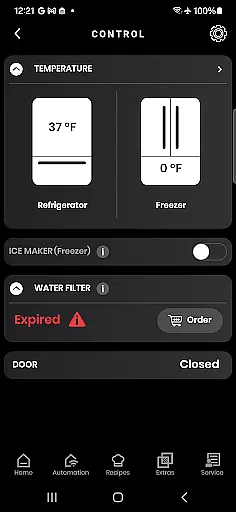
SmartHQ is a comprehensive smart home application that allows users to effortlessly control and monitor their smart appliances from leading brands like GE Appliances, Profile, Café, Monogram, Fisher & Paykel, and Haier. The app serves as a centralized platform for managing various smart devices, ensuring convenience and peace of mind. With features such as remote control, voice integration with Amazon Alexa and Google Assistant, and timely notifications, SmartHQ keeps users informed and in control of their home appliances.
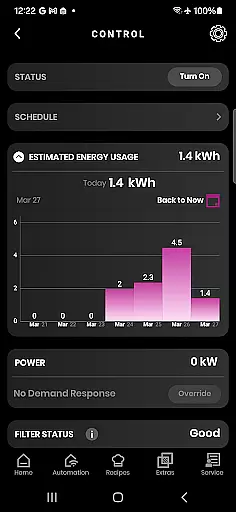
The app also offers personalized experiences by enabling users to create shortcuts for frequently used functions and download new modes for their appliances. Additionally, it provides insights into energy and water usage, enhancing the user's ability to make informed decisions. For cooking enthusiasts, SmartHQ enhances the cooking experience with AI-generated recipes and monitoring capabilities through built-in cameras and smart accessories. Whether you need expert help, proactive service alerts, or convenient product registration, SmartHQ delivers a connected and intelligent home management solution.
SmartHQ stands out with its extensive range of features designed to provide a seamless smart home experience. One of its core functionalities is remote control, allowing users to monitor and manage their appliances from anywhere, ensuring both convenience and security. The app integrates with voice assistants like Amazon Alexa and Google Assistant, enabling users to operate their devices hands-free using simple voice commands.
Another significant feature is the ability to receive timely notifications about appliance status, alerts, and updates. This ensures that users are always aware of their appliance's condition and can take necessary actions promptly. SmartHQ also supports software updates, delivering the latest features and improvements directly to your devices. Furthermore, the app offers a personalized experience by letting users create shortcuts for frequently used functions and download new modes, tailoring the app to individual preferences.
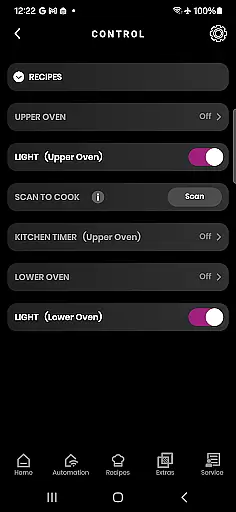
For those interested in sustainability, SmartHQ provides detailed insights into energy and water consumption, empowering users to optimize their usage. Cooking enthusiasts will appreciate the enhanced cooking experience through AI-generated recipes and real-time oven monitoring via built-in cameras. Additional features include convenient product registration, expert help through the SmartHQ Assistant, proactive service alerts, and easy scheduling of technician visits, making SmartHQ an all-encompassing tool for modern home management.
SmartHQ offers an extensive range of features that cater to various aspects of a connected home lifestyle. The app supports smart appliances from multiple brands including GE Appliances, Profile, Cafu00e9, Monogram, Fisher & Paykel, and Haier. This broad brand support ensures that users with diverse appliance portfolios can manage all their devices in one place.
The app's functionality spans across essential areas such as remote control, voice integration with Amazon Alexa and Google Assistant, and personalized experiences through customizable shortcuts. Additionally, it provides valuable insights into energy and water usage, helping users make informed decisions about their consumption patterns.
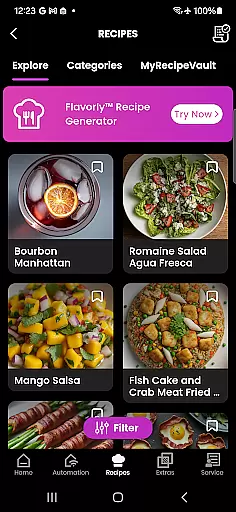
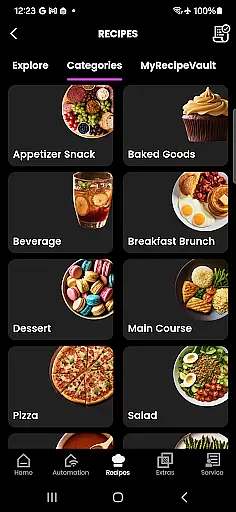
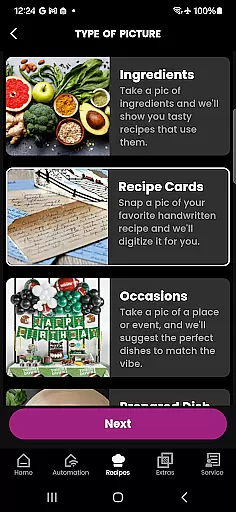
For cooking enthusiasts, SmartHQ enhances the culinary experience with its Flavorly AI recipe generation and oven monitoring capabilities. The inclusion of smart accessories like cookware and probes further enriches this aspect. Moreover, practical features like product registration, expert help via SmartHQ Assistant, proactive service alerts, and scheduling technician visits ensure comprehensive support for all user needs.
This wide array of features demonstrates SmartHQ's commitment to covering various facets of a modern, connected lifestyle, making it an indispensable tool for managing smart homes efficiently.
SmartHQ stands out by providing authentic and credible content tailored to enhance user experience. The app delivers timely notifications and software updates directly from the manufacturers, ensuring that users receive accurate information about their appliances' status and maintenance needs.
One of the key highlights is the integration with expert systems such as the SmartHQ Assistant, which provides reliable answers to appliance-related queries. This feature leverages expert knowledge to offer solutions and guidance, enhancing user confidence in troubleshooting issues independently.
Furthermore, the app facilitates access to official manuals, specifications, and support contacts upon registering appliances. This not only verifies the authenticity of the provided information but also assures users of its reliability when they need technical assistance or documentation.
By combining real-time data from appliances with expert-backed resources, SmartHQ establishes itself as a trustworthy platform where users can depend on both the accuracy of the content and the credibility of expert advice, ultimately fostering trust and satisfaction among its users.
User-friendly interface
Comprehensive appliance control
Voice assistant integration
Timely notifications
Energy usage insights
Limited to compatible devices
Some features require additional purchases
Dependent on stable internet connection
Varied features by region
Potential privacy concerns

Fly your Solo like a boss.
 4.10
4.10
Cute Adorable Animals now on your wrist with our Wear OS watch face!
4.40
Designed to delight, impress and energize your festive spirit every single day
4.3
BILT interactive 3D instructions help you get the job done right
3.50
Discover your Nationality, Family Origin, and Ancestry from one selfie
4.50
Earn money & gift cards when you take surveys, play games, scan receipts & more.
4.50
Digital smart watch face made for Wear OS.
4.70
Remotely monitor the time and temperature of food cooking on your grill.
4.60
No more juggling multiple apps, now you can control everything in one place!
4.60
Discover the "To Be a Christian" App: Your Guide to Deepening Faith!
5.00
Daily lessons from A Course in Miracles with scheduled reminders
4.80
Kasa Smart is your portal to your TP-LINK Smart Home.
4.70
The App can control Roborock vacuum cleaners from anywhere with rich features.
4.60
The go to app for taking unlimited notes!
4.50
Chat, meet genuine singles in your area. Real connections start with being real.
4.30
Use your device sensors to detect energy and convert it into spoken words.
4.10
Your home in your hand
3.80
Turn your watch into a key fob for your Tesla
2.90
Immerse yourself in the serenity of lavender fields and white butterflies
4.5


User Reviews