
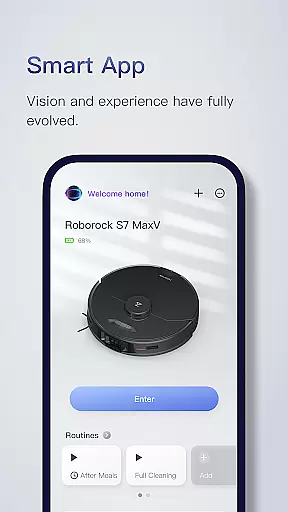
Roborock is a cutting-edge home cleaning solution that combines advanced hardware with intelligent software. The app provides complete control over your Roborock robot, allowing you to manage everything from cleaning schedules to suction strength. With features like Precision LIDAR navigation and artificial intelligence for object recognition, it ensures efficient and safe cleaning.
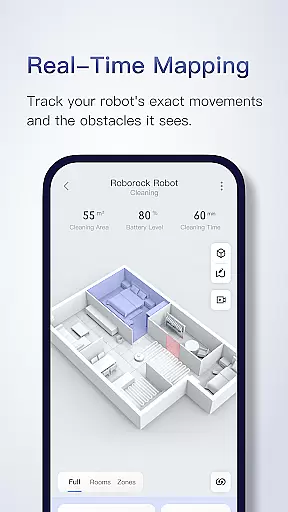
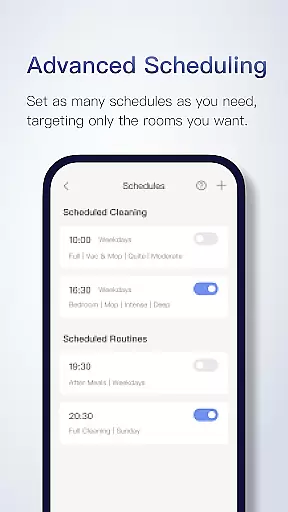
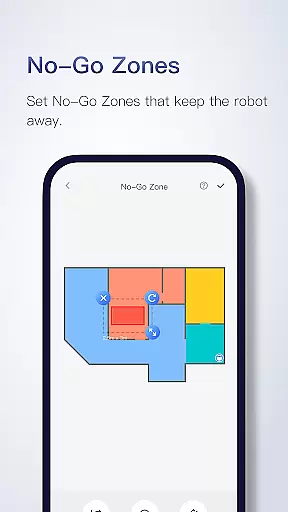
The app's smart mapping technology creates detailed floorplans after the first use, enabling customized cleaning routines for different rooms. You can set multiple cleaning schedules, adjust cleaning intensity, and even establish no-go zones without additional hardware. This makes Roborock an ideal choice for maintaining a spotless home with minimal effort.
Roborock stands out with its array of innovative features designed to enhance user experience. The Seriously Smart Mapping technology not only maps your home but also divides it into customizable zones, allowing targeted cleaning. Advanced Scheduling lets you program cleaning sessions according to your lifestyle, whether it's after meals or when the house is empty.
Customizable Cleaning options let you tailor the robot's performance based on room requirements - stronger suction for carpets or quieter operation for nurseries. The Multi-Level Mapping feature supports up to four different floor plans, automatically recognizing which floor it's on. Real-Time Viewing provides live tracking of the robot's progress and obstacle avoidance, giving you peace of mind while it works.
Roborock app offers comprehensive lifestyle solutions through its advanced home cleaning features. The application supports a variety of products, each with unique capabilities such as Precision LIDAR navigation, sensor matrix for obstacle detection, and AI-based object recognition.
The app's functionality extends to managing your home layout and customizing cleaning schedules, suction strength, and water usage. This versatility allows users to tailor the cleaning process according to different rooms' needs, ensuring an efficient clean whether it's a kitchen or nursery.
With multi-level mapping, zone cleaning, no-go zones, and real-time viewing, Roborock provides a granular level of control over how and when each area of your living space is cleaned. These features collectively contribute to a smarter, more convenient lifestyle for users who demand both performance and customization in their home maintenance routines.
The content within the Roborock app is developed based on cutting-edge software and hardware technology, ensuring a high degree of authenticity and reliability. Features like Precision LIDAR navigation, Sensient, OpticEye, ReactiveAI, and VibraRise are rooted in technological innovation and expert engineering.
Roborock provides seriously smart mapping, advanced scheduling, customizable cleaning options, and multi-level mapping that reflect a deep understanding of user needs and professional expertise in robotics. Each feature has been meticulously crafted to offer genuine value to users seeking intelligent home cleaning solutions.
Moreover, customer support channels back this commitment to credibility, offering assistance through phone and email for various regions. Users can trust that they are engaging with a credible, expert-backed service dedicated to enhancing their lifestyle through sophisticated robotic technology.
Advanced AI navigation
Customizable cleaning modes
Multi-floor mapping support
Real-time progress tracking
Efficient scheduling system
Limited mopping features
Some functions model-specific
No physical remote option
Higher price point
Occasional connectivity issues

Digital watch face design. Modern looking, hi-res & battery friendly.
 4.00
4.00
Stay connected with your loved ones & vehicles | Share live GPS location updates
4.60
Use your device sensors to detect energy and convert it into spoken words.
4.10
Spirit Communicator is a real paranormal ghost hunting app with many fun modes.
3.90
Smart home security protection
3.20
SmartHQ: Your Connected Home Command Center
4.10
Simple, stylish & fresh watch face. Customize colors, gradients & complications.
4.70
DailyGift can help you record your habits and get rewards along the way!
4.60
The Wyze app is your gateway to a smarter life and a safer home.
4.40
Countdown to Christmas 2025 with festive games & activities in a virtual village
4.80
Have your Tehillim with you at all times
4.70
The all-new Cync app. The simple, connected app for Cync and C by GE.
4.50
Earn money & gift cards when you take surveys, play games, scan receipts & more.
4.50
Material You inspired colors with BIG and Bold looks for Wear OS watches.
4.20
Unique BIG BOLD TIME with amazing colors and customisations.
3.70
Designed to delight, impress and energize your festive spirit every single day
4.5
Duo Watch Face (animated)
4.1
Immerse yourself in the serenity of lavender fields and white butterflies
4.2
Big bold hybrid watch face with 30 colors, 5 fonts & 5 complications.
4.2


User Reviews