
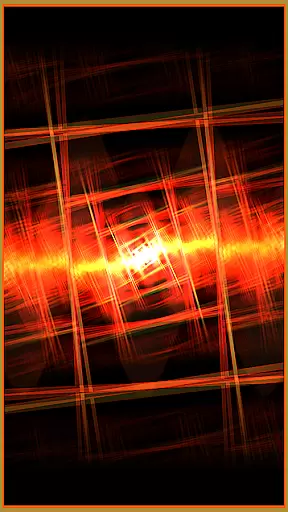


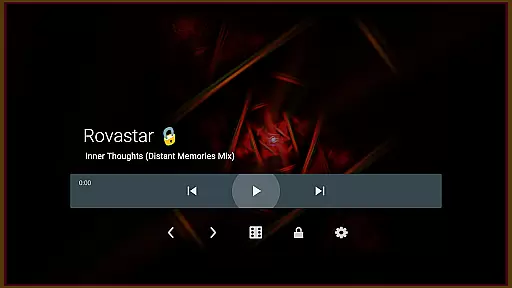

projectM Music Visualizer TV is a cutting-edge music visualization application designed specifically for Android TV. It offers the smoothest graphics and the most extensive collection of visual presets, making it highly responsive to any audio played on your device. Whether you're streaming music through Spotify, Pandora, or other players, projectM transforms your audio experience into stunning visuals. The app also allows users to control playback directly within the interface, eliminating the need to switch between apps.
This modernized version of MilkDrop leverages advanced technologies while maintaining compatibility with MilkDrop (.milk) presets. With over 200 visual effects, 60 FPS rendering, and customizable settings like texture size and mesh adjustments, projectM ensures both high-quality visuals and optimal performance. Perfect for audiophiles and casual listeners alike, this app enhances your music enjoyment by combining dynamic visuals with seamless functionality.
projectM Music Visualizer TV stands out due to its robust feature set tailored for an immersive audio-visual experience. One of its key highlights is the vast library of over 200 visual effects, each capable of adapting dynamically to the rhythm and beat of your music. These effects are rendered at 60 FPS using pixel-shaded technology, ensuring buttery-smooth animations that captivate viewers.
In addition to its impressive visuals, projectM integrates seamlessly with popular music players such as Google Music, Spotify, Pandora, and PowerAMP. This integration enables users to control their music playback—play, pause, or skip tracks—directly from the projectM interface. Users can further enhance their experience by adjusting graphical settings like texture size and mesh dimensions, allowing them to balance between visual fidelity and system performance based on their preferences.
projectM Music Visualizer TV offers an extensive library of over 200 visual effects, ensuring a rich and diverse audio-visual experience. This vast collection provides users with a wide array of visually stunning presets that cater to every musical genre and personal preference.
The application is not just about quantity but also quality and legality. Each preset is crafted with attention to detail, guaranteeing that users receive authentic and high-quality visualizations. The developers have ensured that all visual content is original or properly licensed, giving users peace of mind regarding copyright compliance.
This commitment to a legally sound and artistically varied music visualization library enhances the overall user experience. Users can enjoy their favorite tracks with confidence, knowing that the visuals are as genuine and professionally created as the music itself.
One of projectM's standout features is its ability to deliver 60 FPS Pixel Shaded Rendering, providing ultra-smooth and high-quality graphics that perfectly sync with your music. This ensures that every beat and note is translated into a breathtaking visual display, enhancing the auditory experience with stunning imagery.
Users have the flexibility to adjust texture and mesh sizes under settings, allowing for customizable graphics quality tailored to their device's performance capabilities. Whether you prioritize top-notch visual fidelity or smooth performance, projectM caters to your needs by offering adjustable parameters for an optimized experience.
This balance between aesthetic appeal and technical performance highlights projectMu2019s dedication to delivering superior audio-visual experiences on Android TV platforms. By fine-tuning these settings, users can achieve the perfect harmony between sound and sight, making each listening session truly immersive.
Stunning Visuals
Wide Preset Library
Seamless Player Integration
High Customizability
Smooth Performance
Requires High End Hardware
Complex Settings
Limited Mobile Support
No Offline Tutorials
Premium Price Tag

Simply convert wav to mp3. Clear. Reliable. Safe.
 4.0
4.0
Taal player that lets you sing any Indian & Western song with Tabla & Tanpura
4.60
DJ Music Mixer Pro is a real DJ controllers and DJ Music Studio to remix DJ.
4.40
Permanently backup Now Playing. Maps, filters & listening stats.
4.00
Bass Booster & Volume Equalizer Pro improves your music and video sound quality
4.60
Record, Mix & Master with all n-Track effects, 64-bit audio and Stem Separation.
4.70
Smart piano keyboard, Classical to Pop, Real-time multiplayer connection!
4.20
Learn the notes on the guitar fretboard fast with this easy and fun app
4.60
One-tap booster for max volume - enjoy powerful sound with this audio booster
4.50
Play your hearts out on TouchTunes jukeboxes & connect with fellow music lovers.
4.80
Simple & Intuitive Metronome
4.70
AI Music Maker: Generate And Compose AI Tunes & AI Songs & AI Music & AI Melody!
4.60
A complete sound package for the sound engineer or enthusiast
4.60
Reverse your voice & songs instantly! Fun singing challenge with cool effects.
4.60
Guzheng Master supports many playing techniques as an acoustic Guzheng
4.50
DJ Music Mixer - DJ Remix: remix songs, make beat music & record mix of DJ.
4.40
The Music Journey in Your Hands
4.30
Next generation modular control surface
4.10
The Skullcandy App Experience
3.20


User Reviews