
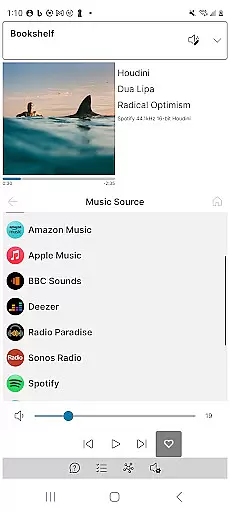
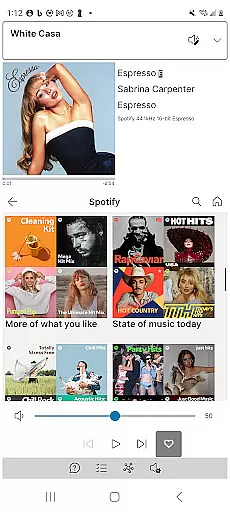
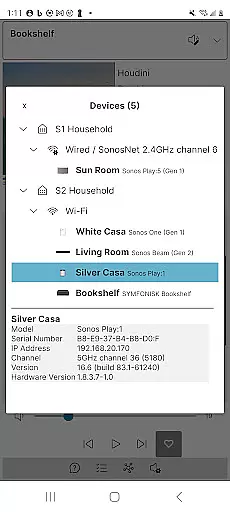
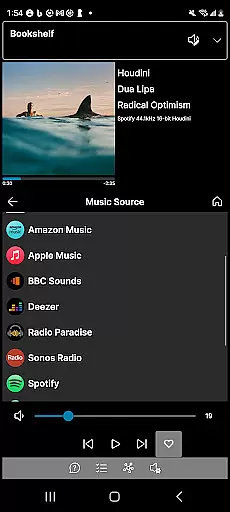
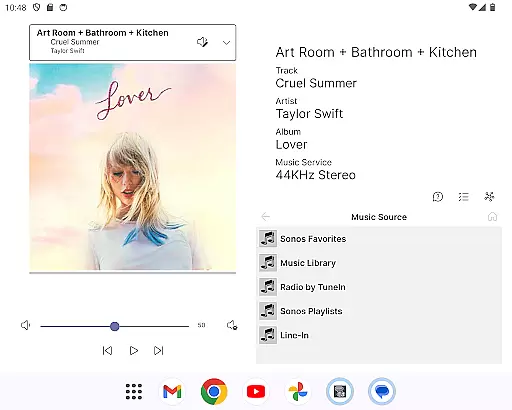
Phonos Ultimate is a powerful music control application designed specifically for Sonos users. This app allows you to manage your entire home music system with ease, offering all the essential features and more. With Phonos Ultimate, you can view all your devices, rooms, groups, and music sources in one place, while enjoying support for over a hundred music services. The app provides advanced controls such as volume adjustment, queue management, playlist creation, and EQ settings editing.
What sets Phonos Ultimate apart are its unique features that enhance user experience. It offers a distinctive Devices View showing how your devices are connected, displays track streaming data like sample rate and bit depth (requires S2), and supports multiple systems simultaneously without relying on the Sonos cloud API. Whether you're controlling local libraries or custom station URLs, this app ensures speed and reliability. Compatible with both portrait and landscape modes, it also supports dark mode for comfortable nighttime use.
This app is ideal for audiophiles who demand precision and performance from their music systems. By providing comprehensive control options and innovative functionalities, Phonos Ultimate enhances the way you interact with your Sonos setup, ensuring an unparalleled audio experience at home.
Phonos Ultimate stands out with its extensive feature set tailored for Sonos users. One of its key strengths is the ability to display all your devices, rooms, groups, and music sources comprehensively. This includes support for over a hundred music services, local libraries, line-in connections, and custom station URLs. Users can save their music queues as Sonos Playlists and enjoy standard playback controls like Play/Pause/Next/Previous along with Shuffle/Repeat options.
Beyond basic functionality, Phonos Ultimate introduces unique capabilities that elevate user interaction. The app's exclusive Devices View illustrates exactly how your devices are interconnected, providing insights into your system’s architecture. Additionally, it shows detailed track streaming information including sample rate and bit depth when using S2-enabled systems. Unlike other apps, Phonos Ultimate does not rely on the Sonos cloud API, ensuring faster response times and greater reliability. It supports simultaneous management of S1 and S2 systems and works seamlessly with every Sonos device except Ace headphones.
For those seeking convenience and customization, Phonos Ultimate delivers. You can easily edit groups, manage queues, add or delete tracks from playlists, and even jump through large lists in Local Library using alpha-jump. Podcast enthusiasts will appreciate the skip forward/backward feature, while visual customization options include portrait, landscape, and dark modes. With no ads and assurance against unwanted system updates, Phonos Ultimate prioritizes user satisfaction above all else.
Phonos Ultimate offers an extensive music library that supports over a hundred music services, similar to what Sonos provides. This vast selection ensures users have access to a wide range of music genres and artists.
In addition to streaming services, the app allows for the integration of local libraries, line-in audio sources, and custom station URLs. This feature not only diversifies the music sources but also enhances the personalization of your listening experience.
The app respects copyright laws by enabling users to manage their music content within legal boundaries, ensuring all music streams are legitimate and properly licensed.
Furthermore, Phonos Ultimate supports saving queues as Sonos Playlists and direct playback of playlists, reinforcing its commitment to providing a rich and authentic music library experience.
One of the standout features of Phonos Ultimate is its ability to display track streaming data, including sample rate and bit depth, for systems on the S2 platform. This transparency allows audiophiles to make informed decisions about their listening quality.
The app does not rely on the Sonos cloud API, which results in faster and more reliable audio streaming. By avoiding potential bottlenecks associated with cloud services, Phonos Ultimate ensures optimal performance at all times.
Users can adjust EQ settings directly through the app, tailoring the sound output to their preferences or room acoustics. This level of control is essential for achieving the desired audio experience.
Additionally, support for various Sonos devices (except Ace headphones) guarantees that whether you're using older models or the latest releases, Phonos Ultimate maintains high standards of audio fidelity across different hardware setups.
User-friendly interface
Comprehensive device control
Unique Devices View
No reliance on cloud API
Supports multiple systems
Not endorsed by Sonos
Limited to existing setups
No headphone support
Requires official app for setup
Advanced features need S2

The Music Journey in Your Hands
 4.30
4.30
The Cubase remote control app
3.60
Performance-Synthesizer & Multi-Track-Sequencer, polyphonic + multi timbral!
4.70
The best music and audio player, with beautiful UI, music search and equalizer.
4.60
Play KORG’s revolutionary touch-based instrument on a variety of devices.
4.40
Versatile MP3 recorder with auto-backup to Dropbox and Google Drive
4.10
Get alarms that fit your lifestyle and wake up to the sounds you love.
4.80
Listen to offline music and sounds from all categories
4.70
Melody Beat: Great for travel, workouts, offline vibes, play your tunes anytime.
4.10
Music, News & Sports Radio Tuner App. Tune in Live FM & AM Radio Stations.
4.80
Unleash your creativity! Turn simple prompts into full fledged songs.
4.70
SqueezePlayer turns your Android phone or tablet into a SqueezeBox on its own!
4.60
Save hundreds of dollars for a physical strobe tuner and instead use this app.
4.50
Formerly known as Spotistats! View your top tracks, artists, albums and more!
4.40
Enjoy singing any song, no matter how high or low it is
4.30
Learn and play 2M+ music tabs & chords on guitar, ukulele, bass, and more
4.30
The official Sonos app
4.10
Powerful beat maker & DJ mixer to remix tracks, make music, & perform DJ mix
3.70
Simple mp3 and mp4 player with advanced features.
3.40


User Reviews