
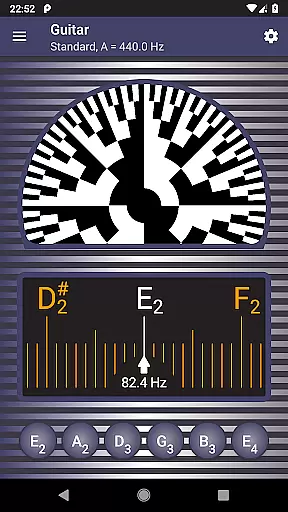
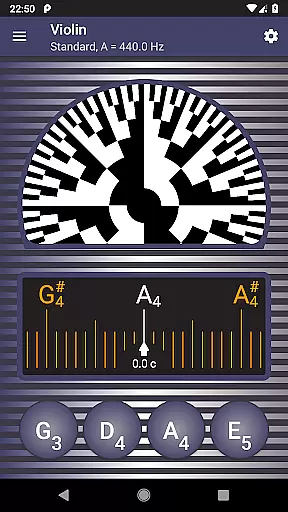
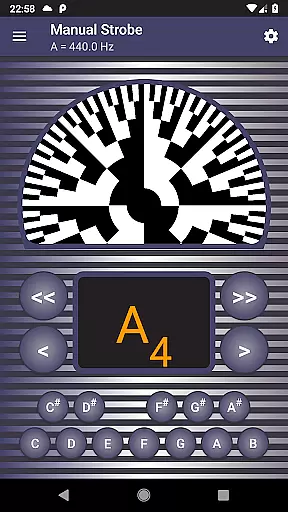
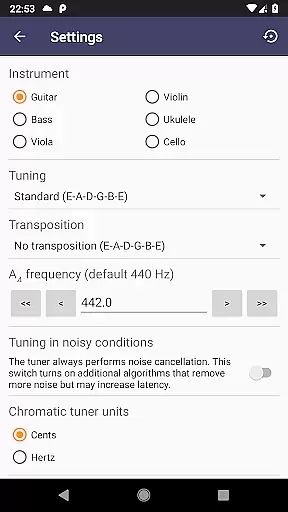
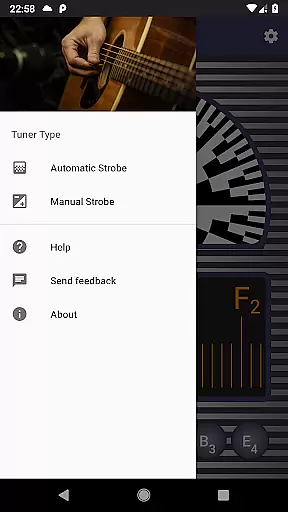
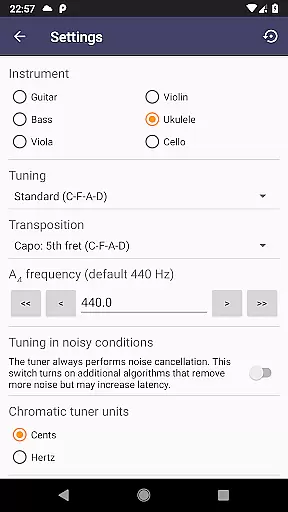
Strobe Tuner Pro represents a breakthrough in mobile instrument tuning, offering both chromatic and stroboscopic tuning capabilities. This professional-grade application delivers exceptional accuracy for guitar, violin, bass, ukulele, viola, cello, banjo, and shamisen players. The app's dual-tuner system combines traditional chromatic tuning with an authentic stroboscopic effect, providing musicians with precise control over their instrument's intonation.
Beyond basic tuning, the application features advanced noise cancellation algorithms that maintain accuracy even in challenging acoustic environments. Its innovative design includes independent tuner operation, allowing users to switch between chromatic and strobe modes seamlessly. The built-in metronome function enhances practice sessions by combining rhythm training with pitch monitoring. Whether you're a beginner learning proper tuning techniques or a professional seeking exacting precision, Strobe Tuner Pro delivers unmatched value at a fraction of the cost of physical tuners.
The application distinguishes itself through two sophisticated tuning mechanisms. The chromatic tuner employs Fast Fourier Transformation (FFT) to analyze frequencies across the musical spectrum, displaying them on a visual scale with target strings highlighted for easy reference. When fine-tuning is required, users can transition to the strobe tuner, which utilizes GPU-accelerated algorithms similar to those found in oscilloscopes, creating an authentic stroboscopic effect that rotates according to pitch accuracy.
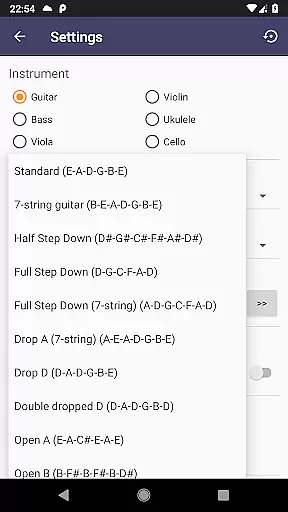
Additional features include a comprehensive manual mode that replicates physical strobe tuners, multiple note naming conventions (English, European, Solmization), and support for equal temperament tuning. The app provides reference tones synthesized according to the set concert pitch frequency, making it suitable for various instruments. Advanced settings allow quick switching between guitar and violin tunings while maintaining a user-friendly interface that caters to both beginners and professionals.
Practical enhancements such as first-start tutorials, built-in help documentation, and alternate tunings for guitar, ukulele, banjo, and shamisen make this application exceptionally versatile. The inclusion of a metronome combined with chromatic tuning functionality creates a powerful practice tool, while extensive testing with real instruments ensures reliable performance across different musical contexts.
Strobe Tuner Pro offers an extensive music library that caters to a wide array of instruments including guitar, violin, bass, ukulele, viola, cello, banjo, and shamisen. This vast selection ensures that musicians of all kinds can find their instrument of choice within the app.
The app guarantees copyright authenticity by using advanced algorithms for its tuners. The chromatic tuner utilizes Fast Fourier Transformation while the strobe tuner employs an oscilloscope-like algorithm processed directly on your device's GPU. These methods ensure accurate frequency detection without infringing on proprietary technologies.
Users benefit from having access to numerous alternate tunings for guitar, ukulele, banjo, and shamisen, which are legally safe and enhance the tuning experience. With these features, Strobe Tuner Pro not only respects intellectual property but also enriches the useru2019s musical journey.
By providing both chromatic and strobe tuners, the application supports traditional tuning techniques alongside modern digital solutions. This dual approach allows users to enjoy the familiarity of conventional methods while exploring new possibilities offered by cutting-edge technology.
Strobe Tuner Pro stands out with its superior audio quality options, delivering precise and clear sound feedback essential for accurate tuning. Its extreme accuracy is achieved through two independent tuning algorithms, catering to both beginners and professionals.
The app includes a metronome feature combined with a chromatic tuner, allowing users to practice rhythm and intonation simultaneously. Advanced noise cancellation ensures that even in noisy environments, the tuner remains reliable and responsive, providing uninterrupted tuning sessions.
For those who prefer tuning by ear, Strobe Tuner Pro synthesizes reference tones that respect the concert pitch setting. Users can play these tones using buttons at the bottom of the screen, ensuring they have a dependable auditory guide during their practice.
With support for various note naming conventions such as English, European, and Solmization, along with equal temperament settings, Strobe Tuner Pro delivers a versatile and high-quality audio experience. This makes it an indispensable tool for musicians seeking precision and adaptability in their tuning process.
Extreme accuracy
Advanced noise cancellation
Multiple instrument support
User-friendly interface
Professional-grade features
Requires good microphone quality
May drain battery quickly
Complex for absolute beginners
Subscription-based pricing
Occasional calibration needed

Over 100 million tracks available for high quality streaming and download
 4.60
4.60
The Music Journey in Your Hands
4.30
Walkout Song DJ is the most intuitive app to manage your sports music.
4.70
More downloads than any other metronome. Includes drum machine & tempo trainer.
4.80
USB audio recording and playback finally possible on Android 3.1 or higher!
3.90
Unleash your creativity! Turn simple prompts into full fledged songs.
4.70
Learn and play 2M+ music tabs & chords on guitar, ukulele, bass, and more
4.30
Slow music down without changing pitch.
3.70
Sheet music reader, piano & music note player. Play music score & learn to read.
3.90
Voice recorder - Audio recorder. Best recorder for recording
4.90
Gorgeous UI, Powerful music Search and Equalizer, the great choice for you!
4.70
SqueezePlayer turns your Android phone or tablet into a SqueezeBox on its own!
4.60
Offline Music Player&MP3 Player with themes, equalizer, lyrics, music play mode
4.60
Guzheng Master supports many playing techniques as an acoustic Guzheng
4.50
Your HD audio recorder on the go for music, meetings, ambience, animal sounds…
4.30
Sing, record, and create music together — enhanced by smart voice tools.
4.00
Turn your phone into a musical instrument from the future!
3.90
Control your MIDI USB or Bluetooth devices in app and avoid some trampling
3.30
Make music anywhere. Turn your device into an instrument.
4.0


User Reviews