



Cheogram is a communication app that connects users to a global network, emphasizing cross-platform interaction. It supports multimedia messaging and integrates with phone systems and address books.
With features like threaded conversations, sticker packs, and tagging options, it offers a comprehensive messaging experience for Android users.
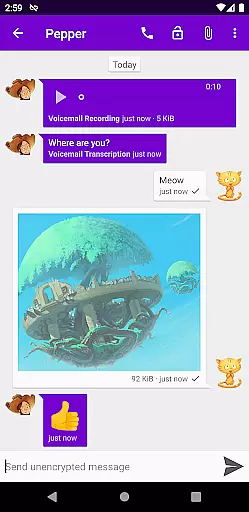
The app provides multimedia messaging with text and animated media, along with unobtrusive subject lines. It recognizes known contacts and integrates with gateways for expanded connectivity.
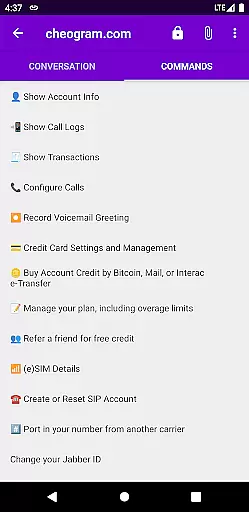
Users can tag contacts, initiate commands through the UI, and engage in lightweight threaded conversations. The inclusion of sticker packs adds a playful element to interactions.
Real-time messaging speed and reliability are crucial for any communication app, ensuring that messages are delivered instantly and without fail. Cheogram Android excels in this area by providing a seamless experience where users can send and receive messages with both media and text, including animated media, without delay.
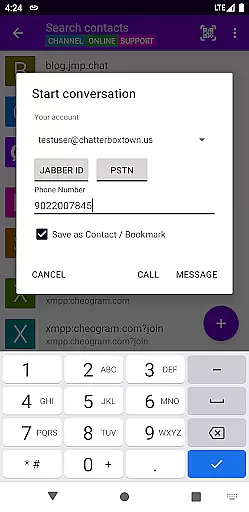
The app integrates with gateways' add contact flows and the native Android Phone app when using a gateway to the phone network. This integration ensures that communications are not only fast but also reliable, maintaining connection stability even when switching between different networks or services.
For users, this means they can trust Cheogram to deliver their important messages on time, every time. Whether it's a simple text or a complex message with media, the assurance of delivery speed and reliability enhances the overall user experience, making communication effortless and efficient.
Media sharing support is an essential feature for modern communication apps, allowing users to share various types of content seamlessly. Cheogram Android offers robust media sharing capabilities, enabling users to exchange messages with both media and text, including animated media, enhancing the richness of conversations.
In addition to basic media sharing, Cheogram provides unobtrusive display of subject lines and shows links to known contacts with their names. These features improve the clarity and personalization of shared content, making interactions more meaningful and engaging for users.
By integrating with address book contacts and offering sticker packs, Cheogram further enriches the media sharing experience. Users can tag contacts and channels, browse by tag, and utilize lightweight threaded conversations, all contributing to a dynamic and versatile platform for sharing media and connecting with others across different networks.
User-friendly interface
Free trial available
Cross-network compatibility
Integrated contact management
Lightweight conversation threads
Requires Jabber service account
Limited to Android platform
No iOS version available
Dependent on third-party services
Potential privacy concerns

Radio communication simulator for gaming communities
 4.0
4.0
Send SMS and chat messages easily with a fast text messaging app for Android.
4.10
HD Video Meeting app is a fast & unlimited video conferencing app across world.
4.30
Federated instant messaging for your mobile device (Jabber, XMPP, Snikket)
4.10
A softphone with crystal clear SIP Calling & Reliable VoIP dialer
4.00
Weargram is an unofficial Telegram Client for Wear OS.
3.50
Bringing the functionality of Winlink to your Android device
4.2
Read OBD2 data and DTCs Create custom dashboards Enhanced diagnostics available
4.70
Simple tool for businesses to talk to their customers.
4.40
Save 10% automatically on your first international mobile top up.
4.60
Manage your mobile phone plan, check unlimited 5g data usage and track rewards
4.50
The ultimate productivity solution for all your email communication needs.
4.40
Fast and mini browser with Ad Blocker,Video Downloader and Video Player
4.40
Create a secure hotspot on-the-go with Portable WiFi - Mobile hotspot.
4.40
2nd Phone Number Line for Anonymous Texting, Calling, and Picture Messages
4.30
SMS Messenger is a lightning-fast messaging app.
4.20 3.90
3.90
Official NDI app: turn your phone into a professional live-streaming IP camera.
3.20
TeamSpeak - Secure Chat for Gaming & Business
3.10


User Reviews