



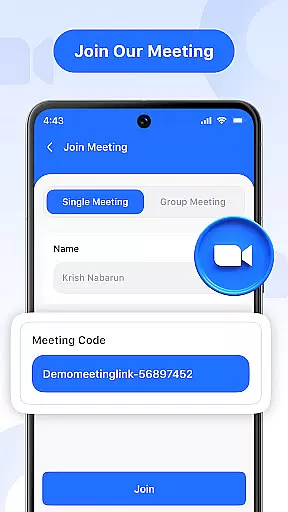
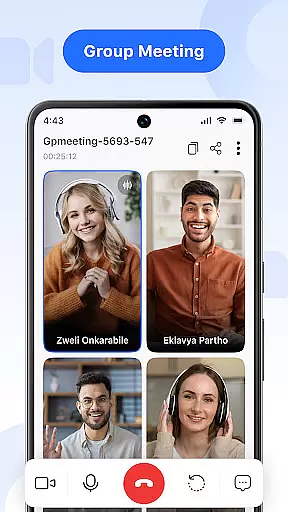


Video Meeting is a cutting-edge video conferencing app designed to enhance virtual communication and collaboration. With features like HD video calls, real-time interaction, and secure meeting access, it caters to both professional and personal use. The app allows users to host meetings instantly, join via secure codes, toggle audio/video settings, and share screens effortlessly.
Whether you're conducting business meetings, leading virtual classrooms, or catching up with friends, Video Meeting provides a seamless experience across various scenarios. Its multi-language support breaks communication barriers while the intuitive interface ensures ease of use for all types of users.
This application truly shines in its ability to make online connections feel as natural as face-to-face interactions, boosting productivity without compromising on security or usability.
Video Meeting stands out with its comprehensive feature set tailored for modern communication needs. The app enables instant meeting creation, allowing hosts to invite participants quickly through shared links or unique meeting codes that ensure secure access.
Advanced functionalities include real-time chat for seamless messaging during calls, audio controls for muting/unmuting microphones, and video toggling for privacy management. Users can also share their screens with a single tap, making presentations more interactive and engaging.
Additional notable features are one-on-one private chats, group hangouts for social interactions, and the option to end meetings for all participants at once. These capabilities, combined with multi-language support, create an inclusive environment suitable for work, study, and leisure activities.
In today's fast-paced digital world, the speed and reliability of real-time messaging are crucial for effective communication. Video Meeting excels in this area by providing instantaneous message delivery across all types of conversations, ensuring that your communications are both swift and dependable.
The app employs cutting-edge technology to minimize latency, allowing messages to be delivered almost instantly after being sent. This ensures that whether you're engaged in a quick chat or involved in an intense brainstorming session, your thoughts and ideas reach the team without delay.
Moreover, Video Meeting guarantees reliable message transmission even under fluctuating network conditions. By optimizing data packets and using efficient routing protocols, it maintains a steady flow of information, which is vital during important decision-making processes.
Users benefit from knowing their messages will get through quickly and reliably, enhancing overall productivity and collaboration within teams. With features like instant meeting launches and secure code invitations, Video Meeting makes certain that every interaction is as responsive and trustworthy as face-to-face dialogue.
Sharing media efficiently can greatly enhance the collaborative experience in video meetings. Video Meeting offers robust support for sharing various types of media, making it easier than ever to present documents, slides, or applications with just one tap.
The platform supports high-quality file transfers, ensuring that images, videos, and other multimedia content retain their clarity when shared among participants. This feature is particularly beneficial during presentations where visual aids play a critical role in conveying complex information clearly.
Additionally, Video Meeting allows users to share their screens seamlessly, enabling others to follow along with live demonstrations or walkthroughs. The ability to toggle between showing or hiding your camera feed adds another layer of flexibility, catering to different privacy preferences while maintaining focus on the shared content.
By integrating these advanced media-sharing capabilities, Video Meeting not only facilitates smoother interactions but also empowers teams to collaborate more effectively, regardless of geographical boundaries. Whether you're conducting business calls, virtual classrooms, or casual catch-ups, the app adapts to meet diverse needs while ensuring top-notch performance.
User-friendly interface
HD video quality
Secure meeting access
Real-time chat functionality
Multi-language options
Limited free features
Occasional connectivity issues
No offline functionality
Premium subscription required
High system requirements

BiP is a fast, secure, free messaging and HD video calling app!
 4.10
4.10
Call Forwarding is easy and simple application to use.
3.80
Enables Plus features of Quick Search.
4.3
Enjoy secure messaging & calling. Safe Messenger: group chats, calls, messages.
4.20
Browse fast on Opera Mini, with Data Saving, News, Football Scores, and Download
4.60
A Browser with powerful ad blocker to help focus on what really matters.
3.00
Call & Text Anywhere With A Canadian Number.
3.60
Read OBD2 data and DTCs Create custom dashboards Enhanced diagnostics available
4.70
Caller ID, Spam Call & SMS Blocker
3.80
Enhance browsing with AI-powered features and Copilot.
4.70
Build your web browser around you with private search, and more.
4.60
Stay in touch with the people who matter most.
4.60
Our Black Friday sale is here. Unlock special discounts on Proton Mail now.
4.30
Pure modern IRC experience for Android
3.70
Quickly and easily identify and block unknown callers
3.70
At select facilities, you now have an easy way to video visit your loved ones!
3.30
Fast, Simple And Secure Application That Provides SMBv3 Server On Your Device
3.30
TeamSpeak - Secure Chat for Gaming & Business
3.10
Bringing the functionality of Winlink to your Android device
4.5


User Reviews