
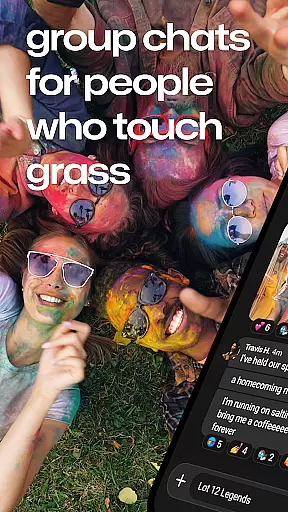
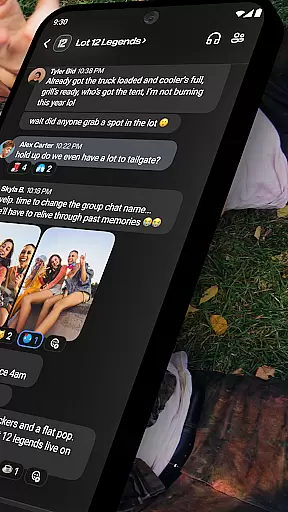
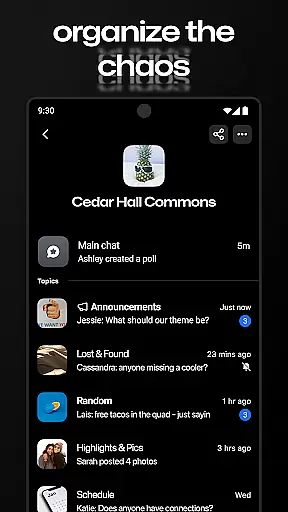



GroupMe is a free communication app designed to help users stay connected with important groups in their lives. Whether it's family, friends, coworkers, or other communities, this app makes group messaging simple and efficient. Available on both mobile devices and computers, GroupMe allows users to create group chats, send texts, images, GIFs, and even emoji, all in one place.
The app stands out with its user-friendly features such as SMS integration, customizable notifications, and the ability to mute specific chats. It also offers a gallery feature that saves shared photos and videos for later viewing. With cross-platform support, GroupMe ensures you can chat from anywhere, whether you're on your phone or desktop.
GroupMe is especially useful for organizing group activities, coordinating events, or simply staying in touch with loved ones. Its seamless functionality and versatile features make it an essential tool for modern communication.
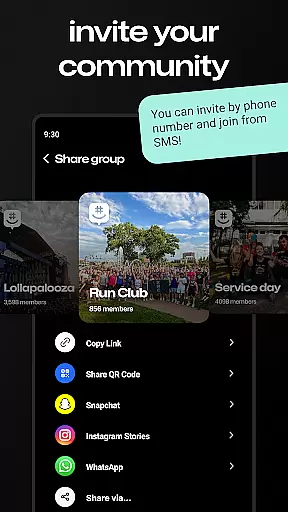
GroupMe offers a wide range of features that enhance group communication. One standout feature is the ability to add anyone to a group chat via their phone number or email address, even allowing SMS-based chatting for users who aren't on the app yet. This inclusivity ensures no one is left out of important conversations.
Customization is another key aspect of GroupMe. Users have full control over their notification preferences, including muting specific chats or entire groups. The app also supports rich content sharing, such as memes, GIFs, and links, which are displayed directly within the chat. Additionally, GroupMe provides exclusive emoji options, adding a fun and expressive element to conversations.
For those who want to preserve memories, the built-in gallery saves all shared media, making it easy to revisit past content. Direct messaging is another highlight, offering the same robust features as group chats but tailored for one-on-one conversations. These thoughtful features ensure GroupMe remains a top choice for group-based communication.
Real-time messaging is a critical feature for any communication app, and GroupMe excels in this area. The app ensures that messages are delivered instantly, keeping you connected with your important contacts without delay.
GroupMe's infrastructure is designed to handle high volumes of messages efficiently. Whether you're chatting with family, friends, or coworkers, the app maintains a steady flow of communication, even during peak usage times.
The reliability of message delivery in GroupMe provides users with peace of mind. You can trust that your messages will reach their destination promptly, regardless of group size or network conditions.
Moreover, the app offers notifications that keep you updated on new messages. With customizable notification settings, you have control over how and when you receive alerts, ensuring an optimal messaging experience tailored to your preferences.
Sharing media is an essential aspect of modern communication, and GroupMe makes it easy to exchange photos, videos, and other files. This functionality enriches conversations by allowing users to share experiences and information visually and interactively.
GroupMe supports various file formats, making it versatile for different types of media sharing needs. From meme images to GIFs, users can search, select, and send multimedia content seamlessly within their chats.
The app also features a gallery that saves shared memories. Users can easily explore photos and videos shared in their groups, reliving moments from the past or catching up on recent events.
In addition to direct media sharing, GroupMe displays content shared from URLs directly in the chat. This feature enhances the user experience by providing immediate access to web content without leaving the conversation, thus maintaining engagement and continuity.
User-friendly interface
Free to use
Supports SMS integration
Rich media sharing
Cross-platform access
SMS limited to US
No video calling
Occasional bugs
Limited customization
Notification delays

We’re taking the yada yada out of wireless—now we’ve taken it out of your app.
 4.70
4.70
A web browser that respects your privacy.
4.30
Messages: Fast, simple SMS app with scheduling and smart features.
4.00
Official NDI app: turn your phone into a professional live-streaming IP camera.
3.20
Welcome to the future of phone service.
4.60
Caller ID App! Add names & photos to unknown calls & Call Recording
4.40
Weargram is an unofficial Telegram Client for Wear OS.
3.50
Read OBD2 data and DTCs Create custom dashboards Enhanced diagnostics available
4.70
Threema is the messenger with the most consistent focus on security and privacy.
4.00
Messenger for SMS - texting message app, faster, simpler & safer, for you.
4.70
Manage BoostMobile Account
4.60
Experience real private browsing without tracking, surveillance, or censorship.
4.50
Faster version of Messages. Messenger for your contacts.
4.50
Simple tool for businesses to talk to their customers.
4.40
A customizable phone number in the cloud
4.20
A softphone with crystal clear SIP Calling & Reliable VoIP dialer
4.00
Caller ID, Spam Call & SMS Blocker
3.80
At select facilities, you now have an easy way to video visit your loved ones!
3.30
TeamSpeak - Secure Chat for Gaming & Business
3.10


User Reviews