
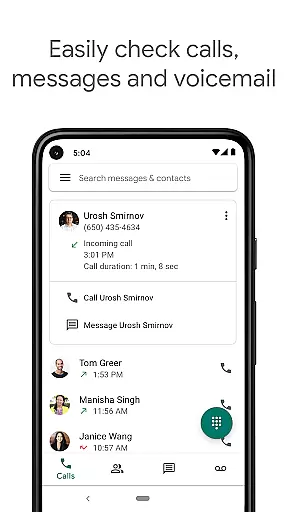
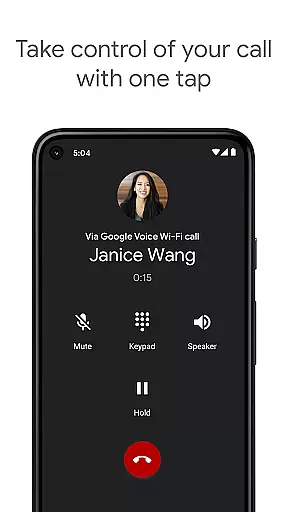
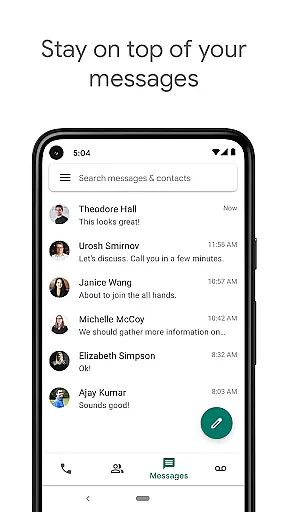
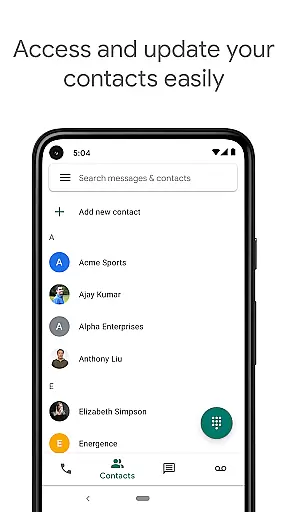
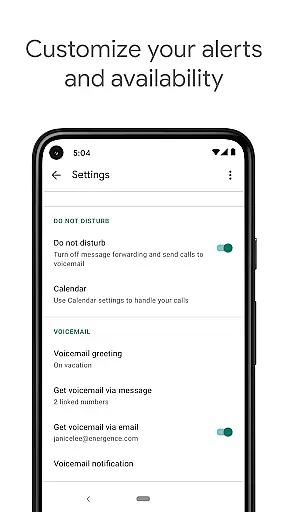
Google Voice is a communication app that provides users with a dedicated phone number for calling, text messaging, and voicemail services. The app seamlessly syncs across all devices including smartphones and computers, ensuring you stay connected wherever you are. With features like spam filtering, personalized call settings, and automatic backups of your communication history, Google Voice gives you complete control over your communications.
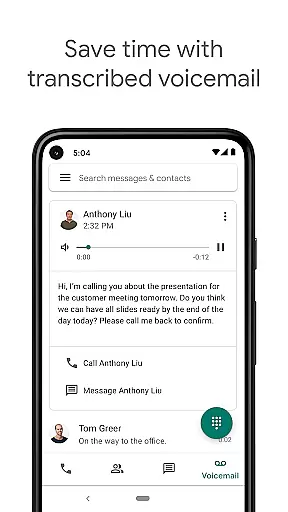
The app stands out with its advanced voicemail transcription service, which allows users to read their voicemails as text within the app or via email. Additionally, it offers competitive international calling rates, making it an economical choice for staying in touch globally. Whether you're managing calls, texts, or voicemails, Google Voice ensures your communications are efficient, organized, and accessible from any device.
Google Voice boasts a variety of features designed to enhance user control and convenience. One of its key functionalities is automatic spam filtering, which helps keep unwanted calls at bay, while personalized settings allow users to manage call forwarding, text messages, and voicemail according to their preferences. This level of customization ensures that users can tailor the app to fit their unique communication needs.
Another standout feature is the app's ability to store and back up all calls, text messages, and voicemails. This not only makes it easy to search through your communication history but also provides peace of mind knowing your data is securely stored. Moreover, Google Voice supports sending and receiving individual and group SMS messages from any synced device, offering unparalleled flexibility in managing messages on the go.
Lastly, the app's voicemail transcription service leverages advanced technology to provide accurate transcriptions that can be read directly in the app or sent to your email. Combined with cost-effective international calling rates, Google Voice delivers a comprehensive communication solution that prioritizes both functionality and affordability.
Real-time messaging speed and reliability are crucial for any communication app, ensuring that messages are delivered instantly and without fail. Google Voice excels in this area by providing users with a seamless experience when sending and receiving text messages across multiple devices.
The app's infrastructure is designed to sync messages in real-time across smartphones, tablets, and computers, allowing users to maintain continuous communication regardless of their location or the device they are using. This synchronization ensures that users never miss a message and can respond promptly, enhancing both personal and professional interactions.
Moreover, Google Voice incorporates advanced spam filtering and number blocking features, which contribute to the overall reliability of the messaging service. By automatically filtering out unwanted messages and calls, users can focus on important communications without distractions.
In summary, Google Voice offers a robust platform for real-time messaging, characterized by its speed, reliability, and additional features that enhance user control over their communications.
Media sharing support is an essential feature for modern communication apps, enabling users to share photos, videos, and other files effortlessly. Google Voice provides comprehensive media sharing capabilities, allowing users to enrich their conversations with multimedia content.
With Google Voice, users can send and receive various types of media files within their text messages. This functionality supports not only individual chats but also group conversations, making it easier to collaborate and share experiences with friends, family, or colleagues.
The app ensures that media files are delivered quickly and reliably, maintaining the quality of the shared content. Whether it's a high-resolution image or a lengthy video, Google Voice handles these files efficiently, preserving their integrity during transmission.
Overall, Google Voice's media sharing support enhances the communicative power of the app, offering users a versatile tool for exchanging multimedia content alongside traditional text-based messages.
User-friendly interface
Advanced voicemail transcription
Efficient spam filtering
Seamless cross-device syncing
Competitive international rates
Limited to select markets
No support for MMS
Dependent on cellular minutes
Occasional transcription errors
Restricted business use

Use this Dialer app alone or as a TREK: Total Interface companion.
 4.70
4.70
At select facilities, you now have an easy way to video visit your loved ones!
3.30
WazzapMigrator: transfer your WhatsApp history from iPhone to Android
4.00
Messenger, an MMS & SMS messages app with Blockers, Driving mode & Private box
4.60
Experience real private browsing without tracking, surveillance, or censorship.
4.50
Fast, Simple And Secure Application That Provides SMBv3 Server On Your Device
3.30
Manage Phone Calls, call history, and contacts easily with Phone Pro.
4.5
Manage your mobile phone plan, check unlimited 5g data usage and track rewards
4.50
SMS Messenger is a lightning-fast messaging app.
4.20
Block spam calls & scam - no more annoying calls with the call blocker function
4.30
Messenger app for faster and simpler SMS text messaging, and personalized themes
4.10
Federated instant messaging for your mobile device (Jabber, XMPP, Snikket)
4.10
Share the moment!
4.10
Messages is Private SMS Messenger 2023 with text message, instant messaging.
4.00
A softphone with crystal clear SIP Calling & Reliable VoIP dialer
4.00
Tether to Windows, OS X, Linux PCs or Android tablets. No root. No tether fees.
3.90
Caller ID, Spam Call & SMS Blocker
3.80
Enables Plus features of Quick Search.
4.0
An app dedicated solely to marriage, not dating, and supported by a rigorous verification mechanism to ensure seriousness.
4.5


User Reviews