
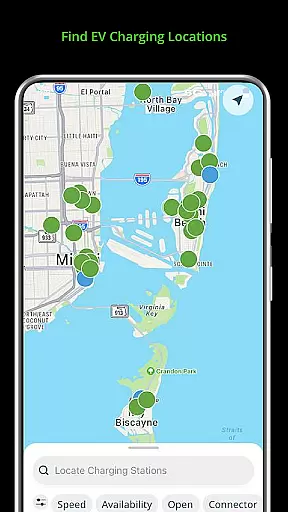
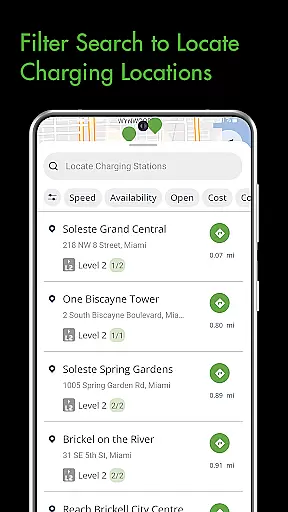
Blink Charging Mobile App is a comprehensive EV charging solution designed to simplify the charging process for electric vehicle owners. The app allows users to locate public charging stations through various search methods including zip code, city, or business name. It provides real-time monitoring of charging sessions with detailed information such as energy delivered and charging speed.
One standout feature is the ability to manage home charging stations like the HQ 200 directly from the app. Users can configure settings, track charging history, and monitor costs. Additionally, the app supports an expanded network that includes SemaConnect stations, allowing for a more versatile charging experience across different networks. This makes the Blink Charging app an essential tool for EV drivers looking to efficiently manage their vehicle's charging needs.
The Blink Charging Mobile App offers several key features that enhance the EV charging experience. First, its station locator functionality helps users find nearby charging stations using multiple search criteria. The app also provides detailed session management tools, enabling users to monitor real-time charging data including energy delivery and cost estimates.
Another significant feature is the home station management capability for HQ 200 units. This allows users to control their home charging setup remotely, including setting preferences and viewing charging history. Furthermore, the app's support for both Blink and SemaConnect networks expands charging options significantly. These features collectively provide a comprehensive solution for managing all aspects of EV charging, making it more convenient and efficient for users.
Accessing detailed vehicle information is crucial for EV owners to optimize their charging experience. The Blink Charging mobile app provides comprehensive data about your electric vehicle's charging sessions.
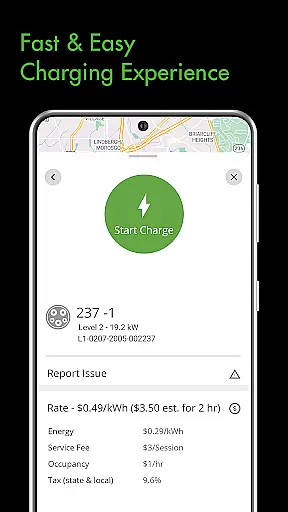
The app displays real-time information including energy delivered, current charging speed, and estimated costs. This allows users to monitor the exact amount of power transferred to their vehicle and understand charging expenses.
Additionally, users can view historical charging data from their home stations. This feature helps EV owners track their charging patterns over time and make informed decisions about their energy usage.
The app's integration with both Blink and SemaConnect networks ensures that users receive consistent and detailed information regardless of which charging station they use across the expanded network.
Price transparency in EV charging is essential for drivers to manage their expenses effectively. The Blink Charging mobile app offers clear visibility into charging costs across different stations.
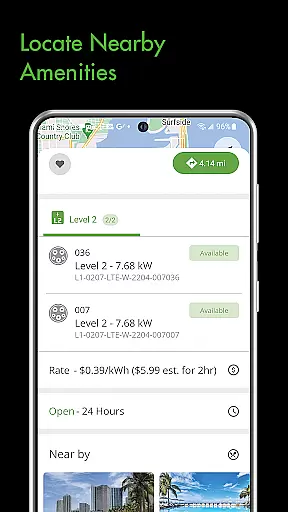
Users can view estimated charging session costs before initiating a charge. This upfront pricing information includes details about energy rates and additional fees, if any.
The app maintains consistent pricing display standards across its entire network, including partner stations like SemaConnect. This uniform approach helps drivers compare costs between various charging locations.
Furthermore, the payment wallet feature enables users to track their spending history and manage their charging expenses more efficiently through organized financial records.
User-friendly interface
Real-time charging data
Home station management
Expanded network coverage
Convenient payment options
Limited to specific networks
Occasional connectivity issues
Requires account setup
Some features are premium
Notifications can be delayed

On the CarShield app, you can view contracts, make payments, & request roadside.
 4.40
4.40
Taximeter; the professional's choice
4.30
The Smarter Way Forward
3.30
Attention! This is the theme for the Car Launcher app
4.2
Realtime Charts is a plugin for the Torque Pro App (OBD 2 & Car)
4.20
The ExtraMile App allows you to pay for fuel from the comfort of your car!
4.70
Lexus app currently supports 2010 or newer vehicles (2018 or newer for Hawaii).
4.80
Trip computer+car diagnostic tool with widest variety of features and dashboard!
4.70
Earn and save with Fuel Rewards®
3.20
Find Your Local Store or Shop Online for the Car, Truck, or SUV Parts You Need
4.70
Browse millions of cars, track vehicle listings or sell your car today
4.70
OBD1 ECMs application. Data log or tune directly from your phone or tablet!
4.60
Find, search, and browse 40,000+ used cars, SUVs, and trucks.
4.50
Your Path to Driving Licensing Success Begins Here! Develop your driving skills.
4.40
Ultimate OBD2 Car Scanner: Diagnostics, Service and Modification Tool
4.30
AI Powered - Automotive Mechanic Assistant
4.30
Get your personalized financing options and shop for used cars today!
4.20
Discover new and used cars in Syria easily! Browse ads and connect with sellers.
3.70
Easily notify car owners in urgent situations, safe, fast, multilingual.
4.3


User Reviews