
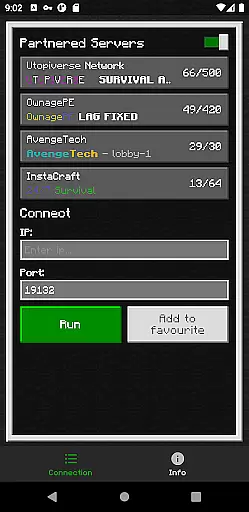
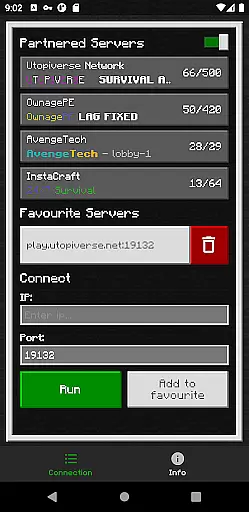
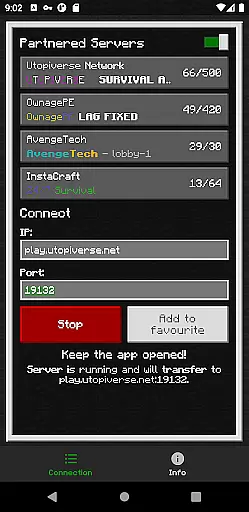
BedrockTogether (Pro) is an innovative networking tool designed to simplify server connections for Minecraft Bedrock Edition players. This ad-free version allows any Bedrock Edition server to appear as a LAN server on Xbox or PlayStation clients, enabling seamless connections without DNS rerouting. While Realms and Nintendo Switch compatibility aren't supported, the app provides a straightforward solution for cross-platform LAN gaming.
The application's core functionality lies in its ability to facilitate direct server connections through the "Friends" tab in Minecraft. By entering the server IP and port, then activating the app, users can easily connect their gaming consoles to servers within the same LAN network. This professional-grade tool is particularly valuable for Minecraft enthusiasts who regularly host or join multiplayer sessions across different devices.
BedrockTogether (Pro) offers several distinctive features that enhance the multiplayer Minecraft experience. The app's primary capability is its unique server bridging function, which eliminates the need for complex DNS configurations while maintaining stable connections. Unlike other networking tools, this application operates independently of Mojang's official infrastructure, providing users with greater flexibility in setting up their gaming sessions.
Additional features include automatic network detection and simplified connection management through its intuitive interface. The app also maintains a minimal system footprint while running, ensuring optimal performance on various devices. Its compatibility with both Xbox and PlayStation platforms makes it an essential tool for Minecraft players seeking seamless LAN connectivity across different gaming systems.
BedrockTogether (Pro) delivers exceptional core functionality by enabling seamless LAN server connections for Minecraft Bedrock Edition users. The app allows Xbox and PlayStation clients to connect effortlessly without DNS rerouting, ensuring a smooth and reliable connection process.
The application's effectiveness is demonstrated through its straightforward operational steps. Users simply input the desired server IP and port, click the 'Run' button, and navigate to the 'Friends' tab in their game. This streamlined approach eliminates unnecessary complexities, making it accessible even for less tech-savvy players.
What sets this tool apart is its ad-free experience and precise execution. The app maintains stability throughout gaming sessions and automatically closes after the client successfully joins the server, optimizing system resources while ensuring uninterrupted gameplay.
The interface design of BedrockTogether (Pro) prioritizes user-friendly interactions through its minimalist and intuitive layout. The main screen presents only essential elements - server IP and port fields, alongside a prominent 'Run' button, creating an uncluttered workspace that enhances user focus.
Operation flow follows logical sequencing that aligns with natural user behavior. The four-step connection process is easy to follow, from entering server details to establishing the connection through the LAN tab. Each step builds upon the previous one, maintaining clear progression.
Additional helpful features include built-in troubleshooting guidance and direct links to support channels. These elements are strategically placed without overwhelming the primary interface, striking a perfect balance between functionality and simplicity.
Seamless LAN connection
User-friendly interface
Stable server performance
No ads or interruptions
Cross-platform support
No Nintendo support
Requires same network
Third-party app
Manual setup needed
Limited troubleshooting

 4.50
4.50 4.50
4.50
HD Camera captures every special moment.
4.60
Quickly & easily calculate the spacing of handrail balusters
4.20
View detailed information about your Nissan Leaf the dealer never shows you.
4.10
The Ultimate Bluetooth Keyboard & Mouse. Securely control your PC, Mac, and more
4.50
Mirror your screen to Fire TV - Super fast and simple
4.40
Your personal health butler
3.60
The ideal app to be the digital eye of your family
3.40
Optimize your WiFi network, turn your phone into Wifi Analyzer
4.70
Pro Emulator is an easy to use game console emulator for a range of consoles.
4.40
Complete kernel toolbox with features to manage and tweak your rooted device
4.30
pdf merge, word to pdf, jpg to pdf, edit pdf, convert to pdf and much more!
4.20
Remote for Roku, Fire TV, Samsung TV, LG TV, Android TV, Chromecast and VIZIO TV
4.20
VESC Tool can monitor and configure VESC-compatible devices over BLE and Wifi
4.20
Automate everything from settings to photos, SMS to speech. ADC2 prize winner.
4.10
Create your own custom widget with endless possibilities
3.90
Clean the junk files on your device
3.40
Unlock your Essential Key. Create custom shortcuts to your favorite apps!
4.2


User Reviews