
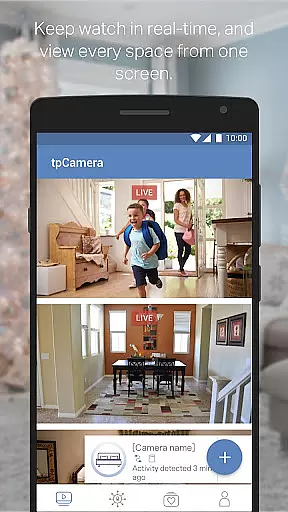
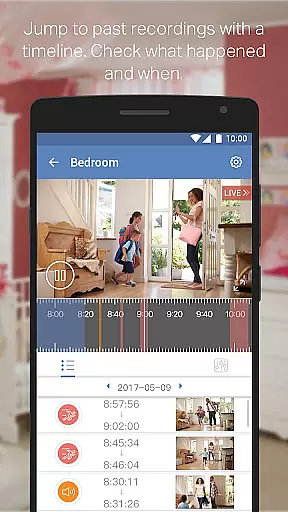
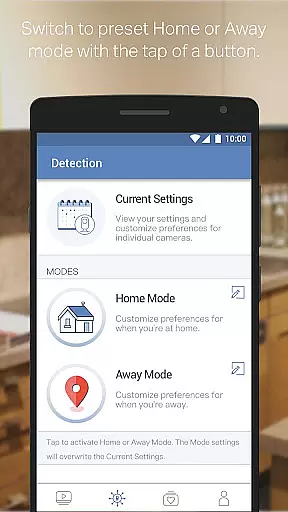
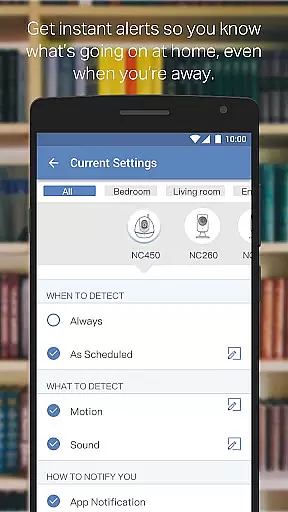
TP-LINK tpCamera is a cloud-based video monitoring app that allows users to stay connected with their home, family, or pets remotely. With this app installed on your smartphone, you can access your cloud cameras anytime and from anywhere over the Internet. This ensures you never miss an important moment.
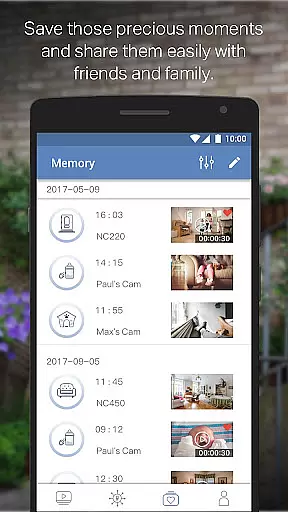
The app offers free cloud service for life, quick registration and setup, and supports managing and streaming live videos from multiple cameras. It also stores photos and videos, allowing you to relive those moments whenever you want. Compatible devices include models such as NC200, NC210, NC220, NC230, NC250, NC260, and NC450.
TP-LINK tpCamera provides several key features that enhance its functionality. The free cloud service for life ensures that users have continuous access to their stored data without additional costs. Quick registration and setup make it easy for users to connect to their home or office cameras in the simplest way possible.
Another notable feature is the ability to manage and stream live videos from multiple cameras simultaneously. This allows users to monitor different areas at once, providing comprehensive security coverage. Additionally, the app's capability to store photos and videos enables users to keep cherished memories and important events securely backed up.
When evaluating a monitoring application like TP-LINK tpCamera, functionality completeness is crucial for ensuring reliable performance. This app offers essential features that cover various user needs, including live video streaming, cloud storage, and multi-camera support.
The tpCamera app provides users with the ability to register and set up their devices quickly, which simplifies the initial setup process. Additionally, its compatibility with a wide range of TP-LINK camera models ensures broad device support, making it versatile for different environments and requirements.
One of the standout aspects is the free lifetime cloud service, allowing users to store and access videos without worrying about subscription fees. This feature enhances the overall value proposition, as users can continuously monitor their spaces without incurring additional costs.
For users who need to manage multiple cameras, the app's capacity to stream live footage from various devices simultaneously is a significant advantage. This comprehensive functionality ensures users have a complete view of their monitored areas, providing peace of mind whether they are at home or away.
Usability is a critical factor when assessing applications like TP-LINK tpCamera, as it directly impacts the user experience. The app is designed to be intuitive, offering straightforward navigation that allows users to easily access core features such as live video feeds and stored media.
Operational smoothness is evident in the app's quick registration process, enabling users to connect to their cameras rapidly. This seamless setup is vital for users who require immediate access to their monitoring systems without dealing with complex configurations.
In terms of performance, tpCamera delivers a stable and responsive experience. Users can stream live videos with minimal latency, ensuring real-time monitoring capabilities. The app also supports multiple languages, catering to a diverse audience and enhancing accessibility.
Furthermore, the app's design emphasizes ease of use, ensuring that even those unfamiliar with surveillance technology can operate it effectively. By prioritizing usability and operational efficiency, TP-LINK tpCamera provides a reliable solution for remote monitoring needs.
User-friendly interface
Free cloud storage
Quick setup process
Multi-camera support
Remote access capability
Limited device compatibility
No advanced analytics
Basic video quality
Occasional connectivity issues
Few customization options

Connect your phone to any endoscope camera, USB camera, or borescope with ease.
 3.70
3.70
An essential GFX utility developed for specific FPS mobile games
4.50
Zlink Carplay Android a mirror link app with a Carplay interface style
4.4
Recite Quran Majeed القران with special 16 line real Kuran page in hand
4.30
Al QURAN-القرأن الكريم app to read Quran offline just like an actual Quran book
4.30
Barcode scanning made simple!
4.40
Game booster GFX may reduce interruptions and improve gaming experience.
4.50
Manage apps & elevate your gaming experience with Game Launcher: Gaming Hub app.
4.30
Simulator of real black light
3.50
Demo for Key Attestation feature of the Android system.
4.80
Read Holy Quran Feel Like Real Quran & Listen Al Quran Mp3 Audio Online Offline.
4.70
The Free Catholic Latin American Bible in complete Spanish
4.60
Phone Software Update Quick Checker helps you to keep your phone apps up to date
4.50
Mirror link car connector to share your screen with car dashboard
3.80
With Endoscope Camera Connector you can connect your phone with endoscope cam
3.70
Mobile Connect To TV - HDMI USB & WiFi Screen Mirroring
3.70
Connect and find your Smart Tag 2 devices through our app.
3.60
Mobs maker Minecraft help MCPE creators make their own mob by using Blockbench
3.50
Identify securely online
3.10


User Reviews