
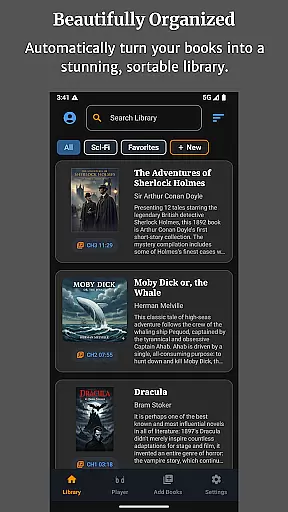
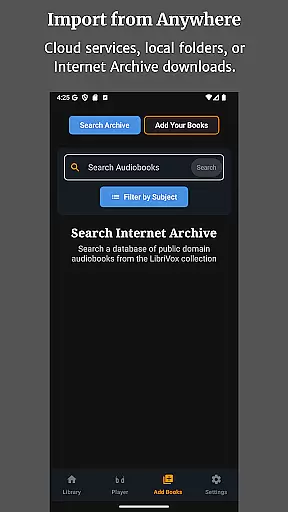
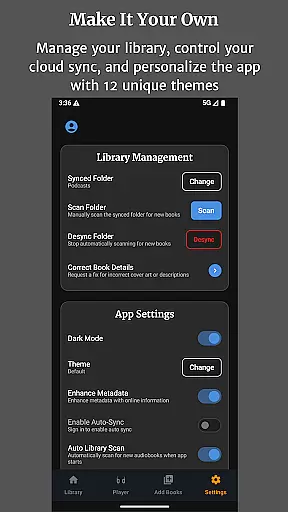
Audiobook Buddy is a comprehensive audiobook management app designed for book enthusiasts who want to organize and enjoy their digital libraries effortlessly. The app consolidates scattered audiobook files from local folders and cloud services like Google Drive, OneDrive, or Dropbox into a unified library with smart organization features.
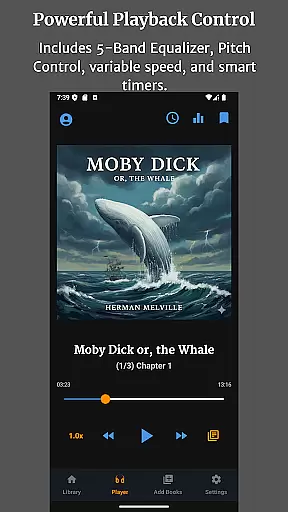
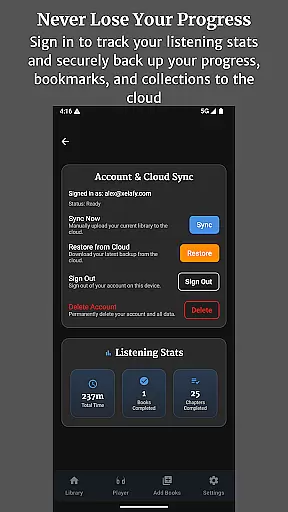
With advanced playback options including a 5-band Equalizer, Pitch Control, and per-book speed settings, Audiobook Buddy ensures an optimal listening experience. Users can create custom collections, access public domain books from LibriVox, and personalize the app's appearance with 11 different themes. The app also supports full lock-screen controls, background playback, and automatic cloud backups of bookmarks and progress.
Ideal for commuters and avid readers, Audiobook Buddy offers seamless cross-device syncing and multilingual support, making it a versatile tool for managing extensive audiobook collections.
Audiobook Buddy stands out with its robust feature set tailored for audiobook listeners. The app's smart library organization system automatically syncs files from various sources, creating a cohesive library structure that simplifies navigation and management.
Playback customization is a key highlight, offering users precise control over their listening experience. Features like the 5-band Equalizer, Pitch Control, and adjustable playback speeds cater to individual preferences. The sleep timer and mini player enhance convenience, while full lock-screen controls ensure uninterrupted usage.
Additionally, Audiobook Buddy provides extensive file format support, including MP3, M4A, FLAC, and more, along with metadata and cover art recognition. With multilingual translations and cloud-synced progress tracking, the app delivers both functionality and accessibility for a global audience.
Audiobook Buddy offers an extensive library of public domain audiobooks sourced from LibriVox, providing users with a vast selection of titles to choose from. Beyond the public domain offerings, the app allows users to import their own files and ZIP archives, effectively building a personalized library that can include copyrighted materials legally owned by the user.
The app supports a wide range of audio formats including MP3, M4A, M4B, AAC, OGG, FLAC, WAV, and WMA, ensuring compatibility with various sources. Metadata formats such as CUE, NFO, and TXT are also supported, allowing for rich data about each audiobook to be displayed and managed. Cover art is handled seamlessly, reading embedded art as well as supporting JPEG, PNG, and WebP formats.
While Audiobook Buddy does not support DRM-protected audiobooks, it encourages users to explore non-DRM titles available on platforms like Open Library and the Internet Archive. This approach ensures that all content within the app is legally accessible and free from copyright restrictions, giving users peace of mind while enjoying their favorite audiobooks.
Audiobook Buddy excels in format compatibility, accommodating a broad spectrum of audio file types such as MP3, M4A, M4B, AAC, OGG, FLAC, WAV, and WMA. This versatility ensures that users can sync and play audiobooks from various sources without worrying about format limitations. Additionally, the app reads metadata formats like CUE, NFO, and TXT, enriching the listening experience with detailed information about each book.
Cover art is another area where Audiobook Buddy shines, supporting embedded artwork along with external image files in JPEG, PNG, and WebP formats. This feature enhances the visual appeal of the library, making it more engaging and easier to navigate. Users can enjoy a beautiful, unified library interface that showcases their collection in the best possible way.
Playback features are equally robust, offering a 5-band Equalizer, Pitch Control, per-book speed settings, and a sleep timer. These tools provide users with the flexibility to customize their listening experience according to personal preferences. Background playback, full lock-screen controls, a mini player, and an optional home screen widget further enhance usability, ensuring that Audiobook Buddy remains a top choice for audiobook enthusiasts seeking comprehensive format support.
User-friendly interface
Extensive file support
Smart library organization
Customizable playback options
Cloud-synced progress tracking
No DRM-protected audiobook support
Limited to personal collections
Advanced features may overwhelm new users
Occasional sync delays with cloud services
Interface customization is theme-only

Plan of Life that Saint Josemaría recommended
 4.80
4.80
Scan. Price. Grade.
4.60
Read popular romance books and web novels on the fantastic ebook reader
3.50
“It is fun to have fun, but you have to know how!”
4.40
Universal Zoom, learn about sizes & distances of the universe and microcosmos
4.80
ISAIAH EXPLAINED with Avraham Gileadi Ph.D.
4.00
Manage collectibles, survey and treasure maps in Elder Scrolls Online.
4.40
Discover, track, and share your reading with friends & our community of readers
4.60
Daily Bible app: King James Version with verses and audio for studying&prayer
4.40
Flora of Virginia Project (www.floraofvirginia.org)
5.00
"When tweetle beetles fight, it's called a tweetle beetle battle."
4.90
Personalized Chat with Bible
4.80
Words spoken by native English speakers and full definitions.
4.60
Werewolf novels & romance stories in audiobooks for book lovers! Werewolf storie
4.60
Bible Spiritual Companion
4.40
Bilingual dictionary with English translations of Modern Standard Arabic words.
4.30
Essential Technical Rescue Field Operations Guide 6, the Industry Standard Guide
4.20
Unlock more features in Lithium and show your support. Expand for details.
4.00
University of North Carolina Herbarium presents the flora of TN, AL, & MS.
4.0


User Reviews