
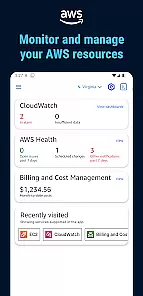
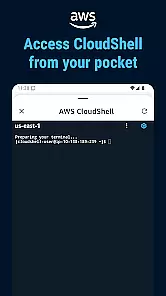
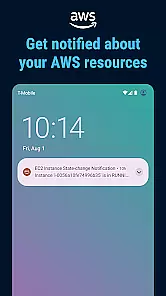
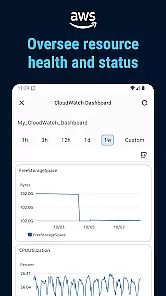
Amazon Web Services (AWS) is a comprehensive cloud computing platform that provides businesses with infrastructure and application services. This app allows users to manage their AWS resources on the go, including EC2 instances, S3 buckets, and RDS databases. With its intuitive interface, users can monitor resource usage, configure settings, and receive alerts all from their mobile device.
The app's core functionality lies in its ability to provide real-time access to critical cloud infrastructure. Whether you're a developer needing to adjust server configurations or an IT manager monitoring system performance, AWS Mobile ensures you maintain operational continuity. The app also supports multi-factor authentication for enhanced security, making it a reliable tool for business environments.
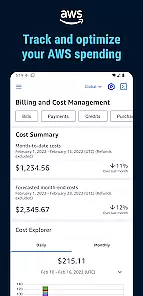
AWS Mobile offers a rich set of features designed to streamline cloud management. Users can view detailed metrics about their resources through CloudWatch integration, giving them insights into performance trends. Additionally, the app supports cost management tools, allowing businesses to track spending and optimize their cloud investments.
Another standout feature is the ability to execute administrative tasks such as starting or stopping instances directly from the app. This eliminates the need for a computer when urgent actions are required. Furthermore, the app includes offline capabilities, enabling users to review cached data even without an internet connection, which is particularly useful during travel or in areas with poor connectivity.
Collaborative work features are essential for modern business applications as they enable teams to work together efficiently regardless of location. Amazon Web Services offers a robust platform that supports seamless collaboration through its cloud-based infrastructure.
The application provides shared workspaces where users can access the same resources and tools, ensuring that all team members are on the same page. Real-time updates and notifications keep everyone informed about the latest developments in their projects.
With AWS, businesses benefit from enhanced communication channels, allowing team members to share insights and feedback instantly. This accelerates decision-making processes and helps maintain project momentum.
Furthermore, the app includes comprehensive permission management, ensuring that sensitive data is only accessible to authorized personnel. This security feature fosters trust among collaborators and protects valuable business information.
Effective task management is crucial for maintaining productivity and ensuring that projects are completed on time. Amazon Web Services offers powerful tools designed to streamline task management for businesses of all sizes.
The application allows users to create detailed task lists, set deadlines, and assign responsibilities to team members. This structured approach helps teams stay organized and focused on their objectives.
AWS also provides advanced tracking features that monitor task progress and generate reports. These analytics help managers identify bottlenecks and allocate resources more effectively, improving overall efficiency.
Additionally, the app's intuitive interface makes it easy for users to update task statuses and communicate with colleagues. This simplicity reduces the learning curve and encourages widespread adoption within the organization.
Comprehensive cloud management
Real-time resource monitoring
Multi-factor authentication
Offline data access
User-friendly interface
Limited advanced configuration options
Occasional syncing delays
No support for all AWS services
Interface can feel cluttered
Steep learning curve for beginners

AI-powered document scanner with auto enhance for perfect PDFs.
 4.60
4.60
The Penny Puss app with DG penny finder
4.10
Earn crypto with secure cloud mining. Monitor, track & withdraw easily
4.40
BuildCalc - the easiest AND the most advanced construction calculator app.
4.80
Amazon A to Z is the place to manage your work-life at Amazon.
4.50
Use Generative Summary to understand your rental or insurance docs in seconds.
4.70
Grow your business and connect with more people with Meta Business Suite.
4.60
Permission Guard is a security app that helps you manage app permissions.
4.80
ADP Mobile Solutions is an employee self service app
4.50
Start earning fast. Apply Today.
4.80
We help people get jobs
4.70
Mobile POS for any business: sales, invoices, retail, restaurants & appointments
4.60
Ship, Track, Find a Location or Get a Quote with UPS. Anytime. Anywhere.
4.60
Deliver and earn money
4.30
Make money as a delivery driver with DoorDash and work when you want as a Dasher
4.30
Build a store in minutes with our full suite of AI tools. Start for free!
4.20
FX Plus adds media, networking, and cloud capabilities to FX File Explorer.
4.10
Work happy with AI Companion
4.10
Find flexible, hourly jobs hiring near you in restaurant, retail & hospitality!
4.00


User Reviews