
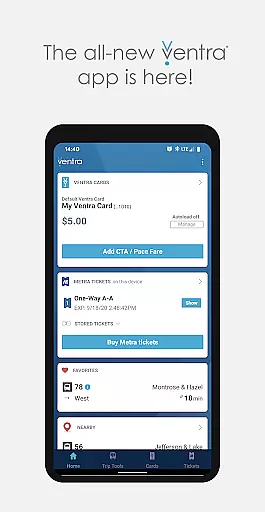
Ventra is a comprehensive transit management app designed specifically for the Chicago metropolitan area. This innovative application allows users to effortlessly manage and pay their fares across CTA, Metra, and Pace buses and trains. With its user-friendly interface, Ventra provides all the essential features found on the Ventra website plus additional functionalities like mobile ticketing for Metra trains.
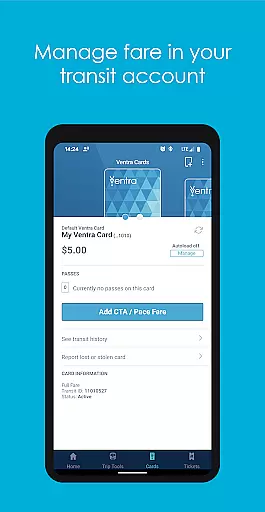
The app's core strength lies in its ability to streamline the entire transit experience. Users can conveniently check their balance, instantly load value or passes, and toggle autoload settings for transit value or passes. Additionally, Ventra offers real-time account notifications and arrival/departure information from multiple transit services, making it an indispensable tool for daily commuters in Chicago.
Ventra stands out with its robust feature set tailored for Chicago transit users. The app enables users to check their Ventra Card's balance and available passes directly from their mobile devices. It also supports instant loading of value or passes to the Ventra Card's transit account, providing unparalleled convenience.
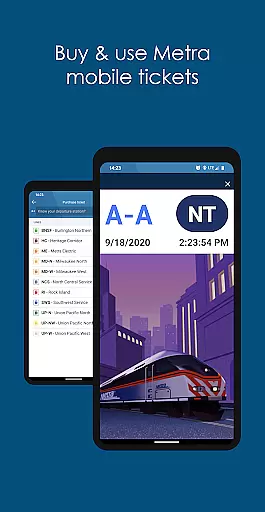
One of the app's most notable features is its mobile ticketing capability for Metra trains. Users can purchase and use Metra mobile tickets directly through the app, eliminating the need for physical tickets. Furthermore, Ventra provides real-time account notifications and transit information, ensuring users are always informed about their account status and upcoming departures.
The integration of multiple transit services into a single platform is another key advantage. By consolidating CTA, Metra, and Pace information, Ventra simplifies the commuting experience and helps users make more informed travel decisions.
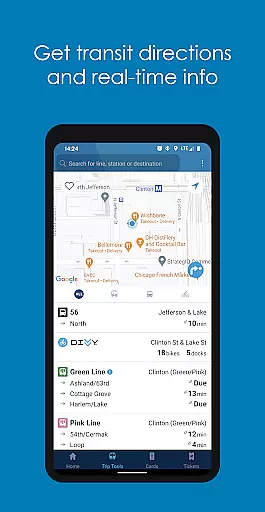
Map accuracy is essential for any navigation app, and Ventra excels in this area. The app provides real-time arrival and departure information for CTA, Metra, and Pace buses and trains, ensuring that users can rely on precise location data to plan their journeys effectively.
Ventra's map data is frequently updated to reflect the latest transit routes and schedules. This ensures that users have access to current and accurate information, which is crucial when navigating the complex public transportation network of Chicago.
By integrating multiple transit services into a single platform, Ventra offers users a comprehensive view of their travel options. Whether users are checking their balance, loading value to their Ventra Card, or buying Metra mobile tickets, they can trust that the location data provided by the app is both reliable and up-to-date.
Effective route planning is a core feature of the Ventra app, designed to simplify the commuting experience in and around Chicago. With the ability to view real-time arrival and departure information from various transit services, users can efficiently plan their routes and make informed decisions about their travel.
The app allows users to pick specific stops, save favorites, and even check service near their current location. These features enhance the route planning process by providing personalized and relevant transit information tailored to each user's needs.
In addition to basic route planning, Ventra sends real-time account notifications to alert users when it's time to load more fare or buy additional tickets. This proactive approach ensures that users can maintain uninterrupted travel without having to worry about running out of funds or tickets while on the go.
User-friendly interface
Comprehensive transit coverage
Instant fare loading
Real-time notifications
Mobile ticketing option
Limited to Chicago area
Occasional connectivity issues
Requires stable internet
Metra tickets only
No offline functionality

All of NHSA's trail information at your fingertips for the 2025-2026 season
 4.0
4.0
Instant diesel discounts - save big with each fill up!
4.40
Airport parking, with airport shuttle (TPS shuttle), reservations, and Spot Club
4.80
Number locator, real connection map
4.10
Order a cab online. An affordable taxi ride and driver in no time. What a bolt!
4.80
Your real-time window to the world. Explore anywhere, anytime.
3.30
ParkWhiz, an Arrive Mobility brand, part of the Arrive Network
4.30
Route Planner is travel map to get turn by turn navigation & driving directions
3.90
Lets explore the world's famous places by using Live Cams, GPS & Satellite View.
4.20
Navigate confidently with our precise Digital Compass app & Direction Compass!
4.70
Route tracker, Speedometer, Odometer, Fuel, HUD mode, save route as .GPX
4.40
Find radar maps, GPS coordinates, altitude, offline maps, location, travel route
4.40
Find routes fast with GPS Maps, GPS Navigation & driving directions.
4.10
Get real-time bus and train schedules for easy, hassle-free city transportation.
3.90
Explore Live Earth Map with 3D World Map & locate cites, mountains real time.
3.80
Gas Station & Fuel Rewards Points
3.70
Explore Earth with live GPS, satellite view & street navigation
3.60
Off-Roading Navigation App With Trails, Public Lands, & Private Property Info
3.30
Fully offline 1:50k New Zealand topographical map North Island
4.5


User Reviews