
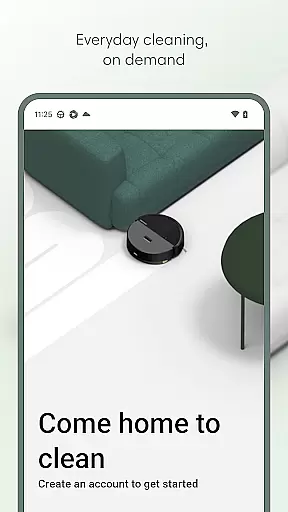
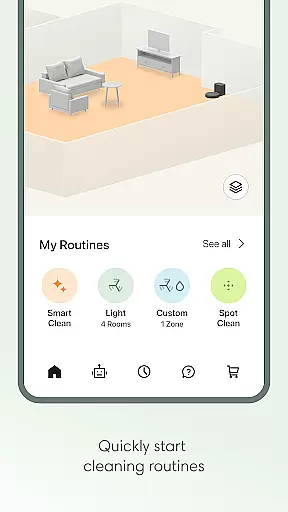
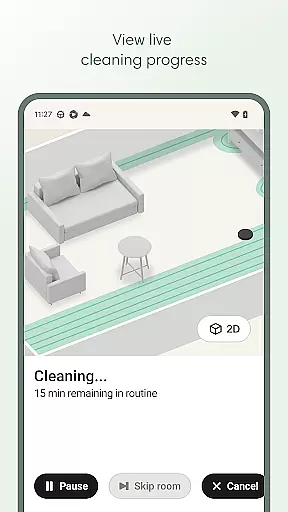
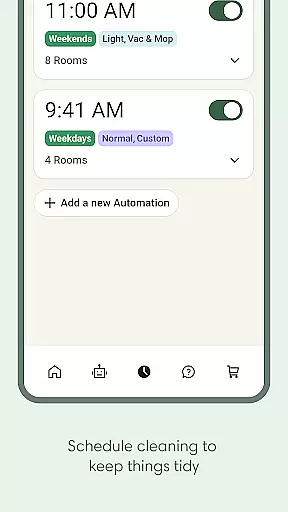
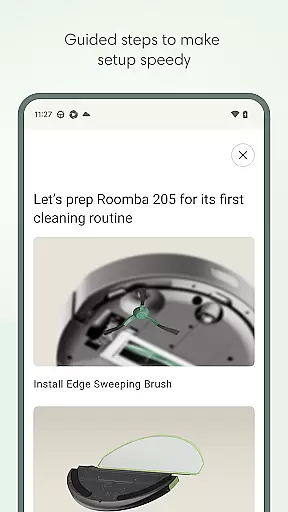
Roomba Home is a smart cleaning management app designed for Roomba robot vacuum owners. The application allows users to remotely control their cleaning devices, offering functionalities such as starting, stopping, and scheduling cleaning sessions. It also provides advanced features like personalized cleaning routines, real-time tracking of the robot's cleaning path, and smart home integration.
One of the key highlights of Roomba Home is its ability to create detailed maps of your home. Users can label rooms, set up no-go zones, and target specific areas for cleaning. This ensures efficient cleaning tailored to individual preferences. Additionally, the app offers proactive maintenance alerts and seamless voice assistant compatibility with Alexa, Siri, and Google Assistant, making daily cleaning routines effortless and highly customizable.
This app is particularly useful for busy professionals or families who want to maintain a consistently clean home without manual intervention. With intelligent recommendations and easy-to-use controls, Roomba Home elevates the standard of home cleanliness while saving time and effort.
Roomba Home comes packed with innovative features that enhance the user's interaction with their robotic vacuum cleaner. One standout feature is the Routine Builder, which allows users to customize cleaning schedules down to specific rooms and settings. You can adjust suction power, mopping intensity, and even the number of passes the robot makes in each room, ensuring a personalized cleaning experience.
The app also supports advanced mapping capabilities, enabling users to save up to five different floor plans. These maps can be annotated with room labels, virtual walls, and furniture markers, giving you complete control over where and how the robot cleans. Real-time monitoring lets you see exactly where your robot is working, and you can make adjustments on the fly through the intuitive interface.
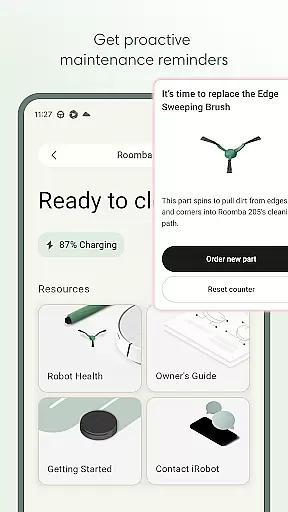
Another notable feature is the Health Dashboard, which monitors the status of both the robot and its accessories. It provides timely maintenance reminders and troubleshooting tips, helping to extend the life of your device. Voice command compatibility adds another layer of convenience, allowing hands-free operation through popular smart home ecosystems.
The Roomba Home app offers comprehensive lifestyle category coverage by integrating various smart home functionalities into a single platform. This app is designed to work seamlessly with multiple Roomba series robots, ensuring that users can manage their cleaning routines effectively regardless of the model they own.
With features ranging from easy setup processes to advanced cleaning customization options, the app caters to diverse user needs. Users can create detailed cleaning schedules, adjust settings for different rooms, and even control the robot via voice commands using Alexa, Siri, or Google Assistant. This wide array of features ensures that all aspects of home cleaning are covered.
Additionally, the app provides real-time insights and proactive maintenance suggestions, enhancing the overall user experience. By offering these extensive capabilities, the Roomba Home app not only simplifies daily chores but also elevates the standard of home cleanliness, making it an essential tool for modern living.
Content authenticity and expert credibility are crucial components of the Roomba Home app's value proposition. The app delivers accurate and reliable information about the robotu2019s performance and maintenance needs, which is backed by iRobot's expertise in home cleaning technology.
Users can trust the app's recommendations for cleaning routines and maintenance tasks, as they are based on data collected from previous cleaning jobs and the robot's health dashboard. This ensures that the advice provided is both relevant and actionable, helping users maintain optimal performance of their Roomba devices.
Furthermore, the app's compatibility with various smart home systems like Alexa, Siri, and Google Assistant underscores its credibility. These integrations are developed in collaboration with leading tech companies, reinforcing the app's reliability and enhancing user confidence in its capabilities. Overall, the Roomba Home app stands out for its commitment to providing authentic and credible content that enhances the user experience.
User-friendly interface
Advanced customization options
Real-time robot tracking
Smart home integration
Proactive maintenance alerts
Limited to newer Roomba models
Requires 2.4 GHz Wi-Fi network
No support for 5GHz networks
Premium features may need subscription
Occasional connectivity issues

Discover how to help puppies stay calm around noise with this helpful app.
 4.0
4.0
Designed to delight, impress and energize your festive spirit every single day
4.1
Daily lessons from A Course in Miracles with scheduled reminders
4.80
View over 160,000 line dance stepsheets from the CopperKnob website.
3.30
Spiritus Ghost Box is an Audio and Visual ITC tool for paranormal research.
4.00
Spirit Communicator is a real paranormal ghost hunting app with many fun modes.
3.90
Have your Tehillim with you at all times
4.70
A unique and customizable watch face which rotates its layout every minute.
4.80
Just play, earn rewards, fetch gift cards, and turn gaming into real payouts!
4.80
Get roadside help, discounts, travel tools & more — AAA is with you everywhere.
4.80
My Diary - Daily Journal with lock: Diary journal app and secret diary with lock
4.80
A smart Siddur with halachic times
4.60
Crochet made easy: step-by-step tutorials, beginner patterns & projects
4.60
Retro animated weather with hourly forecast Watch Face for Wear OS
4.60
This is a simple and highly functional alarm clock "Smart Alarm" paid version.
4.20
Discounts, savings, and rewards
4.20
Your home in your hand
3.80
Unique BIG BOLD TIME with amazing colors and customisations.
3.70
Going above and beyond known spirit communication
3.60


User Reviews