

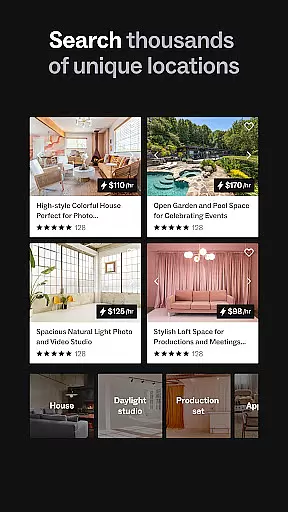

Peerspace is a leading platform for booking unique spaces by the hour, designed primarily for events, meetings, and creative projects. The app provides access to an extensive range of venues including photo studios, meeting rooms, lofts, galleries, and even backyards. It caters to both guests seeking extraordinary locations for personal or professional use and hosts looking to monetize their underutilized spaces. With its intuitive mobile interface, Peerspace allows users to browse, connect with hosts, and book spaces seamlessly from their devices.
One of the standout features of Peerspace is its dual-sided marketplace. Guests can find inspiring spaces that suit their specific needs while hosts have the flexibility to set pricing, availability, and acceptable uses for their properties. This creates a dynamic ecosystem where creativity meets convenience. Whether you're planning a corporate event, a photoshoot, or a casual gathering, Peerspace offers a streamlined solution to secure the perfect venue quickly and efficiently.
Peerspace stands out with several key features that enhance user experience. First, its vast selection of venues spans multiple categories, ensuring there's something for every type of event or project. Each listing includes high-quality photos, detailed descriptions, and transparent pricing, empowering users to make informed decisions. Additionally, the app's search and filter functionalities allow for precise customization based on location, size, amenities, and more.
Another notable feature is the seamless communication system integrated into the app. Users can directly message hosts to clarify details or request customizations before finalizing bookings. For hosts, Peerspace simplifies the process of managing listings through automated notifications about new inquiries, booking confirmations, and payment processing. These tools ensure smooth interactions between guests and hosts while maintaining operational efficiency.
Lastly, Peerspace prioritizes accessibility and convenience. Its mobile app enables users to manage all aspects of their bookings on the go, from sending messages to receiving real-time updates. This flexibility makes it an ideal choice for busy professionals and creatives who need reliable access to unique spaces without logistical hassles.
Task creation and detail customization are essential features for event planning applications like Peerspace. This functionality allows users to define specific requirements and preferences when booking unique spaces for meetings, events, and productions.
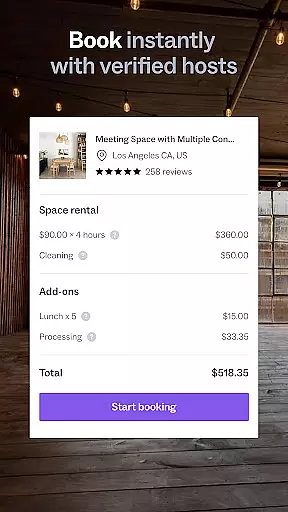
Peerspace offers a streamlined process where users can browse various venues, from photo studios to meeting rooms, and customize booking details according to their needs. The app provides options to specify the duration, time, and additional services required, ensuring that every booking is tailored to the user's event objectives.
The value of this feature lies in its ability to provide a personalized booking experience. Users can communicate directly with hosts to clarify details or request additional amenities, ensuring that the space meets all their event requirements. This level of customization enhances the overall event planning process.
By enabling detailed customization, Peerspace not only improves user satisfaction but also increases the likelihood of successful events. Guests can focus on their personal and professional objectives while enjoying the unique locations provided by local hosts.
Reminder settings play a crucial role in event management applications such as Peerspace. These settings ensure that users never miss an important update or booking confirmation by providing timely notifications about their scheduled events.
Peerspace incorporates automatic notification features that alert users to new messages, booking requests, and upcoming reservations. This functionality is particularly useful for managing communications with local hosts and keeping track of event details leading up to the booking date.
Users benefit from reminder settings by staying organized and informed throughout the event planning process. Timely notifications help users manage their schedules effectively, ensuring they can prepare adequately for their meetings, events, or productions without missing any critical steps.
This feature adds significant value by enhancing the reliability and efficiency of event management within the app. With automatic reminders, Peerspace ensures that users remain engaged and up-to-date, contributing to a seamless and stress-free event experience.
User-friendly interface
Wide variety of spaces
Transparent pricing model
Efficient booking process
Flexible hosting options
Limited rural availability
Service fees apply
Variable host responsiveness
No instant booking for all
Dependent on host policies

PheedLoop Go! is the mobile event app for events powered by PheedLoop.
 4.40
4.40
Some connections are better kept private
4.2
TV.Garden is a video player to play your own TV streams from around the world!
3.40
The official app for Sched events! View your event schedule here.
4.20
The Official Football Ticketing App for Fans in Qatar
4.5
Soft Proxy for Your Online World
4.0
Meet people over dinner
4.40
Freebie Games for Epic Games, Steam, Amazon, Rockstar etc.
4.40
TodayTix is the easiest way to get tickets to the best shows in your city.
4.90
Invitation card maker for birthday party & Wedding. Digital greeting card editor
4.90
CUE Live utilizes ultrasonic sound waves to sync devices at CUE enabled events
4.80
Birthday Greetings provides Birthday Card, Frames, Gifs & Father's day Wishes
4.80
Save money on concert, sport, and theater tickets, and discover upcoming events.
4.80
Wedding planner app with wedding venues, wedding checklist, countdown & budget.
4.60
Greeting card maker with photos best app| Birthday cards| All wishes eCards FREE
4.50
Microsoft Build is an annual developer conference hosted by Microsoft
4.20
Purchase line-skip passes, drinks, cover, and more at bars and clubs
3.50
Create Birthday Cards in Birthday Invitation Maker and Birthday Card Creator App
3.00
An App for Bhutanese
4.1


User Reviews