
Sched is a leading platform for session registration and attendance management, designed to streamline the organization of complex multitrack events. This app allows event planners and attendees to manage all event details in one place, ensuring a seamless experience. With features like full scheduling, personalization options, speaker directories, and offline caching, Sched enhances how people interact with events. The platform's vision is to create a world where events are truly experienced rather than merely endured, offering significant value to both organizers and participants.
Whether you're attending a conference, convention, or festival, Sched provides tools that help you stay informed and engaged. Users can browse complete event schedules without needing physical guides, personalize their itineraries, and access professional profiles of speakers. Its offline capabilities ensure users have critical information at their fingertips even without an internet connection. These robust features make Sched an essential tool for maximizing event engagement and efficiency.
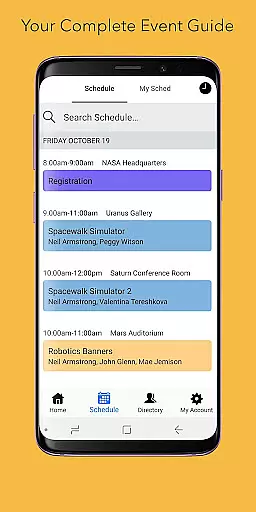
Sched offers a comprehensive suite of features tailored to enhance event management and participation. One standout feature is its full schedule functionality, which lets users conveniently browse entire event agendas directly from their devices. This eliminates the need for printed materials and ensures attendees always have up-to-date information at hand. Additionally, the app allows users to personalize their experiences by creating accounts to save favorite sessions into personalized schedules, making it easier to navigate large events.
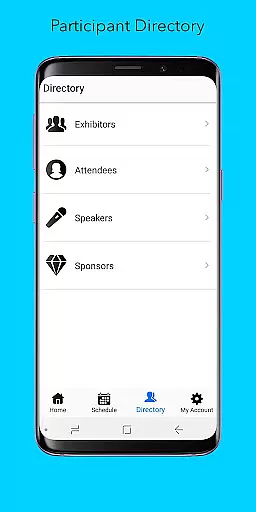
Another key feature is the directory of comprehensive professional profiles for speakers and exhibitors, providing valuable insights about event participants. Moreover, Sched is fully equipped with offline caching capabilities, ensuring users can access their schedules even when they lose internet connectivity. These innovative features collectively empower users to engage more deeply with events while simplifying logistical challenges associated with attendance and planning.
Task creation and detail customization are essential features for event management platforms like Sched. This functionality allows event organizers to create detailed sessions, workshops, or presentations with specific information such as time, location, speaker details, and session descriptions.
Sched offers a comprehensive suite of tools for task creation. Organizers can easily input session details, categorize events into tracks, and even add multimedia content to session descriptions. The platform also supports advanced scheduling options, enabling the setting of prerequisites or related sessions, which enhances the attendee experience by guiding them through a structured event journey.
The benefits for users are significant. Attendees receive clear, organized information about each session, allowing them to plan their event participation effectively. They can filter sessions based on interest, availability, or track focus, ensuring they maximize their event experience. For organizers, the ability to customize session details means they can present a polished, professional event schedule that reflects the complexity and diversity of their multitrack events.
This level of detail and customization not only improves the user experience but also increases engagement and satisfaction. By providing attendees with all necessary information in an accessible format, Sched ensures that participants can fully immerse themselves in the event without worrying about logistics.
Reminder settings play a crucial role in ensuring attendees do not miss out on important sessions at events managed through platforms like Sched. These settings allow users to set up personalized alerts for upcoming sessions, enhancing their ability to manage time and prioritize attendance.
Sched provides flexible reminder options that cater to different user preferences. Attendees can choose to receive notifications via push alerts, emails, or both. The timing of these reminders is customizable, allowing users to set alerts anywhere from minutes before a session starts to days ahead, depending on their planning needs.
The practical advantages of this feature are numerous. Users gain peace of mind knowing they will be reminded of key sessions, reducing anxiety about missing important talks or meetings. Additionally, organizers benefit from increased session attendance and participant engagement, as timely reminders help keep attendees informed and punctual.
By integrating sophisticated reminder settings, Sched demonstrates its commitment to improving the overall event experience. This feature exemplifies how thoughtful design can transform a standard scheduling tool into an indispensable companion for event attendees, ensuring they make the most of every moment.
User-friendly interface
Comprehensive event management
Offline access available
Personalized schedules
Professional networking opportunities
Limited free features
Requires account creation
Occasional sync issues
Premium subscription costs
Steep learning curve for new users

Buy event tickets easily with our user-friendly App. Stay updated on hot events
 4.1
4.1
Some connections are better kept private
4.5
Rocket Monkey - Space rocket launch schedule for launch sites around the world
4.20
Listen Full Quran MP3 Offline - Qibla Compass, Salah Timing & 99 Names of Allah
4.60
Clubs, Festivals, Discounted Tickets, Guest Lists & VIP Tables
4.90
The Official App
3.70
Thanksgiving Wishes, Thanksgiving Stickers & Animated GIF for Whatsapp Stickers
4.1
Buy tickets for any event!
3.90
Buy and sell tickets to sports, concerts, theater, festivals, and comedy events
4.10
Find EDM shows near you! See your favorite artists live, and discover new music.
4.90
Design Invitations & Cards for Any Occasion
4.80
Plan your wedding for free on the go: vendors, budget, website and checklists!
4.80
Here you can choose tickets for films, performances, concerts and other events
4.60
Create Wedding Invitation and Wedding Anniversary Cards using our app
4.60
Wedding planner app with wedding venues, wedding checklist, countdown & budget.
4.60
Connect with an ecosystem of 5M+ eventgoers and organizers.
4.50
Microsoft Build is an annual developer conference hosted by Microsoft
4.20
Manages display and transfer of tickets from the Mundo Tickets platform
3.80
No invest, Easy way to earn USDT through crypto cloud mining
3.80


User Reviews